agentgateway does not need Kubernetes. It is a single binary and it takes a single YAML file. This is a cookbook for running it that way in production shape: three nodes across three availability zones, no CRDs, no controller, no xDS, and every feature that matters proved out one at a time. Each capability below is shown the same way, the config that turns it on followed by the command that demonstrates it: HTTP routing, JWT authentication and CEL authorization, three LLM providers, layered guardrails, MCP with per-tool authorization, rate limiting, and the admin UI. Four managed AWS services cover the parts that a fleet needs and a single process does not, and there is a section on each.
Every figure was measured on the running fleet, not predicted. Sixty-seven assertions across nine scripts, all passing. See how each was tested.
The architecture
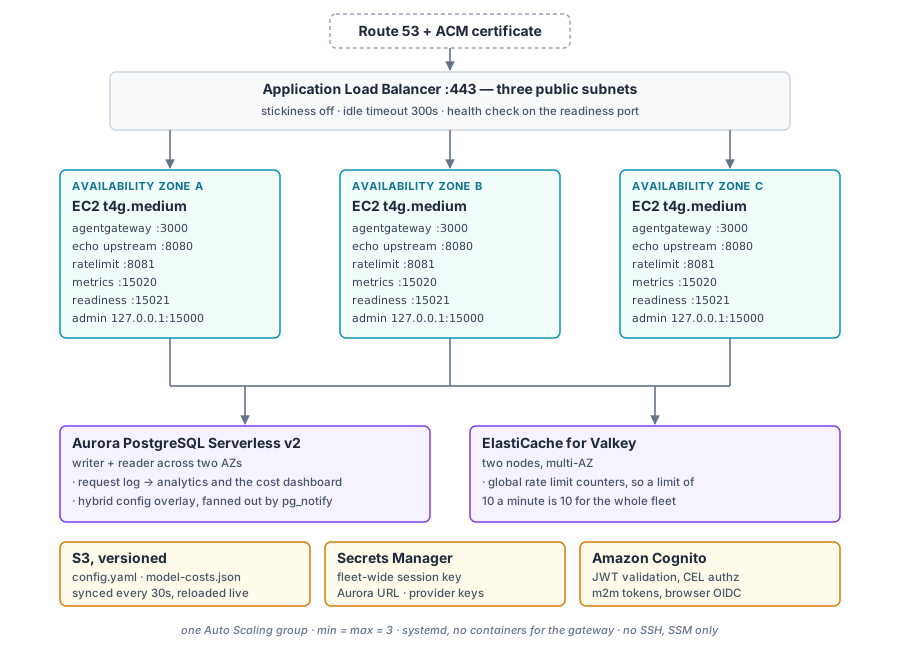
Three nodes, one Auto Scaling group, one config file. The only container anywhere
is the third-party rate limit service; the gateway itself is a binary in
/usr/local/bin with a systemd unit. There is no SSH and no port 22 in
any security group: shell access is SSM Session Manager.
Four AWS services cover what a control plane would otherwise do. They are not interchangeable, so here is what each one holds. The product side of all of this is documented under agentgateway standalone, and Architecture is the overview.
S3, versioned
Holds config.yaml, the model cost catalog and the OpenAPI document.
It is the reviewed baseline, the same object every node reads.
Object versioning is the audit trail and the rollback. A bad push is undone by copying an earlier version back.
Aurora PostgreSQL
Two jobs. It stores the request log that the analytics and cost pages read, so those pages show the whole fleet.
And it stores the config overlay: anything edited in the admin
UI, announced to the other nodes with pg_notify.
ElastiCache for Valkey
Holds the global rate limit counters. Each node runs its own copy of the rate limit service, so the check never leaves the box, but the counters are shared.
Without it, a limit of ten a minute set on three nodes lets about thirty through.
An OIDC issuer
agentgateway validates JWTs from any issuer that publishes a JWKS, so bring your own. This lab uses Cognito only because it needs no extra infrastructure and the Terraform can create it.
Swapping it is two values: the issuer URL and the JWKS URL.
Running it: the lab is scripted
Everything below can be done by hand, and the page shows the commands so you can. But the lab ships as a set of scripts that build the stack and then run every test in this page against it, asserting the results rather than printing output for you to read. Each one explains what it is doing as it goes, so they work as a walkthrough as well as a test.
export LAB_AWS_PROFILE=<your aws profile>
export LAB_AWS_REGION=us-east-1
export LAB_ROUTE53_ZONE=<your public hosted zone>
export OPENAI_API_KEY=... ANTHROPIC_API_KEY=...

scripts/00-preflight.sh     # checks only, spends nothing
scripts/01-apply.sh         # build, 12 to 18 minutes
scripts/02-verify.sh        # three healthy nodes, identical config on each
What each script does
| Script | What it does |
|---|---|
00-preflight.sh |
Checks the account, the hosted zone, Bedrock model access and the elastic IP headroom, and prints the hourly cost. Spends nothing. |
01-apply.sh |
Plans and applies the Terraform, then waits for the fleet to answer. |
02-verify.sh |
Three healthy nodes, identical binary version and config hash on each, every public endpoint answering, traffic reaching all three, and the request log schema present in Aurora. |
10-routing.sh |
Path matching, rewrites, header manipulation, retries, CORS and fault injection. |
11-auth.sh |
JWT validation and CEL authorization, with a real minted token for each case so 401 and 403 are distinguishable. |
12-llm.sh |
Three providers including Bedrock on the instance role, virtual models, virtual keys, both guardrail layers, streaming, and the priced request log. |
13-mcp.sh |
Two targets multiplexed into one tool list, and per-tool authorization filtering
tools/list as well as gating tools/call. |
15-ratelimit.sh |
The per-node limit against the fleet-wide one, and what happens when the counter is unreachable. |
20-ha-node-loss.sh |
Stops the gateway on one node, then terminates an instance and times the rebuild, polling throughout. |
21-ha-mcp-session.sh |
Drives one MCP session at all three nodes directly, then breaks it by changing one node's session key and restores it. |
22-ha-config-push.sh |
Pushes a config change and watches the fleet converge, holding a streaming response open across the reload. |
23-ha-ui-overlay.sh |
Creates a resource through the admin API on one node, confirms it on the others, then destroys that node and confirms its replacement inherited it. |
30-rotate-credentials.sh |
Rolls updated credentials onto the fleet one node at a time, waiting for health in between. |
teardown.sh |
Destroys everything, then sweeps for the resources a destroy tends to leave behind. |
quick.sh |
up, test, features, ha,
demo or teardown, for a rebuild or for CI. |
Each script ends with a pass and fail count and exits non-zero on a failure, so they are worth re-running after any config change. Every capability test pairs a positive case with a negative one: a token without the scope, a tool the caller is not entitled to, a request past the limit.
scripts/lib.sh refuses
to run unless LAB_AWS_PROFILE is set explicitly, and overrides anything a
sourced secrets file exported, because sourcing one can repoint you at a different
account without saying so. Roughly $0.50 an hour while it is up. Tear it down with
scripts/teardown.sh, which destroys the stack and then sweeps for the
resources a destroy tends to leave behind.
What gets deployed, and how to see it
One region, three availability zones. Not three regions: an Auto Scaling group is a regional construct, so it spreads instances across the AZs of a single region. Going multi-region is a different design, with a second stack and latency-based DNS in front.
After scripts/01-apply.sh, four commands tell you everything about the
shape of the fleet.
The Auto Scaling group
command
aws autoscaling describe-auto-scaling-groups --auto-scaling-group-names agw-ha \
  --query 'AutoScalingGroups[0].{Name:AutoScalingGroupName,Min:MinSize,Max:MaxSize,
           Desired:DesiredCapacity,AZs:AvailabilityZones,HealthCheck:HealthCheckType,
           Strategy:AvailabilityZoneDistribution.CapacityDistributionStrategy}'
what you should see
{
    "Name": "agw-ha",
    "Min": 3,
    "Max": 3,
    "Desired": 3,
    "AZs": [
        "us-east-1a",
        "us-east-1b",
        "us-east-1c"
    ],
    "HealthCheck": "ELB",
    "Strategy": "balanced-best-effort"
}
Check three fields there. Min, Max and Desired all 3 means the group holds the size and replaces losses instead of scaling. HealthCheck: ELB means the group takes the load balancer's view of a node, so a node whose gateway has stopped gets replaced rather than left in service, which asking EC2 alone would not catch. balanced-best-effort keeps one node in each AZ instead of packing them into whichever has capacity.
The nodes, and which AZ each is in
command
aws autoscaling describe-auto-scaling-groups --auto-scaling-group-names agw-ha \
  --query 'AutoScalingGroups[0].Instances[].[InstanceId,AvailabilityZone,
           LifecycleState,HealthStatus,InstanceType]' --output table
what you should see
-----------------------------------------------------------------------------
|                         DescribeAutoScalingGroups                         |
+----------------------+-------------+------------+----------+--------------+
|  i-08fb53a790ab11757 |  us-east-1b |  InService |  Healthy |  t4g.medium  |
|  i-0b25fb58174b97e52 |  us-east-1c |  InService |  Healthy |  t4g.medium  |
|  i-0d2cc0139bbb4ce23 |  us-east-1a |  InService |  Healthy |  t4g.medium  |
+----------------------+-------------+------------+----------+--------------+
One instance per AZ, all InService and Healthy. If two land in
the same AZ you have lost the property the lab is about, and the usual cause is that AZ
having no capacity for the instance type at that moment.
The same thing in the console, under EC2 then Instances:
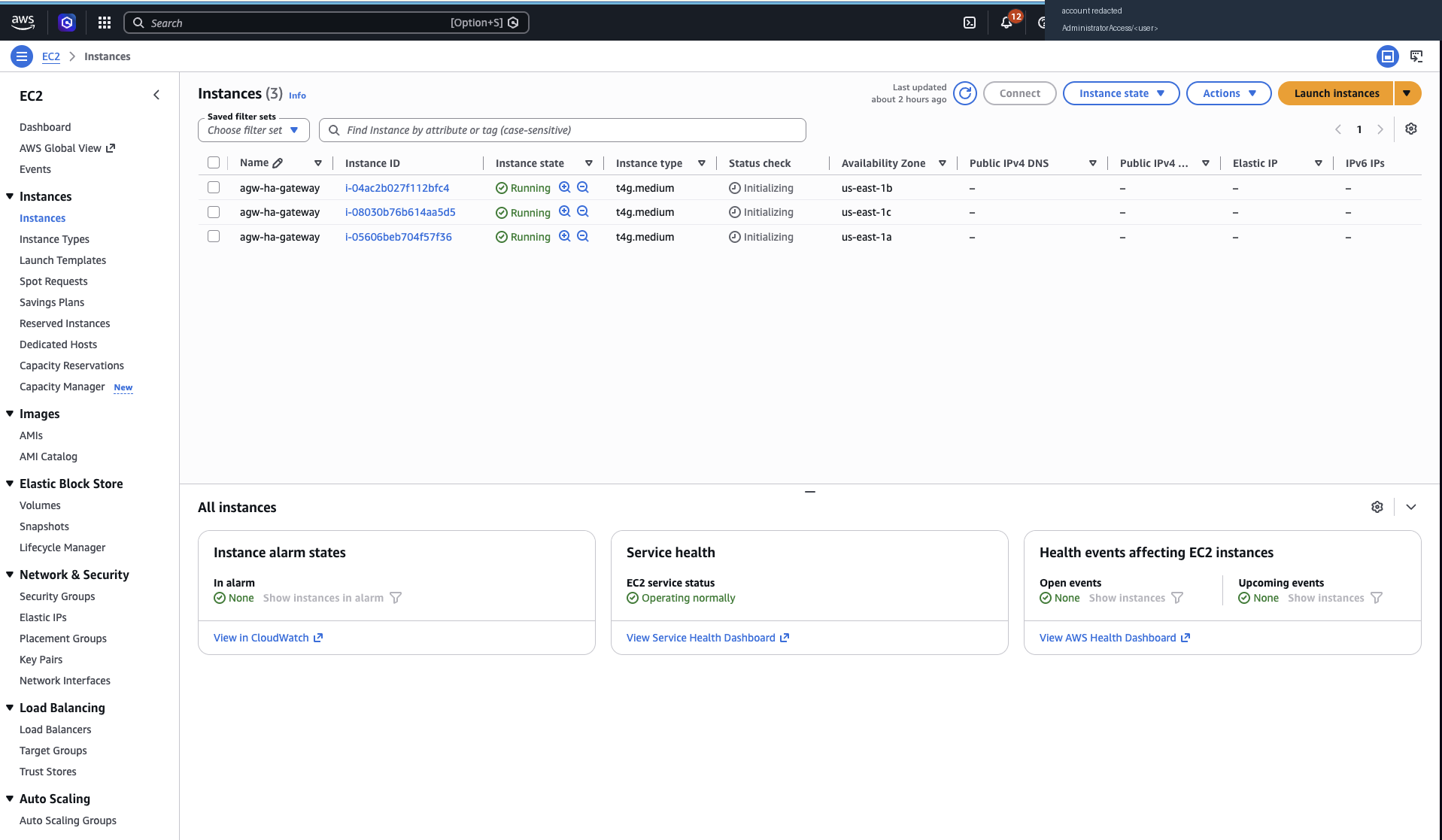
Three nodes, one per availability zone, all Running. Note the empty
Public IPv4 and Elastic IP columns: the gateway nodes sit in private subnets, reachable
only through the load balancer, and there is no SSH key or port 22 rule anywhere in the
stack. Shell access is SSM Session Manager. The instance ids differ from the command
output above because the fleet was rebuilt in between, which is the normal state of
affairs here.
Filter that view by the Lab tag to see only this stack, and add the
Availability Zone column if it is not already shown, since it is the one that matters
here.
Whether the load balancer agrees they are healthy
command
TG=$(aws elbv2 describe-target-groups --names agw-ha-gw \
       --query 'TargetGroups[0].TargetGroupArn' --output text)

aws elbv2 describe-target-health --target-group-arn "$TG" \
  --query 'TargetHealthDescriptions[].[Target.Id,Target.Port,TargetHealth.State]' \
  --output table
what you should see
--------------------------------------------
|           DescribeTargetHealth           |
+----------------------+-------+-----------+
|  i-08fb53a790ab11757 |  3000 |  healthy  |
|  i-0b25fb58174b97e52 |  3000 |  healthy  |
|  i-0d2cc0139bbb4ce23 |  3000 |  healthy  |
+----------------------+-------+-----------+
This is a different check from the previous one, and the more useful of the two. A node
can be InService in the group while the gateway on it is failing its health
check, which is what you see if the config did not load. The health check targets the
readiness port rather than the data port, so a node goes healthy only once the config
parsed and the listeners are bound.
And that traffic actually reaches all three
command
for i in $(seq 1 20); do
  curl -s https://<gateway>/whoami | jq -r .node
done | sort | uniq -c
what you should see
   6 i-08fb53a790ab11757
   8 i-0b25fb58174b97e52
   6 i-0d2cc0139bbb4ce23
Three distinct ids, roughly even. The /whoami route is answered inside the
gateway process rather than by an upstream, so it keeps answering when every backend is
gone. That is why the HA exercises poll it.
scripts/02-verify.sh runs all of the above plus a check that every node is
running the same pinned binary version and the same config file hash, which is the
cheapest way to catch a fleet that has drifted.
Installing agentgateway on a node
There is no operator and no agent. A node is a binary, a config file, an environment file and a systemd unit. The Terraform does this from user data at boot, and it is short enough to follow by hand if you want to build one node manually first.
1. The binary
agentgateway is the open source project hosted at the Linux Foundation, and the binary comes from its public GitHub releases. There is no licence key and nothing to register.
The quick way, which is what the documentation shows:
# latest release
curl -sL https://agentgateway.dev/install | bash

# or a specific one
curl -sL https://agentgateway.dev/install | bash -s -- --version v1.4.1

agentgateway --version
Prebuilt binaries exist for linux amd64 and arm64, macOS arm64 and windows amd64, so the same command works on a laptop for trying things out.
This lab does it the longer way instead, because a fleet has one extra requirement: a node
the Auto Scaling group builds next week has to be running the same build as the two beside
it, and latest does not guarantee that. So the version is pinned and the
download is checksum-verified:
AGW_VERSION=v1.4.1
ARCH=$(uname -m)
case "$ARCH" in
  aarch64) AGW_ARCH=arm64 ;;
  x86_64)  AGW_ARCH=amd64 ;;
esac

BASE_URL="https://github.com/agentgateway/agentgateway/releases/download/$AGW_VERSION"

for tool in agentgateway agctl; do
  curl -fsSL -o "/tmp/$tool"        "$BASE_URL/$tool-linux-$AGW_ARCH"
  curl -fsSL -o "/tmp/$tool.sha256" "$BASE_URL/$tool-linux-$AGW_ARCH.sha256"
  expected=$(awk '{print $1}' "/tmp/$tool.sha256")
  actual=$(sha256sum "/tmp/$tool" | awk '{print $1}')
  [ "$expected" = "$actual" ] || { echo "checksum mismatch for $tool"; exit 1; }
  install -m 0755 "/tmp/$tool" "/usr/local/bin/$tool"
done

/usr/local/bin/agentgateway --version
agctl comes along for inspecting a running proxy. Both are single static
binaries with no runtime dependencies, which is what makes this deployment as simple as it
is. Reference:
Deploy the binary,
agctl and
Inspect configuration.
You can confirm what any node is running, which is worth doing before you trust a fleet.
The git_revision is the commit of the public release:
$ agentgateway --version
{
  "version": "1.4.1",
  "git_revision": "163ea2146acb7b82082acea30ed691b29079095f",
  "rust_version": "1.97.1",
  "build_profile": "release",
  "build_target": "aarch64-unknown-linux-musl"
}
2. A service account and somewhere to put things
useradd --system --no-create-home --shell /sbin/nologin agentgateway

mkdir -p /etc/agentgateway/remote /var/log/agentgateway /var/lib/agentgateway
chown -R agentgateway:agentgateway /var/log/agentgateway /var/lib/agentgateway
/etc/agentgateway/remote is where the S3 sync lands before anything is
copied into place. The gateway runs unprivileged; every port it binds is above 1024.
3. The environment file
This is the only per-node file, and it is what lets one identical config file work everywhere. The config references environment variables, so this file supplies the Aurora URL, the fleet-wide session key, the provider credentials and this node's own identity. It is rendered from a single Secrets Manager document and never written to disk in plain form anywhere else.
aws secretsmanager get-secret-value \
  --secret-id "$RUNTIME_SECRET_ARN" \
  --query SecretString --output text \
| jq -r 'to_entries[] | "\(.key)=\(.value | tostring | @sh)"' > /tmp/env

# this node's own identity, from instance metadata, so the access log can say
# which node served a request
TOKEN=$(curl -sf -X PUT http://169.254.169.254/latest/api/token \
  -H 'X-aws-ec2-metadata-token-ttl-seconds: 300')
IID=$(curl -sf -H "X-aws-ec2-metadata-token: $TOKEN" \
  http://169.254.169.254/latest/meta-data/instance-id)
AZ=$(curl -sf -H "X-aws-ec2-metadata-token: $TOKEN" \
  http://169.254.169.254/latest/meta-data/placement/availability-zone)

{ echo "AGW_NODE_ID=$IID"; echo "AGW_NODE_AZ=$AZ"; echo "RUST_LOG=info"; } >> /tmp/env

install -o root -g agentgateway -m 0640 /tmp/env /etc/agentgateway/env
rm -f /tmp/env
Values are single-quoted by jq's @sh so a credential
containing an awkward character cannot break systemd's EnvironmentFile
parsing. Mode 0640 owned by root, group-readable by the service account.
4. The config file
aws s3 cp "s3://<config-bucket>/config.yaml"       /etc/agentgateway/config.yaml
aws s3 cp "s3://<config-bucket>/model-costs.json"  /etc/agentgateway/model-costs.json
aws s3 cp "s3://<config-bucket>/echo-openapi.json" /etc/agentgateway/echo-openapi.json
5. The systemd unit
The full unit file, and the four lines that matter
[Unit]
Description=agentgateway standalone
Documentation=https://agentgateway.dev/docs/standalone/latest/
After=network-online.target
Wants=network-online.target

[Service]
Type=simple
User=agentgateway
Group=agentgateway
EnvironmentFile=/etc/agentgateway/env
ExecStart=/usr/local/bin/agentgateway -f /etc/agentgateway/config.yaml
Restart=always
RestartSec=5

StandardOutput=append:/var/log/agentgateway/agentgateway.log
StandardError=append:/var/log/agentgateway/agentgateway.log

# Long enough to outlast connectionTerminationDeadline in config.yaml, so
# in-flight requests finish instead of being cut off on a restart.
KillSignal=SIGTERM
TimeoutStopSec=45

LimitNOFILE=65536
NoNewPrivileges=true
ProtectSystem=strict
ProtectHome=true
PrivateTmp=true
ReadWritePaths=/var/log/agentgateway /var/lib/agentgateway

[Install]
WantedBy=multi-user.target
systemctl daemon-reload
systemctl enable --now agentgateway
Four lines of that unit are the ones doing real work. EnvironmentFile is
what makes the config file portable. -f names the file the gateway will
watch. LimitNOFILE matters for a proxy holding many connections.
TimeoutStopSec has to outlast the drain deadline set in the config, or
systemd kills the process mid-request.
6. Check it came up
systemctl is-active agentgateway
curl -s localhost:15021/healthz/ready      # ready
curl -s localhost:15020/metrics | head     # prometheus metrics
curl -s localhost:15000/config_dump | jq . # what it actually loaded
tail -f /var/log/agentgateway/agentgateway.log
The readiness endpoint is the one the load balancer uses, and it reports ready only after the config parsed and the listeners bound. If the config has a problem, this is where you see it first.
7. What else runs on the node
| Unit | What it does |
|---|---|
agentgateway |
The gateway. Data plane on 3000, metrics on 15020, readiness on 15021, admin and UI backend on loopback 15000. |
agw-config-sync.timer |
Every 30 seconds, syncs the config bucket and copies a file into place only if the content differs. Never touches the gateway process. |
agw-ratelimit |
The Envoy rate limit service, in a container, counting into ElastiCache. gRPC on 8081, its own HTTP endpoint on 8090. |
agw-echo |
A small local upstream on 127.0.0.1:8080 that the demo routes forward to and that the OpenAPI-derived MCP tools call. |
| CloudWatch agent, OTel collector | Ship the access log to CloudWatch Logs, scrape the metrics endpoint into CloudWatch, and forward traces to X-Ray. Installed best-effort, so a problem here never stops the gateway serving. |
Full bootstrap is terraform/user_data.sh.tftpl, and the rendered copy from
a real boot is on each node at /var/log/agw-bootstrap.log. See also
Debug your setup and
Running on AWS.
Why S3, and how the gateway is told to re-read it
agentgateway watches its own config file. Point it at a path with
-f and it reloads the dynamic sections whenever that file changes, as
described in Configuration overview. So the
distribution problem is just getting the same bytes onto three filesystems, which S3
and a timer handle:
-
S3 holds the object
One bucket, versioning on. This is the only place the fleet's configuration is authored.
-
A systemd timer syncs it every 30 seconds
Each node runs
agw-config-sync.timer, which pulls the bucket down and copies a file into place only if the content actually differs. The bucket is reached through an S3 gateway endpoint, so this traffic never touches the NAT gateways. -
The gateway notices and reloads itself
Nothing restarts. The timer never touches the gateway process. agentgateway sees the file change and swaps its listeners, routes, policies, models and MCP targets over in place.
Publishing a change to the whole fleet is therefore one command:
aws s3 cp config/config.yaml s3://<config-bucket>/config.yaml
One thing to know before you rely on it. The config block at the top of
the file is applied at startup only. Everything below it reloads
live. So the split is:
| Reloads live, no restart | Startup only, needs a restart or an instance refresh |
|---|---|
gateways, routes, policies,
backends, llm, mcp, ui,
frontendPolicies, and config.modelCatalog, which is
the documented exception that lives in the startup block but reloads anyway |
listener addresses, the session key, the database URL, the storage mode,
tracing, logging format, worker threads: everything else under
config |
Static configuration is the reference for everything in that startup block. In practice the split is the right line: adding a route or a model or a guardrail is a push, while changing where the gateway listens or which database it uses is a deployment, and the Auto Scaling group does a rolling instance refresh that keeps two of three nodes in service while it happens.
How to make a change to the fleet
You change it in one place, never once per node. There are three routes in and the only question is which one a given change belongs to.
| What you are changing | Where | How it reaches the other nodes | Restart? |
|---|---|---|---|
| Routes, listeners, policies, guardrails, models declared in the file, MCP targets, the UI policy | config.yaml in git, pushed to S3 once |
Each node's sync timer pulls it within 30s and the gateway's file watcher reloads | No |
| Runtime additions: a new model, provider, virtual model, virtual key, MCP target, or route | The admin UI or admin API, on any one node | Written to Aurora; pg_notify tells the other nodes, which reload
their own state |
No |
Anything in the startup config block: listener addresses, the
session key, the database URL, the storage mode, logging format |
config.yaml in git, pushed to S3 |
Push, then roll the Auto Scaling group. The rolling refresh keeps two of three nodes in service. | Yes |
Route one: the file
Edit the file, push it once. That is the whole procedure.
# edit config/config.yaml, then
aws s3 cp config/config.yaml s3://<config-bucket>/config.yaml

# watch it land, without touching any node
watch -n2 'curl -s https://<gateway>/whoami | jq -r .node'
All three nodes converge within the sync interval. Nothing restarts, and connections in flight are not dropped. Roll back by copying an earlier S3 object version.
/etc/agentgateway/config.yaml on a node. It
is a derived copy. The next sync overwrites it, so the change lasts up to 30 seconds
and only on that one node. If you need to try something on a single node, stop its
timer first with systemctl stop agw-config-sync.timer, and remember to
start it again.
Route two: the admin UI or the admin API
Do it once, on whichever node you happen to reach. Do not repeat it on the other two. The write goes to Aurora, not to a local file, and the other nodes are told.
# add a model at runtime. The UI's Models page does exactly this call.
curl -s -X PUT localhost:15000/api/config/resources/llm.model \
  -H 'content-type: application/json' \
  -d '{"resources":[{"value":{
        "name":"experiment-1",
        "provider":{"reference":"openai"},
        "params":{"model":"gpt-4o-mini"}}}]}'

# it is immediately visible on every node, including through the load balancer
curl -s https://<gateway>/v1/models -H 'x-api-key: <key>' | jq -r '.data[].id'

# remove it the same way
curl -s -X DELETE localhost:15000/api/config/resources/llm.model/experiment-1
The kinds you can create and delete this way, all of which appear immediately on every node:
| Resource kind | What you can add or change at runtime |
|---|---|
llm.model | A model clients can request by name |
llm.provider | A reusable provider definition that models reference |
llm.virtualModel | A published name that routes across several models, weighted or failover |
llm.apiKey | A virtual key issued to a team or an application |
llm.policy | Policy applied to the LLM routes, such as guardrails or a limit |
modelCatalog | Pricing used to put a cost on each request |
mcp.target | An MCP server or OpenAPI-derived target in the multiplexed set |
mcp.policy | Policy on the MCP routes, such as per-tool authorization |
mcp.settings | MCP behaviour such as stateful mode and name prefixing |
traffic.gateway | A gateway, meaning a port and its listeners |
traffic.route | An HTTP route with its matches, policies and backends |
traffic.tcpRoute | A TCP or TLS route |
ui.policy | Policy in front of the admin UI, such as the OIDC settings |
What if the file and the overlay both define the same name
They cannot. The clash is refused when you try to save it, so there is no precedence rule to reason about and no chance of two definitions of one name being live at once.
Say config.yaml declares a model called gpt-4o-mini. Creating
a model with that same name through the UI or the admin API is rejected outright and no
overlay row is written:
$ curl -s -X PUT localhost:15000/api/config/resources/llm.model \
    -H 'content-type: application/json' \
    -d '{"resources":[{"value":{"name":"gpt-4o-mini", ...}}]}'

"config resource llm.model/gpt-4o-mini conflicts with file-owned resource"
HTTP 409
So the division is simple. The file is authoritative for every name it declares, and the overlay can only introduce names the file does not use. Two things follow from that, and both are useful:
- You can always tell where a piece of configuration came from. If it is in the file, the file is the only thing that defines it.
- Nobody can quietly change a reviewed definition from a browser. Overriding something declared in the file means editing the file, which means a diff and an approval.
If you do want to replace a file-declared model with a different definition, remove it from the file and push, then create the replacement in the overlay. Or simply change it in the file, which is usually what you wanted.
Best practice
- Declare in git what you want reviewed. Routes, authentication, authorization rules, guardrails and rate limits belong in the file, where they get a diff and an approval.
- Use the overlay for operational additions. Issuing a virtual key to a team or adding a model for an experiment does not deserve a pull request, and a name already declared in the file is refused, so an overlay addition can never conflict with the reviewed set.
- One writer, one time. Whichever route you use, the change is made once. Repeating it per node is how fleets drift.
- Promote things that stick. If an overlay addition becomes
permanent, move it into
config.yamland delete the overlay row, so the file stays the full picture of intended state. - Check what actually loaded, not what you pushed.
curl -s localhost:15000/config_dumpon a node shows the merged result.
What Aurora PostgreSQL is for
Two separate jobs, configured by two fields. Both exist because three processes need to look like one gateway.
The request log, which the dashboards read
agentgateway writes one record per proxied request: timing, status, the LLM provider and model, token counts, the priced cost, the caller identity, and the trace ids. The Analytics page and the cost dashboard in the admin UI read that. The backend is chosen by the URL scheme, and the schema is created on first startup with no migration step. Full details in Request Log.
config.yaml
the two fields
config:
  database:
    url: $AGW_DATABASE_URL      # postgresql://... , from Secrets Manager
maxConnections: 10postgres:// or postgresql:// URL selects PostgreSQL;
anything else selects SQLite, which is ideal for a single instance and needs no
external service. A fleet wants one shared database so the dashboards describe all of
it, which is why this lab points all three nodes at Aurora.
The config overlay, which makes the admin UI fleet-wide
The storage mode decides where the admin UI writes. In the default
file mode it writes back to the local config file, which is exactly what
you want on a single instance: one file, edited in one place, and the UI and the file
always agree.
On a fleet you want those two concerns separated, and that is what
hybrid mode does. The file from S3 stays the reviewed baseline that every
node shares, and the things an operator changes at runtime go to Aurora instead. Each
write issues a PostgreSQL NOTIFY, so the other nodes pick it up
immediately and a node built later inherits it.
config.yaml
six lines
config:
  database:
    url: $AGW_DATABASE_URL
    maxConnections: 10          # must be at least 2 on PostgreSQL for hybrid
  storage:
    mode: hybrid                # file baseline + database overlay
Thirteen kinds of resource can live there: LLM models, providers, virtual models,
virtual keys and pricing; MCP targets, policies and settings; gateways and routes; and
the UI policy. Anything outside that set only ever comes from config.yaml,
which is what keeps the shape of the gateway under review while day-to-day additions
stay quick. They are listed individually in
How to make a change to the fleet, alongside the API call that
creates one.
So a virtual key issued to a team, or a model added for an experiment, is made once and is immediately true everywhere, including on a node the Auto Scaling group builds next week. The route definitions and the policies you want reviewed stay in git. The Admin UI page covers the interface that drives this.
What ElastiCache is for
agentgateway has two rate limit policies, both documented in Rate limiting. They look almost identical in the config and behave very differently once you have more than one node, so it is worth being clear about which counts what.
localRateLimit | remoteRateLimit | |
|---|---|---|
| Where the count is kept | In memory, in each gateway process | In ElastiCache, shared by every node |
| Set a cap of 10 requests a minute on three nodes, and a caller gets | about 30, because each node allows 10 | exactly 10, because there is one counter |
| Costs per request | Nothing. No network call. | A call to the rate limit service on the same node, which talks to ElastiCache. |
| Use it for | Protecting a single node from being overwhelmed | Capping what a caller may consume, which is what you want in front of an LLM |
Neither is better. They answer different questions. "Is this node being hammered" is a
per-node question, so localRateLimit answers it in memory for nothing. "Has
this caller used up its allowance" is a question about the caller, not about a node, so it
needs a counter every node shares, which is what remoteRateLimit and
ElastiCache give you.
That distinction matters most in front of an LLM, because the thing being capped costs money. A cap that quietly multiplies by the number of nodes is not a cap.
How the fleet-wide limit is configured
the policy
    remoteRateLimit:
      host: $RATELIMIT_HOST     # 127.0.0.1:8081, the service on this node
      domain: agentgateway
      failureMode: failOpen
      descriptors:
      - entries:
        - key: llm_caller
          value: 'jwt.sub'      # a CEL expression, so the limit is per caller
        type: requests
ratelimit-config.yaml, which sets the actual number
domain: agentgateway
descriptors:
- key: llm_caller
  rate_limit:
    unit: minute
    requests_per_unit: 10       # ten requests a minute, per caller, for the fleet
failOpen is the right default for a limit and the wrong one for
an authorization check. If the counter is unreachable the gateway logs a
warning and lets the request through. failClosed refuses instead. Which
you want depends on whether the limit is protecting a budget or protecting a secret.
agentgateway configuration cookbook
Same shape every time: the relevant lines of config.yaml, then the command,
then what you should see. Replace <gateway> with your own hostname
throughout. Each subsection opens with links into the agentgateway documentation for the
policy it uses, so you can go from the worked example to the full field reference.
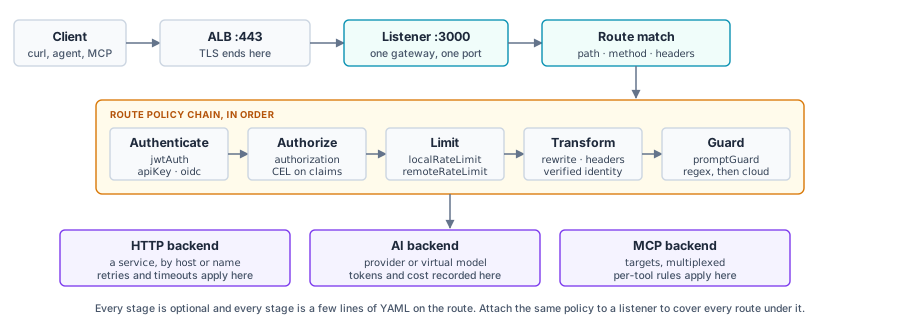
Where each policy in the cookbook below actually runs. Every stage is optional, and attaching a policy to the listener instead of the route applies it to every route underneath.
The config file also carries an A2A route, which marks that traffic as agent-to-agent so it gets the matching processing and telemetry rather than being treated as opaque HTTP. For the complete set of fields available anywhere in the file, the configuration schema explorer is the authority, and schema validation wires it into your editor.
Routing, rewrites and header manipulation
Reference: Routes, Request matching, Rewrites, Header manipulation, Retries, Timeouts, CORS, Fault injection, Mirroring.
Routing
config.yaml
routes:
- name: echo-public
  gateways: main
  matches:
  - path:
      pathPrefix: /api/public
  policies:
    urlRewrite:
      path:
        prefix: /                     # /api/public/foo reaches the upstream as /foo
    requestHeaderModifier:
      set:
        x-served-by: $AGW_NODE_ID     # add, set and remove take a map, not a list
      add:
        x-gateway-tier: public
      remove:
      - x-internal-only               # a client cannot smuggle this through
    timeout:
      requestTimeout: 15s
    retry:
      attempts: 3
      backoff: 100ms
      codes: [502, 503, 504]
  backends:
  - host: 127.0.0.1:8080
test it
scripts/10-routing.sh

# or by hand
curl -s -H 'x-internal-only: should-not-arrive' \
  https://<gateway>/api/public/headers | jq .

# the upstream sees path /headers, x-served-by set by the gateway,
# x-gateway-tier added, and no x-internal-only at all
Which node answered
Reference: Direct response, CEL variables and functions.
Worth setting up first, because every other test benefits from it. A
directResponse route is answered in the gateway process, so it keeps
working when every upstream is gone, which makes it the right thing for the HA loops
to poll.
Node identity
config.yaml
- name: whoami
  gateways: main
  matches:
  - path:
      exact: /whoami
  policies:
    directResponse:
      status: 200
      body: '{"node":"$AGW_NODE_ID","zone":"$AGW_NODE_AZ","ip":"$AGW_NODE_IP"}'
      headers:
        content-type: '"application/json"'    # values here are CEL expressions,
        x-agw-node: '"$AGW_NODE_ID"'          # hence the inner quotes
test it
for i in $(seq 1 20); do curl -s https://<gateway>/whoami | jq -r .node; done \
  | sort | uniq -c

# three instance ids, roughly evenly split
JWT authentication and CEL authorization
Reference: JWT authentication, HTTP authorization, Transformations, CEL reference. For other providers see the integration guides for Keycloak, Auth0, Okta, Entra ID and Descope.
Cognito access tokens carry client_id and scope but
no aud claim. That is fine:
jwtAuth treats audiences as optional, so issuer plus JWKS is a complete
check, and configuring an audience here would reject every valid token.
Authentication and authorization
config.yaml
- name: echo-private
  gateways: main
  matches:
  - path:
      pathPrefix: /api/private
  policies:
    jwtAuth:
      mode: strict                    # no token at all is a 401
      issuer: $COGNITO_ISSUER
      jwks:
        url: $COGNITO_JWKS_URL
    authorization:
      rules:
      # a machine caller needs the scope
      - allow: 'jwt.scope.contains("$COGNITO_API_AUDIENCE/llm.invoke")'
      # a human caller needs the group
      - allow: '"platform" in jwt["cognito:groups"]'
    # hand the upstream the identity the gateway verified. `set` overwrites, so a
    # client sending its own x-verified-subject has it replaced, not trusted.
    transformations:
      request:
        set:
          x-verified-subject: 'jwt.sub'
          x-verified-scope: 'jwt.scope'
test it
scripts/11-auth.sh

# mint a real token rather than hand-editing one, so a refusal is the
# gateway's decision and not a malformed input
TOKEN=$(curl -s -u "$CLIENT_ID:$CLIENT_SECRET" \
  -d 'grant_type=client_credentials' \
  --data-urlencode 'scope=urn:agentgateway:api/llm.invoke' \
  https://<cognito-domain>/oauth2/token | jq -r .access_token)

curl -s -o /dev/null -w '%{http_code}\n' https://<gateway>/api/private/headers
# 401, no credential

curl -s -o /dev/null -w '%{http_code}\n' \
  -H "authorization: Bearer $TOKEN" https://<gateway>/api/private/headers
# 200

# now mint one with only the mcp.call scope and repeat: 403
# 401 and 403 mean different things here, and you can see which
LLM: three providers on one endpoint
Reference: LLM consumption, Amazon Bedrock, Anthropic, OpenAI, Virtual models, Routing-based configuration, Chat completions.
Bedrock authenticates with the EC2 instance role, so that provider has no credential anywhere in the config file, in Secrets Manager or in the environment. That is the strongest single argument for running this on EC2 rather than off-cloud.
Providers, models and virtual models
config.yaml
llm:
  gateways: main
  providers:
  - name: bedrock
    provider: bedrock
    params:
      awsRegion: $BEDROCK_REGION      # no apiKey: the instance role is the credential
  - name: anthropic
    provider: anthropic
    params:
      apiKey: $ANTHROPIC_API_KEY

  models:
  - name: claude-bedrock
    provider: { reference: bedrock }
    params: { model: $BEDROCK_MODEL }
  - name: claude-direct
    provider: { reference: anthropic }
    params: { model: claude-sonnet-4-5-20250929 }
  - name: gpt-4o-mini-fallback
    visibility: internal              # not requestable by name, not in /v1/models
    provider: { reference: openai }
    params: { model: gpt-4o-mini }

  virtualModels:
  - name: chat-split                  # one client-facing name, two providers
    routing:
      weighted:
        targets:
        - { model: claude-bedrock, weight: 50 }
        - { model: claude-direct,  weight: 50 }
  - name: chat-resilient              # lower priority is preferred
    routing:
      failover:
        targets:
        - { model: claude-bedrock,       priority: 0 }
        - { model: claude-direct,        priority: 1 }
        - { model: gpt-4o-mini-fallback, priority: 2 }
test it
scripts/12-llm.sh

curl -s https://<gateway>/v1/models -H 'x-api-key: agw_sk_platform_demo' \
  | jq -r '.data[].id'
# the public models and the virtual models, but not gpt-4o-mini-fallback

curl -s https://<gateway>/v1/chat/completions \
  -H 'x-api-key: agw_sk_platform_demo' -H 'content-type: application/json' \
  -d '{"model":"chat-split","max_tokens":40,
       "messages":[{"role":"user","content":"Reply with one word: ok"}]}' \
  | jq -r '.model'
# run it six times and you see both providers serving the one model name
Virtual keys, so provider credentials stay on the node
Reference: API key authentication, Manage API keys, Virtual key management, Budget and spend limits.
API keys
config.yaml
  policies:
    apiKey:
      mode: optional
      location:
        header:
          name: x-api-key
      keys:
      # keyHash, not key, so the file in git holds only a hash.
      # hash your own with: printf %s '<key>' | shasum -a 256
      - keyHash: sha256:<hex>
        metadata:
          name: platform-team         # this metadata becomes the identity in
          owner: platform             # the logs, metrics and cost dashboard
          tier: internal

    # either a virtual key or a Cognito token gets you in; the rule enforces it
    jwtAuth:
      mode: permissive
      issuer: $COGNITO_ISSUER
      jwks:
        url: $COGNITO_JWKS_URL
    authorization:
      rules:
      - allow: 'has(apiKey.key)'
      - allow: 'has(jwt.scope) && jwt.scope.contains("$COGNITO_API_AUDIENCE/llm.invoke")'
test it
curl -s -o /dev/null -w '%{http_code}\n' https://<gateway>/v1/models
# 403, no credential

curl -s -o /dev/null -w '%{http_code}\n' \
  -H 'x-api-key: agw_sk_not_a_real_key' https://<gateway>/v1/models
# 401, credential present and wrong
In production you would issue these from the admin UI rather than the file, and with hybrid storage on they go to Aurora and are live on every node at once. The two keys in the committed file are deliberately published so the lab is runnable.
Guardrails, in-process first then the paid ones
Reference: About guardrails, Regex filters, AWS Bedrock Guardrails, Multi-layered guardrails, OpenAI moderation.
Guards run in the order you list them, and they differ a lot in what each one costs per request. Order them so the expensive ones only ever see prompts that already passed the free one.
| Guard | Where it runs | Cost per request |
|---|---|---|
| Regex and the built-in PII detectors | Inside the gateway process | No network call. Microseconds, and nothing to pay. |
| AWS Bedrock Guardrails | API call to Bedrock | Added latency, and AWS bills per guardrail unit. |
| OpenAI moderation | API call to OpenAI | Added latency and a provider charge. |
| Azure AI Content Safety, Google Model Armor | API call to that cloud | Added latency and that provider's charge. |
| A custom webhook | A service you run | Added latency, plus whatever running it costs you. |
All of them are available on this deployment. The nodes have egress through NAT, so any of the cloud services or your own webhook can be reached. This lab wires up two of them, regex and Bedrock Guardrails, to keep the prerequisites short rather than because the others are out of reach. Swapping or adding one is a config change and a push.
Layered prompt guards
config.yaml
    guardrails:
      request:
      - regex:                        # layer one: in-process, no network hop
          action: reject
          rules:
          - builtin: creditCard
          - builtin: ssn
          - builtin: email
      - bedrockGuardrails:            # layer two: policies live in the AWS console
          guardrailIdentifier: $BEDROCK_GUARDRAIL_ID
          guardrailVersion: "1"
          region: $BEDROCK_REGION
        rejection:
          status: 403
          body: '{"error":{"message":"Blocked by the gateway content policy"}}'
      response:
      - regex:
          action: mask                # mask on the way out rather than reject
          rules:
          - builtin: creditCard
          - builtin: ssn
test it
# layer one: never reaches a provider
curl -s https://<gateway>/v1/chat/completions \
  -H 'x-api-key: agw_sk_platform_demo' -H 'content-type: application/json' \
  -d '{"model":"claude-bedrock","max_tokens":40,
       "messages":[{"role":"user","content":"My card is 4111 1111 1111 1111"}]}' \
  | jq -r '.error.message // .choices[0].message.content'

# layer two: a denied topic defined in the console, not in this file
#   "What is our internal discount floor for the enterprise tier?"
The operational difference between the two layers is where the policy lives. The regex
rules are in config.yaml, so changing them is a config change with a diff
and a push. The Bedrock guardrail's content filters, PII rules and denied topics live in
the AWS console, so a security team can change what is blocked without touching the
gateway config or restarting anything, and the gateway picks it up on the next request.
MCP: two servers, one tool list, per-tool authorization
Reference: About MCP, Streamable HTTP, Virtual MCP, OpenAPI, MCP authorization, MCP target policies, Spec compatibility.
The gateway federates a remote MCP server and a plain REST API into a single virtual MCP server. The REST API has no MCP server in front of it at all: agentgateway generates the tools from its OpenAPI document and makes the HTTP calls itself.
MCP targets and authorization
config.yaml
mcp:
  gateways: main                      # served at /mcp and /sse
  statefulMode: stateful
  prefixMode: always                  # namespace tool names with the target name
  failureMode: failClosed

  targets:
  - name: bin
    mcp:
      host: https://<remote-mcp-server>/mcp
  - name: echo
    openapi:                          # a REST API exposed as MCP tools
      schema:
        file: /etc/agentgateway/echo-openapi.json
      host: 127.0.0.1:8080

  policies:
    cors:
      exposeHeaders:
      - Mcp-Session-Id                # the browser client needs to read this

    mcpAuthentication:
      mode: strict
      issuer: $COGNITO_ISSUER
      jwks:
        url: $COGNITO_JWKS_URL
      jwtValidationOptions:
        requiredClaims: [exp, iss]    # Cognito access tokens have no aud
      resourceMetadata:
        resource: $AGW_PUBLIC_URL/mcp
        scopesSupported:
        - $COGNITO_API_AUDIENCE/mcp.call
        bearerMethodsSupported: [header]

    mcpAuthorization:
      rules:
      - allow: 'mcp.tool.target == "echo" && has(jwt.scope) && jwt.scope.contains("$COGNITO_API_AUDIENCE/mcp.call")'
      - allow: 'mcp.tool.target == "bin"  && has(jwt.scope) && jwt.scope.contains("$COGNITO_API_AUDIENCE/admin")'
      - allow: '"cognito:groups" in jwt && "platform" in jwt["cognito:groups"]'
test it
scripts/13-mcp.sh

# by hand: initialize, keep the session, list tools
curl -s -D h.txt -X POST https://<gateway>/mcp \
  -H "authorization: Bearer $TOKEN" -H 'content-type: application/json' \
  -H 'accept: application/json, text/event-stream' \
  -d '{"jsonrpc":"2.0","id":1,"method":"initialize","params":{
       "protocolVersion":"2025-06-18","capabilities":{},
       "clientInfo":{"name":"lab","version":"1"}}}' > /dev/null
SID=$(grep -i '^mcp-session-id' h.txt | sed 's/.*: //' | tr -d '\r\n')

curl -s -X POST https://<gateway>/mcp \
  -H "authorization: Bearer $TOKEN" -H "mcp-session-id: $SID" \
  -H 'content-type: application/json' \
  -H 'accept: application/json, text/event-stream' \
  -d '{"jsonrpc":"2.0","id":2,"method":"tools/list"}' \
  | sed -n 's/^data: //p' | jq -r '.result.tools[].name'

# echo_whoami, echo_headers, echo_status come from the OpenAPI document.
# The bin_* tools come from the remote server.
# Swap in a token with only mcp.call and the bin_* tools disappear from the
# list entirely, and calling one is refused rather than merely hidden.echo_whoami; mcp.tool.name is whoami, the name
the target publishes. Select the server with mcp.tool.target and the rule
keeps working if you rename a target or change prefixMode.
MCP authentication and OAuth metadata
Reference: MCP authentication, the mcpAuthentication policy, and the client guides for Claude, Cursor and VS Code.
mcpAuthentication validates the bearer token and serves the OAuth
protected-resource metadata that MCP clients read. Point it at your issuer.
MCP authentication
config.yaml
    mcpAuthentication:
      mode: strict
      issuer: $OIDC_ISSUER
      jwks:
        url: $OIDC_JWKS_URL
      resourceMetadata:
        resource: $AGW_PUBLIC_URL/mcp
        scopesSupported:
        - $API_AUDIENCE/mcp.call
        bearerMethodsSupported: [header]

      # Optional. Set it when your provider needs the gateway to adapt its OAuth
      # endpoints or answer client registration on its behalf. Supported values:
      #   auth0  keycloak  okta  descope  authentik  entra
      # provider:
      #   keycloak: {}
test it
# the discovery chain an MCP client follows
curl -s -D - -o /dev/null -X POST https://<gateway>/mcp \
  -H 'content-type: application/json' -d '{}' | grep -i www-authenticate

curl -s https://<gateway>/.well-known/oauth-protected-resource/mcp | jq .

# a client that takes a token directly
claude mcp add --transport http agw https://<gateway>/mcp \
--header "Authorization: Bearer $TOKEN"| Client style | What it needs |
|---|---|
| Scripts, curl, CI | A token from your IDP's token endpoint. Nothing else. |
| A client configured with a token or a pre-registered client id | Nothing else. Any OIDC issuer works. |
| A client that registers itself via OAuth Dynamic Client Registration | An issuer that offers a registration_endpoint, and the matching
provider adapter set above. Amazon Cognito has no DCR, so use one
of the listed providers as a second issuer on its own route if you need this. |
Multiple issuers on one gateway is supported: give each its own route with its own
mcpAuthentication block. Because routes reload live, adding one is a
single aws s3 cp. A ready-to-uncomment example is in
config/config.yaml just above the LLM section.
Rate limits, local against global
Reference: Rate limiting, CEL variables for descriptor values.
The comparison
test it
scripts/15-ratelimit.sh

# the local limit on /api/public is 60 a minute, per process.
# 90 requests spread across three nodes: well over 60 get through.

# the global limit on /mcp is 10 a minute, counted in ElastiCache.
# 16 requests spread across three nodes: exactly 10 get through.
The script also stops the rate limit service on one node so you can watch
failOpen do what it says: that node stops counting and starts allowing,
while the other two keep refusing.
The admin UI, published safely
Reference: Admin UI, OIDC browser authentication, HTTP authorization, LLM playground, Cost dashboard.
By default the UI is only on the admin interface, which here is loopback. Attaching it to the data plane gateway publishes it on the one port the fleet already exposes, behind Cognito browser login. Authentication is not authorization: anyone in the pool can log in, and a second rule decides who gets in.
The UI
config.yaml
ui:
  gateways: main
  policies:
    oidc:
      issuer: $COGNITO_ISSUER
      # explicit endpoints rather than discovery: Cognito serves the OAuth
      # endpoints on the hosted-UI domain, not on the issuer host
      authorizationEndpoint: $COGNITO_AUTHORIZE_URL
      tokenEndpoint: $COGNITO_TOKEN_URL
      tokenEndpointAuth: clientSecretBasic
      jwks:
        url: $COGNITO_JWKS_URL
      clientId: $COGNITO_UI_CLIENT_ID
      clientSecret: $COGNITO_UI_CLIENT_SECRET
      redirectURI: $AGW_PUBLIC_URL/oauth/callback
      scopes: [openid, email, profile]
    authorization:
      rules:
      - allow: '"platform" in jwt["cognito:groups"]'
test it
curl -s -o /dev/null -w '%{http_code}\n' https://<gateway>/ui
# 302 to Cognito

# then in a browser, as the seeded user. Move that user to the viewer group
# and the login still succeeds while the authorization rule refuses.http redirect URIs, so the browser OIDC flow cannot work without a real
certificate. That is why the lab requires a Route 53 hosted zone and issues an ACM
certificate rather than serving the load balancer's own hostname over plain HTTP.
Proving it: the HA tests and what they showed
Four exercises, each run against the live three node fleet. Every card below gives what was actually done, what was measured, the result, and the script that does it, so you can reproduce any of them. The numbers are what the scripts printed.
Why the MCP session test is the interesting one
The problem. MCP is stateful. A client calls
initialize once, gets a session id back, then makes many
tools/call requests carrying that id. On one server that is easy,
because the server remembers the session. On three servers behind a load balancer it
breaks straight away: initialize lands on node A, which creates the
session, and the next tools/call lands on node B, which has never heard
of it.
The two usual answers both cost something. Sticky sessions pin the client to node A, so load goes uneven and every session on that node dies with it. A shared session store means every node looks the session up, which is more infrastructure, more latency on every tool call, and one more thing that can fail.
What happens here instead. The session is not stored anywhere. Its
contents, meaning which targets are in it and their upstream session ids, are
serialised, encrypted with AES-256-GCM using config.session.key, and
handed to the client as the session id itself. The id is not a pointer to state held
somewhere else; it is the state. Every node loads the same key from Secrets Manager,
so any node can open a session any other node issued. No stickiness, no shared
store, and losing a node loses nothing. Target group stickiness is switched off on
purpose.
stdio
MCP targets on a multi-node fleet. The encrypted session state includes the
upstream's address, and a stdio target is a child process of one specific
node. A sibling can decrypt the session id perfectly and still have nothing to talk
to. Both targets in this lab are remote over streamable HTTP, which is what makes the
session portable.
✓ Instance loss
- Done
- Terminated one of the three EC2 instances outright with
terminate-instance-in-auto-scaling-group, while polling/whoamitwice a second. - Measured
- Wall-clock time until three nodes were healthy again, and whether the replacement matched its siblings.
- Result
- 139 seconds from terminate to three healthy. The replacement installed the same pinned binary, read the secret, pulled the config and passed its readiness check with no manual step. Same version and same config hash as the other two.
- Script
scripts/20-ha-node-loss.sh
✓ Portable MCP session
- Done
- Opened one MCP session, then sent
tools/callto each node's private address in turn, bypassing the load balancer. Then gave one node a differentsession.keyand repeated. Then restored the key. - Measured
- Whether a session created on one node is usable on the others, and whether the shared key is genuinely what makes that work.
- Result
- HTTP 200 on all three nodes, each call running on the node addressed. 12 of 12 calls succeeded through the load balancer on one session. With one node re-keyed, that node alone returned 400 while the other two returned 200; restoring the key returned it to 200.
- Script
scripts/21-ha-mcp-session.sh
✓ Fleet health
- Done
- Queried the Auto Scaling group and the ALB target group, then ran
agentgateway --versionandsha256sum /etc/agentgateway/config.yamlon each node over SSM. - Measured
- Nodes in service, their availability zones, and whether all three run the same build and the same config.
- Result
- 3 of 3 healthy, one per AZ, identical version and identical config hash.
- Script
scripts/02-verify.sh
✓ Load distribution
- Done
- Sent 20 requests to
/whoamithrough the load balancer and counted the responses by node id. - Measured
- Whether traffic actually reaches all three nodes rather than favouring one.
- Result
- 6 / 8 / 6 across the three nodes.
- Script
scripts/02-verify.sh
✓ Process loss
- Done
- Ran
systemctl stop agentgatewayon one node, left it down, then started it again. - Measured
- How long the ALB takes to remove a node whose gateway has stopped, and whether traffic keeps flowing.
- Result
- Out of service within about 20 seconds, which is two failed health checks at a 10 second interval. Traffic continued on the survivors, and the node returned to healthy after restart.
- Script
scripts/20-ha-node-loss.sh
✓ Config push
- Done
- Added a route to
config.yaml, ran a singleaws s3 cp, and held a streaming chat completion open across the reload. - Measured
- Time for all three nodes to serve the new route, whether any process restarted, and whether an in-flight stream survived.
- Result
- All three serving the new route inside the sync interval. Process start times still predated the push, so nothing restarted. The open stream delivered 124 server-sent events uninterrupted.
- Script
scripts/22-ha-config-push.sh
✓ Config overlay replication
- Done
- Created an
llm.modelthrough the admin API on one node only, then queried/v1/modelson all three. - Measured
- Whether a runtime change made on one node reaches the others, and how quickly.
- Result
- Published by all three nodes in about 8 seconds, with no restart and no push.
- Script
scripts/23-ha-ui-overlay.sh
✓ Config overlay durability
- Done
- Terminated the node that created the overlay resource, waited for the Auto Scaling group to build a replacement, then queried the replacement.
- Measured
- Whether a runtime change outlives the node that made it.
- Result
- The replacement inherited it from Aurora and served requests against it, having never seen the original API call.
- Script
scripts/23-ha-ui-overlay.sh
✓ Per-node rate limit
- Done
- Configured a cap of 60 requests a minute using
localRateLimit, which each gateway process counts on its own. Sent 90 requests through the load balancer. - Measured
- How many were allowed, given three separate counters of 60.
- Result
- All 90 allowed, because 90 spread over three nodes is only about 30 each and no single counter reached 60. That is the right tool for protecting one node from overload, and the wrong one for capping what a caller may spend.
- Script
scripts/15-ratelimit.sh
✓ Fleet-wide rate limit
- Done
- Configured a cap of 10 requests a minute per caller on the LLM routes, counted in ElastiCache. Sent 20 requests as one caller through the load balancer, so they landed on all three nodes. Then sent one request as a different caller.
- Measured
- How many of the 20 were allowed. If each node kept its own counter, each would allow 10 and about 30 would get through.
- Result
- Exactly 10 allowed, 10 refused with 429. The cap meant 10 for the whole fleet rather than 10 per node. The second caller's request succeeded, because the limit is per caller and it had its own count.
- Script
scripts/15-ratelimit.sh
✓ Rate limit degradation
- Done
- Stopped the rate limit service on one node with
systemctl stop agw-ratelimit, then sent more requests past an already-spent limit. - Measured
- What happens to traffic when the counter cannot be reached.
- Result
- Requests landing on that node were allowed while the other two kept refusing, which is
failureMode: failOpendoing what it says. - Script
scripts/15-ratelimit.sh
✓ Credential rotation
- Done
- Changed the Aurora master password, updated the Secrets Manager document, then re-rendered the environment file and restarted the gateway one node at a time, waiting for health in between.
- Measured
- Whether credentials can be rotated without an outage, and whether the fleet ends up consistent.
- Result
- Each node returned to healthy before the next was touched, so three stayed serving throughout. All nodes ended on identical shared credentials, and Aurora-backed requests kept answering 200.
- Script
scripts/30-rotate-credentials.sh
The capability tests were run the same way: routing, authentication and authorization, the three LLM providers, both guardrail layers, and MCP with per-tool authorization, each with a negative case alongside the positive one. Sixty-seven assertions in total, all passing.
Writing the config file well
Six conventions that keep a single config file clean across a fleet. Each is also noted in the file's own comments, next to the setting it applies to. The configuration overview, schema explorer and CEL in YAML pages are the reference behind them.
| Convention | Why |
|---|---|
Define every variable you reference. The file is shell-expanded
on load and on every reload, so anything of the form
$NAME resolves from /etc/agentgateway/env, wherever it
appears. |
Keeps the committed file identical on every node while the environment supplies what differs. A node continues serving its current config until a new one loads cleanly, so a push is safe to iterate on. |
| Write placeholders in comments as prose. Expansion covers the whole file, so a commented example reads like the rest of it. | Lets you keep worked examples inline, as this lab does for a second MCP issuer, without them needing an environment to match. |
Write numeric-looking string values as literals rather than
variables. guardrailVersion: "1" is in the file for this reason. |
Keeps a version or an id unambiguous once the database overlay is merged in. |
Choose one place for span attributes: either
config.tracing or frontendPolicies.tracing. |
One source for tracing settings, so what you read is what is exported. |
Select MCP servers with mcp.tool.target and match
tool names with mcp.tool.name, which is the name as the target
publishes it rather than the multiplexed name the client sees. |
Rules keep working when you change prefixMode or rename a target,
because they key on the target rather than on a naming convention. |
Guard optional claims, and give each identity type its own rule or
descriptor. Use "cognito:groups" in jwt for a claim name
containing a colon, and list one rate limit descriptor per identity type. |
A machine token carries scope and a human token carries groups.
Separate expressions stay readable and each covers exactly the caller it is
meant for. |
Operating it
Copy-paste, replacing the placeholders:
# publish a config change to the whole fleet
aws s3 cp config/config.yaml s3://<config-bucket>/config.yaml

# a shell on a node. There is no SSH and no port 22 in any security group.
aws ssm start-session --target <instance-id>

# reach the admin API and UI, which stay on loopback
aws ssm start-session --target <instance-id> \
  --document-name AWS-StartPortForwardingSession \
  --parameters 'portNumber=15000,localPortNumber=15000'

# what the running process actually loaded, as opposed to what you think you pushed
curl -s localhost:15000/config_dump | jq .
Access logs go to CloudWatch as JSON with a node field, so per-node
attribution is a query rather than a guess:
fields @timestamp, node, zone, user, llm_model, llm_cost_usd, mcp_tool
| stats count(*), sum(llm_cost_usd) by node
Prometheus metrics are scraped on each node and forwarded to CloudWatch, traces go to
X-Ray, and the in-product analytics and cost dashboard are at /ui, backed
by Aurora. Reference:
Metrics,
Traces,
Prometheus,
OpenTelemetry,
Grafana,
LLM observability,
MCP observability.
Rotating credentials
Every credential the gateway uses lives in one Secrets Manager document, and each node
renders that document into /etc/agentgateway/env when it starts. That means
updating the secret does not by itself reach a running node: the node has to re-render
and the gateway has to restart. The lab does that in a rolling fashion so the fleet keeps
serving:
# which credentials the secret holds, and which need a restart
scripts/30-rotate-credentials.sh --show

# roll the current secret onto all three nodes, one at a time,
# waiting for each to return healthy before touching the next
scripts/30-rotate-credentials.sh
The general shape is the same for every credential. Change it at source, put the new value in the secret, then roll the fleet. What differs is the first step.
The Aurora password
NEW=$(openssl rand -hex 20)

# 1. change it on the cluster
aws rds modify-db-cluster --db-cluster-identifier agw-ha \
  --master-user-password "$NEW" --apply-immediately

# 2. wait for the cluster to finish applying it
aws rds describe-db-clusters --db-cluster-identifier agw-ha \
  --query 'DBClusters[0].Status' --output text   # available, not resetting-master-credentials

# 3. rewrite the URL in the secret
SEC=$(cd terraform && tofu output -raw runtime_secret_arn)
aws secretsmanager get-secret-value --secret-id "$SEC" \
  --query SecretString --output text > /tmp/cur.json
NEW="$NEW" python3 -c "
import json, os, re
d = json.load(open('/tmp/cur.json'))
d['AGW_DATABASE_URL'] = re.sub(r'(://[^:]+:)[^@]+(@)',
    lambda m: m.group(1) + os.environ['NEW'] + m.group(2), d['AGW_DATABASE_URL'])
json.dump(d, open('/tmp/new.json','w'))
"
aws secretsmanager put-secret-value --secret-id "$SEC" \
  --secret-string "$(cat /tmp/new.json)"
rm -f /tmp/cur.json /tmp/new.json

# 4. roll it onto the fleet
scripts/30-rotate-credentials.sh--manage-master-user-password, which puts it in its own Secrets Manager
secret and gives you
--rotate-master-user-password for scheduled rotation; the gateway would then
read the URL from that secret instead.
The session key
This one has a visible effect on clients, so it is worth understanding before you rotate
it. The key is what encrypts MCP session state into the session id, so changing it makes
every existing session unreadable and clients have to call initialize again.
SEC=$(cd terraform && tofu output -raw runtime_secret_arn)
aws secretsmanager get-secret-value --secret-id "$SEC" \
  --query SecretString --output text \
| jq --arg k "$(openssl rand -hex 32)" '.SESSION_KEY = $k' > /tmp/new.json
aws secretsmanager put-secret-value --secret-id "$SEC" --secret-string "$(cat /tmp/new.json)"
rm -f /tmp/new.json

scripts/30-rotate-credentials.sh
During the roll the nodes briefly disagree, so a session issued by an already-rotated node will not open on one still holding the old key. Rotate it when a short window of clients re-initialising is acceptable, or drain MCP traffic first.
The OIDC cookie secret
Same procedure with .OIDC_COOKIE_SECRET. The effect is that everyone signed
in to the admin UI is signed out and logs in again.
Provider API keys
Create the new key at the provider, put it in the secret, roll the fleet, then revoke the old one at the provider. Doing it in that order means there is no window where the gateway holds a key that no longer works.
aws secretsmanager get-secret-value --secret-id "$SEC" \
  --query SecretString --output text \
| jq --arg k "$NEW_OPENAI_KEY" '.OPENAI_API_KEY = $k' > /tmp/new.json
aws secretsmanager put-secret-value --secret-id "$SEC" --secret-string "$(cat /tmp/new.json)"
rm -f /tmp/new.json
scripts/30-rotate-credentials.sh
The Cognito client secret
A Cognito app client can hold more than one secret at a time, which makes this one genuinely zero-downtime: add the new secret, roll it out, then remove the old one.
POOL=<user-pool-id>
CID=$(cd terraform && tofu output -raw cognito_ui_client_id)

# what it has now
aws cognito-idp list-user-pool-client-secrets --user-pool-id "$POOL" --client-id "$CID"

# add a second secret; both are valid at this point
aws cognito-idp add-user-pool-client-secret --user-pool-id "$POOL" --client-id "$CID"

# put the new one in the secret and roll the fleet, then remove the old secret
aws cognito-idp delete-user-pool-client-secret --user-pool-id "$POOL" \
  --client-id "$CID" --client-secret-id <old-secret-id>
Virtual keys, which need none of this
Worth contrasting. The API keys clients present to the gateway are configuration, not startup credentials, so rotating one needs no restart and no roll at all. Add the new key, let clients move over, then delete the old one, either in the file or through the admin UI:
# add the replacement
curl -s -X PUT localhost:15000/api/config/resources/llm.apiKey \
  -H 'content-type: application/json' \
  -d '{"resources":[{"value":{"key":"agw_sk_new","metadata":{"name":"platform-team"}}}]}'

# ... clients switch over ...

# then remove the old one
curl -s -X DELETE localhost:15000/api/config/resources/llm.apiKey/<old-id>
Both keys work at once, which is what lets you rotate without coordinating a cutover. The
file version of the same thing is a keyHash entry, added and removed with a
push.
What each credential costs to rotate
| Credential | Needs a fleet roll | Visible to clients |
|---|---|---|
| Aurora password | Yes | No, if the timing is tight |
| Session key | Yes | Yes, MCP clients re-initialise |
| OIDC cookie secret | Yes | Yes, admin UI users sign in again |
| Provider API keys | Yes | No |
| Cognito client secret | Yes | No, two secrets are valid at once |
| Virtual keys | No | No, both keys work at once |
Troubleshooting
The checks worth reaching for first, in the order they usually pay off.
| What you see | Where to look | Usual cause |
|---|---|---|
Instance is InService in the Auto Scaling group but the target group
says unhealthy |
curl localhost:15021/healthz/ready on the node, then
tail /var/log/agentgateway/agentgateway.log |
The gateway is running but has not accepted the config, so the listeners never bound. The log names the field. |
| Node never becomes healthy after a rebuild | /var/log/agw-bootstrap.log |
Something in the boot sequence, most often the binary download or reading the secret. The log is the rendered bootstrap, top to bottom. |
| A config change does not seem to have taken | curl -s localhost:15000/config_dump | jq . |
Read what the process loaded rather than what you pushed. If the dump is stale,
check the sync timer with
systemctl status agw-config-sync.timer. |
| Everything worked, then a push made no difference | The gateway log at the moment of the push | The new config was not adopted, so the node kept its last good one. The log names the variable or field responsible. |
401 where you expected success |
Decode the token payload and compare iss against the configured
issuer |
No credential, or one the gateway cannot verify. Different from
403. |
403 with a token you know is valid |
The authorization rules, and the claims actually present in the
token |
Authenticated but not entitled. Usually a rule referencing a claim this token does not carry, so guard it. |
MCP tools/list comes back empty |
The mcpAuthorization rules |
Rules keyed on the client-visible prefixed name. Select the server with
mcp.tool.target and match names with the unprefixed
mcp.tool.name. |
| A rate limit does not fire | The descriptor expression, and the key the limit service is counting | Give each identity type its own descriptor rather than one conditional expression, and confirm the limit by exceeding it. |
| LLM requests succeed but arrive with no cost | The provider name in the request log against the keys in
model-costs.json |
The catalog keys on the provider name the gateway reports, which for Bedrock is
aws.bedrock. |
| An MCP session works sometimes and fails sometimes | Whether every node holds the same SESSION_KEY, and whether any target
is stdio |
Either the keys differ across the fleet, or a target is a child process local to one node. |
| The admin UI redirect loops or is refused | The redirect URI registered with the provider, and the UI
authorization rule |
The redirect URI must match exactly and be https. A refusal after a successful login is the authorization rule, not the login. |
Two commands worth knowing before you need them:
# a shell on a node. There is no SSH and no port 22 in any security group.
aws ssm start-session --target <instance-id>

# the admin API and UI, which stay on loopback
aws ssm start-session --target <instance-id> \
  --document-name AWS-StartPortForwardingSession \
  --parameters 'portNumber=15000,localPortNumber=15000'
Where to take it next
- Drive it from git instead of S3. Nothing about the gateway changes. Point the sync timer at a checkout and the same file watcher does the same job.
- Scale the group. Nothing in the config is per-node except the identity stamped into the logs, so five nodes work the same as three. The session key and the overlay are what make that true.
- Swap the identity provider. Any OIDC issuer that publishes a JWKS works for JWT and browser login. For MCP client registration, pick one of the providers with a native adapter.
- Put a WAF on the load balancer. It is an ordinary ALB, so the usual AWS edge controls apply without the gateway knowing.
The complete config file
Everything above, in one file. This is the whole control plane for the fleet: the same bytes on all three nodes, with the environment supplying what differs between them.
config/config.yaml, in full
# yaml-language-server: $schema=https://agentgateway.dev/schema/config
#
# ===========================================================================
# agentgateway standalone: one config file for a three-node fleet on EC2
# ===========================================================================
#
# This file is the whole control plane. There are no CRDs, no controller and no
# xDS: agentgateway reads this file, watches it, and reloads the dynamic sections
# when it changes. All three nodes run this file byte-identical.
#
# Nothing environment-specific is templated in. agentgateway shell-expands the
# entire file before parsing it, on first load and on every reload, so every
# endpoint and credential below is an environment variable reference resolved
# from /etc/agentgateway/env, which each node renders from AWS Secrets Manager
# at boot.
#
# Three consequences worth knowing before you edit this file:
#
#   1. Define every variable you reference. If one is missing the new config is
#      not adopted and the gateway carries on serving its last good one, naming
#      the variable in the log, so a push is safe to iterate on.
#   2. Expansion covers comments as well as values, so write placeholders in
#      commented examples as prose rather than as variable references.
#   3. A dollar sign followed by a letter, a digit or an opening brace is
#      expanded. A trailing dollar, such as a regex end anchor, is left alone.
#
# Push a change to the whole fleet with:
#   aws s3 cp config/config.yaml s3://<config-bucket>/config.yaml
#
# ---------------------------------------------------------------------------

# ===========================================================================
# 1. Startup configuration
#
# Everything under `config` is read once at process start. The rest of the file
# reloads live. `modelCatalog` is the documented exception: it sits here but
# reloads dynamically.
# ===========================================================================
config:
  # The admin API and the UI backend stay on loopback. The UI is published
  # through the data plane gateway further down, behind Cognito OIDC, so the
  # fleet exposes exactly one port to the load balancer.
  # Reach the admin API with:
  #   aws ssm start-session --target <id> \
  #     --document-name AWS-StartPortForwardingSession \
  #     --parameters 'portNumber=15000,localPortNumber=15000'
  adminAddr: "127.0.0.1:15000"

  # Prometheus metrics. Scraped on the node by the OTel collector and forwarded
  # to CloudWatch, so nothing needs to reach this port from outside.
  statsAddr: "0.0.0.0:15020"

  # The ALB target group health check points here, not at the data port. It
  # reports ready only once the config parsed and the listeners are bound, so a
  # node that came up with a broken config never receives traffic.
  readinessAddr: "0.0.0.0:15021"

  # Omitted, so the async runtime sizes itself to the instance's CPU count. A
  # fixed number or a percentage such as "50%" would pin it instead.

  # Finish in-flight requests before exiting. The systemd unit allows 45s, which
  # has to outlast this.
  connectionTerminationDeadline: 30s

  # -------------------------------------------------------------------------
  # The session key is why this fleet needs no session affinity.
  #
  # agentgateway serialises MCP session state (which targets are in the session,
  # their upstream session ids, and the backend address) and encrypts it into the
  # Mcp-Session-Id it hands the client. Every node here loads the same key from
  # Secrets Manager, so any node can decrypt a session ID any other node issued.
  # The ALB round-robins with stickiness off and MCP sessions still work.
  #
  # Give the nodes different keys and the property disappears: a session created
  # on one node is undecodable garbage to the other two.
  # -------------------------------------------------------------------------
  session:
    key: $SESSION_KEY

  # -------------------------------------------------------------------------
  # Aurora PostgreSQL. This is the state the three processes share.
  #
  # It backs the request log, which is what the Analytics page and the cost
  # dashboard read. Point three nodes at one database and the dashboard shows
  # the whole fleet's traffic instead of whichever third you happened to hit.
  #
  # The schema is created on first startup. SQLite is the default backend and is
  # documented as unsafe for more than one instance, so Postgres is not a
  # preference here, it is a requirement.
  # -------------------------------------------------------------------------
  database:
    url: $AGW_DATABASE_URL
    # At least 2 on PostgreSQL when using hybrid storage: the overlay keeps a
    # LISTEN connection open alongside the query pool.
    maxConnections: 10

  # -------------------------------------------------------------------------
  # Hybrid storage: the file above is the baseline, the database holds the
  # overlay.
  #
  # In the default `file` mode, editing anything in the admin UI writes back to
  # the local config file, which on a fleet means three files immediately
  # disagreeing with each other and with S3.
  #
  # In `hybrid` mode, UI edits are written to Aurora instead, and agentgateway
  # uses PostgreSQL LISTEN/NOTIFY to tell the other nodes the overlay changed.
  # Create a virtual key on one node and it is live on the other two without a
  # restart, and a node the Auto Scaling group builds tomorrow inherits it.
  #
  # Overlay-backed resource kinds: modelCatalog, llm.provider, llm.model,
  # llm.virtualModel, llm.apiKey, llm.policy, mcp.target, mcp.policy,
  # mcp.settings, traffic.gateway, traffic.route, traffic.tcpRoute, ui.policy.
  # -------------------------------------------------------------------------
  storage:
    mode: hybrid

  mcp:
    sessionTtl: 30m

  # Prices every request so cost lands in the logs, the metrics and the CEL
  # context. Synced from S3 alongside this file and reloaded live: repricing the
  # fleet is one s3 cp and no restart.
  #
  # Key each entry on the provider name the gateway reports, which is not always the
  # name used under `llm.providers` below: Bedrock reports aws.bedrock. Matching them
  # up is what puts a USD figure on every request; check one request's cost after
  # adding a provider to confirm the catalog is being used.
  modelCatalog:
  - file: /etc/agentgateway/model-costs.json

  # The OTel collector on this node forwards traces to X-Ray and scrapes the
  # metrics endpoint into CloudWatch.
  #
  # This and frontendPolicies.tracing are mutually exclusive; setting both is a
  # startup error. Span attributes therefore live here rather than in a frontend
  # policy.
  tracing:
    otlpEndpoint: $OTLP_ENDPOINT
    randomSampling: true
    fields:
      add:
        node: '"$AGW_NODE_ID"'
        zone: '"$AGW_NODE_AZ"'

  logging:
    format: json
    level: info

# ===========================================================================
# 2. Fleet-wide policies
#
# Applied to all traffic on every listener.
# ===========================================================================
frontendPolicies:
  accessLog:
    add:
      # Which node served this request. The value is a quoted CEL string
      # literal after shell expansion, which is how a per-node value gets into
      # an otherwise identical config file.
      # In CloudWatch Logs Insights:
      #   stats count(*) by node
      node: '"$AGW_NODE_ID"'
      zone: '"$AGW_NODE_AZ"'
      # Identity, whichever way the caller authenticated.
      user: 'jwt.sub'
      user_email: 'jwt.email'
      client: 'jwt.client_id'
      api_key_owner: 'apiKey.key'
      # LLM attribution, unset on non-LLM routes.
      llm_provider: 'llm.provider'
      llm_model: 'llm.responseModel'
      llm_tokens: 'llm.totalTokens'
      llm_cost_usd: 'llm.cost'
      mcp_tool: 'mcp.tool.name'
      mcp_session: 'mcp.sessionId'

# ===========================================================================
# 3. The gateway
#
# One named gateway on one port. The LLM, MCP and UI sections all attach to it,
# as do the explicit routes, so the ALB has a single target.
# ===========================================================================
gateways:
  main:
    port: 3000

# ===========================================================================
# 4. HTTP routing
#
# Ordinary API traffic, to show that this is a general-purpose proxy and not only
# an AI gateway. The upstream is a small echo service running on each node at
# 127.0.0.1:8080, so this section has no external dependency and its response
# tells you which node handled the request.
# ===========================================================================
routes:

# ---------------------------------------------------------------------------
# 4a. Unauthenticated node identity.
#
# The HA scripts hammer this to watch traffic move between nodes as instances go
# away and come back. directResponse means it is answered in-process, so it stays
# up even when every upstream is gone.
# ---------------------------------------------------------------------------
- name: whoami
  gateways: main
  matches:
  - path:
      exact: /whoami
  policies:
    directResponse:
      status: 200
      body: '{"node":"$AGW_NODE_ID","zone":"$AGW_NODE_AZ","ip":"$AGW_NODE_IP"}'
      # directResponse header values are CEL expressions, hence the quoting: the
      # inner quotes make each one a CEL string literal.
      headers:
        content-type: '"application/json"'
        x-agw-node: '"$AGW_NODE_ID"'
        x-agw-zone: '"$AGW_NODE_AZ"'

# ---------------------------------------------------------------------------
# 4b. A public API route with the traffic management stack on it.
# ---------------------------------------------------------------------------
- name: echo-public
  gateways: main
  matches:
  - path:
      pathPrefix: /api/public
  policies:
    urlRewrite:
      path:
        # /api/public/foo reaches the upstream as /foo
        prefix: /
    # add, set and remove take a map of header name to value, not a list.
    requestHeaderModifier:
      set:
        x-served-by: $AGW_NODE_ID
      add:
        x-gateway-tier: public
      remove:
      - x-internal-only
    responseHeaderModifier:
      add:
        x-agw-node: $AGW_NODE_ID
    cors:
      allowOrigins:
      - $AGW_PUBLIC_URL
      allowMethods:
      - GET
      - POST
      - OPTIONS
      allowHeaders:
      - content-type
      - authorization
      maxAge: 10m
    timeout:
      requestTimeout: 15s
    retry:
      attempts: 3
      backoff: 100ms
      codes:
      - 502
      - 503
      - 504
    # Per-process, so three nodes allow roughly three times this. Section 8
    # replaces it with a limit that means what it says.
    localRateLimit:
    - maxTokens: 60
      tokensPerFill: 60
      fillInterval: 60s
      type: requests
  backends:
  - host: 127.0.0.1:8080

# ---------------------------------------------------------------------------
# 4c. The same upstream behind Cognito, with authorization on the token claims.
#
# mode: strict rejects a request with no token at all. The authorization rules
# then run against the verified claims. Cognito access tokens carry client_id and
# scope but no aud, which is why no audiences are configured: agentgateway treats
# audiences as optional and issuer plus JWKS is a complete check.
# ---------------------------------------------------------------------------
- name: echo-private
  gateways: main
  matches:
  - path:
      pathPrefix: /api/private
  policies:
    jwtAuth:
      mode: strict
      issuer: $COGNITO_ISSUER
      jwks:
        url: $COGNITO_JWKS_URL
      jwtValidationOptions:
        requiredClaims:
        - exp
        - iss
        - sub
    authorization:
      rules:
      # Machine callers need the LLM scope. Mint a token that has it, and one
      # that does not, to see both sides of this rule.
      - allow: 'jwt.scope.contains("$COGNITO_API_AUDIENCE/llm.invoke")'
      # Human callers need to be in the platform group.
      - allow: '"platform" in jwt["cognito:groups"]'
    urlRewrite:
      path:
        prefix: /
    # Hand the upstream the identity the gateway actually verified. `set` replaces
    # any existing value, so a client that sends its own x-verified-subject has it
    # overwritten rather than trusted. Values are CEL against the verified claims.
    transformations:
      request:
        set:
          x-verified-subject: 'jwt.sub'
          x-verified-scope: 'jwt.scope'
          x-verified-client: 'jwt.client_id'
  backends:
  - host: 127.0.0.1:8080

# ---------------------------------------------------------------------------
# 4d. Fault injection, on its own path so it never touches anything real.
# ---------------------------------------------------------------------------
- name: echo-chaos
  gateways: main
  matches:
  - path:
      pathPrefix: /api/chaos
  policies:
    urlRewrite:
      path:
        prefix: /
    # duration is a CEL expression, so probabilistic delay is expressed directly
    # rather than with a separate percentage field. A number is milliseconds.
    delay:
      duration: 'random() < 0.5 ? 500 : 0'
    # Mirror every request to the same upstream. percentage is a fraction from 0.0
    # to 1.0, not 0 to 100.
    requestMirror:
      backend:
        host: 127.0.0.1:8080
      percentage: 1.0
  backends:
  - host: 127.0.0.1:8080

# ---------------------------------------------------------------------------
# 4e. A2A. Marking the route as A2A turns on agent-to-agent processing and the
# matching telemetry, rather than treating the traffic as opaque HTTP.
# ---------------------------------------------------------------------------
- name: a2a
  gateways: main
  matches:
  - path:
      pathPrefix: /a2a
  policies:
    a2a: {}
    jwtAuth:
      mode: strict
      issuer: $COGNITO_ISSUER
      jwks:
        url: $COGNITO_JWKS_URL
    urlRewrite:
      path:
        prefix: /
  backends:
  - host: 127.0.0.1:8080

# ---------------------------------------------------------------------------
# Not here: an MCP route for clients that register themselves.
#
# Everything in section 6 authenticates MCP callers against Cognito, which covers
# curl and any client you configure by hand with a token. What it does not cover is
# a client that discovers the authorization server from our metadata and registers
# itself, using OAuth Dynamic Client Registration. Cognito has no DCR, and no AWS
# service does, so there is nothing to point at.
#
# agentgateway ships native MCP OAuth adapters for auth0, keycloak, okta, descope,
# authentik and entra. Any one of those can be added as a SECOND issuer on its own
# route without disturbing anything above, and adding it is one `aws s3 cp` because
# routes reload live. The shape is:
#
#   - name: mcp-dcr
#     gateways: main
#     matches:
#     - path: { exact: /mcp-dcr }
#     - path: { exact: /.well-known/oauth-protected-resource/mcp-dcr }
#     - path: { pathPrefix: /.well-known/oauth-authorization-server/mcp-dcr }
#     policies:
#       mcpAuthentication:
#         mode: strict
#         issuer: <a variable holding your issuer URL>
#         audiences: [ <a variable holding your audience> ]
#         jwks:
#           url: <a variable holding your JWKS URL>
#         provider:
#           auth0: {}          # or keycloak / okta / descope / authentik / entra
#         resourceMetadata:
#           resource: <the AGW_PUBLIC_URL variable>/mcp-dcr
#           scopesSupported: [openid, profile, offline_access]
#           bearerMethodsSupported: [header]
#     backends:
#     - mcp:
#         targets:
#         - name: bin
#           mcp:
#             host: https://mcpbin.is.solo.io/remote/mcp
#
# The placeholders above are written as prose rather than as real variable references,
# because expansion covers comments as well as values. That keeps this example inline
# and useful without needing an environment to match it.
# ---------------------------------------------------------------------------

# ===========================================================================
# 5. LLM
#
# Three providers on one OpenAI-compatible endpoint. Bedrock authenticates with
# the instance role, so that provider has no key anywhere in this file or in the
# environment; OpenAI and Anthropic use keys from Secrets Manager.
# ===========================================================================
llm:
  gateways: main

  policies:
    # Virtual keys. Callers present one of these instead of a provider key, so
    # the real provider credentials never leave the node, and the metadata below
    # becomes the identity in the logs, the metrics and the cost dashboard.
    #
    # These are the file baseline. With hybrid storage on, keys created in the
    # admin UI go to Aurora and are live on all three nodes, which is how you
    # would actually issue them.
    apiKey:
      mode: optional
      location:
        header:
          name: x-api-key
      # keyHash rather than key, so the file in git and in S3 holds only a hash.
      # These two are demo keys, deliberately published so the lab is runnable:
      #   agw_sk_platform_demo     -> platform team
      #   agw_sk_datascience_demo  -> data science team
      # Hash your own with: printf %s "<key>" | shasum -a 256
      keys:
      - keyHash: sha256:a12d4bd12457b4752df4c7b8629501e13d2dffbd5b3c2a9dad4057596301fa6f
        metadata:
          name: platform-team
          owner: platform
          tier: internal
      - keyHash: sha256:911ea8d13f653fac61c07b2a950e07e50e31277e6f04e3a3247e24c4f0ca96e5
        metadata:
          name: data-science
          owner: data-science
          tier: standard

    # Either a virtual key or a Cognito token gets you in. permissive decodes
    # whatever is present for the authorization rule to use without rejecting on
    # its own, and the rule below does the actual enforcement.
    jwtAuth:
      mode: permissive
      issuer: $COGNITO_ISSUER
      jwks:
        url: $COGNITO_JWKS_URL

    authorization:
      rules:
      - allow: 'has(apiKey.key)'
      - allow: 'has(jwt.scope) && jwt.scope.contains("$COGNITO_API_AUDIENCE/llm.invoke")'

    # Fleet-wide, counted in ElastiCache by the rate limit service on each node.
    # This is where a shared counter earns its keep: LLM calls cost money, so the limit
    # should mean the same number across the fleet as it does on one node.
    #
    # The descriptor value is a CEL expression evaluated per request, so the limit is
    # per caller rather than per fleet. `jwt.sub` is the caller identity the gateway
    # verified.
    #
    # Two conventions for descriptors:
    #
    #   Give each identity type its own descriptor rather than writing one conditional
    #   expression. Each is then evaluated independently and stays readable.
    #
    #   Confirm a new limit by exceeding it. scripts/15-ratelimit.sh does exactly that,
    #   and it is the quickest way to see a policy working end to end.
    #
    # Callers presenting a virtual key instead of a token are covered by the
    # localRateLimit on the traffic routes and by virtual-key budgets.
    remoteRateLimit:
      host: $RATELIMIT_HOST
      domain: agentgateway
      failureMode: failOpen
      descriptors:
      - entries:
        - key: llm_caller
          value: 'jwt.sub'
        type: requests

  # -------------------------------------------------------------------------
  # Reusable provider defaults, referenced by the models below.
  # -------------------------------------------------------------------------
  providers:
  - name: openai
    provider: openAI
    params:
      apiKey: $OPENAI_API_KEY

  - name: anthropic
    provider: anthropic
    params:
      apiKey: $ANTHROPIC_API_KEY

  - name: bedrock
    provider: bedrock
    params:
      # No apiKey. Bedrock is reached with the EC2 instance role, which is the
      # single best reason to run this on EC2 rather than off-cloud.
      awsRegion: $BEDROCK_REGION

  models:
  - name: gpt-4o-mini
    provider:
      reference: openai
    params:
      model: gpt-4o-mini

  - name: claude-direct
    provider:
      reference: anthropic
    params:
      model: claude-sonnet-4-5-20250929

  - name: claude-bedrock
    provider:
      reference: bedrock
    params:
      model: $BEDROCK_MODEL

  # Internal, so it cannot be requested by name; only the virtual model below
  # can route to it. Useful for a cheap fallback you do not want advertised.
  - name: gpt-4o-mini-fallback
    visibility: internal
    provider:
      reference: openai
    params:
      model: gpt-4o-mini

  virtualModels:
  # One client-facing name, traffic split across two providers. The cost
  # dashboard then prices the same prompt two ways, which is the point.
  - name: chat-split
    routing:
      weighted:
        targets:
        - model: claude-bedrock
          weight: 50
        - model: claude-direct
          weight: 50

  # Priority groups. Everything goes to Bedrock until Bedrock looks unhealthy,
  # then to Anthropic direct, then to the cheap fallback.
  - name: chat-resilient
    routing:
      failover:
        targets:
        - model: claude-bedrock
          priority: 0
        - model: claude-direct
          priority: 1
        - model: gpt-4o-mini-fallback
          priority: 2

# ===========================================================================
# 6. MCP
#
# Served at /mcp and /sse on the gateway. Two targets multiplexed into one
# virtual MCP server, so a client sees one tool list.
#
# Both targets are remote. That is not incidental: MCP session state travels in
# the encrypted session ID, and it includes the upstream's address. A stdio
# target is a child process of one specific node, so its session cannot be
# picked up elsewhere no matter how well the session ID decodes. Remote targets
# are what make the session genuinely portable across the fleet.
# ===========================================================================
mcp:
  gateways: main
  statefulMode: stateful
  prefixMode: always
  failureMode: failClosed

  targets:
  # A hosted MCP test server, reachable over streamable HTTP.
  - name: bin
    mcp:
      host: https://mcpbin.is.solo.io/remote/mcp

  # The local echo service turned into MCP tools from its OpenAPI description.
  # No MCP server is involved: agentgateway generates the tools from the spec and
  # calls the REST API. The spec file is synced from S3 with the rest of the
  # fleet config.
  - name: echo
    openapi:
      schema:
        file: /etc/agentgateway/echo-openapi.json
      host: 127.0.0.1:8080

  policies:
    # Sessions are what make MCP stateful, and Mcp-Session-Id has to be readable
    # by the browser client for the session to survive.
    cors:
      allowOrigins:
      - "*"
      allowHeaders:
      - mcp-protocol-version
      - content-type
      - authorization
      exposeHeaders:
      - Mcp-Session-Id

    mcpAuthentication:
      mode: strict
      issuer: $COGNITO_ISSUER
      audiences:
      - $AGW_PUBLIC_URL/mcp
      jwks:
        url: $COGNITO_JWKS_URL
      # Cognito access tokens have no aud claim, so require only what they
      # actually carry. The audience above is still published in the resource
      # metadata for spec-compliant clients.
      jwtValidationOptions:
        requiredClaims:
        - exp
        - iss
      resourceMetadata:
        resource: $AGW_PUBLIC_URL/mcp
        scopesSupported:
        - $COGNITO_API_AUDIENCE/mcp.call
        bearerMethodsSupported:
        - header
        resourceDocumentation: $AGW_PUBLIC_URL/api/public/docs

    # Per-tool authorization on the verified token. This is the control that
    # matters for MCP: not "can this caller reach the server" but "can this
    # caller call this tool".
    # Two things to know about these expressions, both of which cost time to
    # discover:
    #
    #   - mcp.tool.name is the name sent to the upstream target, not the prefixed
    #     name the client sees. Multiplexing exposes echo_whoami, but the rule sees
    #     whoami. Select the server with mcp.tool.target instead of matching a
    #     prefix on the name.
    #   - Guard every optional claim. A machine token has scope and no
    #     cognito:groups; a human token is the other way round. An unguarded
    #     reference to a claim the token does not carry makes the expression fail
    #     rather than evaluate to false. has() only accepts a field selection, so
    #     a claim whose name contains a colon has to be guarded with map
    #     membership: "cognito:groups" in jwt, not has(jwt["cognito:groups"]).
    #
    # These rules filter tools/list as well as gating tools/call, so a caller only
    # ever sees the tools it is allowed to use.
    mcpAuthorization:
      rules:
      # The locally generated tools, for anyone holding the MCP scope.
      - allow: 'mcp.tool.target == "echo" && has(jwt.scope) && jwt.scope.contains("$COGNITO_API_AUDIENCE/mcp.call")'
      # The hosted target needs the admin scope on top, so a token with only
      # mcp.call sees the echo tools and not these.
      - allow: 'mcp.tool.target == "bin" && has(jwt.scope) && jwt.scope.contains("$COGNITO_API_AUDIENCE/admin")'
      # Human callers in the platform group can call anything.
      - allow: '"cognito:groups" in jwt && "platform" in jwt["cognito:groups"]'

    # Global limits, counted in ElastiCache by the rate limit service on each
    # node, so the count is shared rather than one bucket per process.
    remoteRateLimit:
      host: $RATELIMIT_HOST
      domain: agentgateway
      failureMode: failOpen
      descriptors:
      - entries:
        - key: mcp_caller
          value: 'jwt.sub'
        type: requests

# ===========================================================================
# 7. The admin UI
#
# By default the UI is only on the admin interface, which here is loopback. This
# publishes it through the data plane gateway instead, behind Cognito browser
# login, so it is reachable at https://<fqdn>/ui without opening a second port.
#
# With hybrid storage on, what you do in this UI is written to Aurora and
# announced to the other two nodes. That is the difference between an admin UI on
# a fleet and an admin UI on one box.
# ===========================================================================
ui:
  gateways: main

  policies:
    oidc:
      issuer: $COGNITO_ISSUER
      # Explicit endpoints rather than discovery. Cognito serves the OAuth
      # endpoints on the hosted-UI domain, not on the issuer host, so spelling
      # them out is both correct and one less startup dependency.
      authorizationEndpoint: $COGNITO_AUTHORIZE_URL
      tokenEndpoint: $COGNITO_TOKEN_URL
      tokenEndpointAuth: clientSecretBasic
      jwks:
        url: $COGNITO_JWKS_URL
      clientId: $COGNITO_UI_CLIENT_ID
      clientSecret: $COGNITO_UI_CLIENT_SECRET
      redirectURI: $AGW_PUBLIC_URL/oauth/callback
      scopes:
      - openid
      - email
      - profile

    # Authentication is not authorization. Anyone in the pool can log in; only
    # the platform group gets in here.
    authorization:
      rules:
      - allow: '"platform" in jwt["cognito:groups"]'
See also
agentgateway documentation used throughout this lab:
- Standalone documentation and architecture overview
- Deploy the binary
- Configuration overview, static configuration, schema explorer and editor validation
- Gateways, listeners, routes and backends
- Policy attachment points and conditional policies
- LLM consumption, model costs and the cost dashboard
- MCP connectivity and agent connectivity
- CEL variables and functions, the CEL reference and the CEL playground
- Admin UI, debugging, agctl and request tracing
- Running on AWS and the request log
- Release notes
Elsewhere:
- The Model Context Protocol
- Sibling lab, agentgateway on Kubernetes if you want the CRD-driven version
Versions
Built and verified on:
2023 (arm64)16.148.0e166091a1.12.4v1.4.1