The story: a large estate runs Istio in sidecar mode and wants ambient, for the density win of one ztunnel per node instead of a proxy in every pod. The blocker is never the idea, it is doing it safely on a live fleet: some namespaces have only L4 concerns, some have L7 routing and authz, some callers will still be on sidecars for months, and none of it can take an outage. This lab is that migration, done the incremental way, on the Solo images that make it safe.
The prize is not subtle. On istio.io's own published benchmark a ztunnel per node runs at roughly a tenth of the CPU and a fifth of the memory of an Envoy sidecar per pod (~0.06 vCPU + 12 MB vs ~0.2 vCPU + 60 MB), and adds microseconds per hop where a sidecar hop adds around a millisecond, and every service-to-service call crosses two sidecars. Multiply by the pod count and the reclaim is large. The reason it holds at scale is structural, not tuning: a sidecar carries the whole mesh's config, whereas ztunnel carries two compact resource types and resolves destinations on demand, so a node only holds state for what it actually talks to.
The model to hold: in ambient there is no sidecar. ztunnel handles L4 for every enrolled pod (mTLS, L4 authorization, TCP telemetry). Everything the sidecar did at L7 moves to a waypoint. So a namespace with only L4 needs no waypoint; a namespace with any L7 policy needs one before it is enrolled. That single decision drives the whole migration.
The end state
Where the migration lands. The L7 namespace sits behind a waypoint that does routing and HTTP authz; the L4 namespace has only ztunnel. The two callers that matter for a real migration, the Istio ingress gateway and a client that is still on a sidecar, both reach the waypointed service through the waypoint, so its L7 policy is enforced for them too. That last part is the Solo-only piece.
Why this is an Enterprise lab
The mixed-fleet piece is the reason. On the Solo distribution, when a sidecar (or the ingress gateway) sees
that its destination uses a waypoint, it stops applying its own client-side L7 and forwards to the waypoint
over HBONE, so the waypoint's policy runs for it. That behaviour is ENABLE_WAYPOINT_INTEROP, on
by default on the Solo images. Community Istio does not route sidecar or ingress traffic through waypoints,
so during a mixed migration a waypoint's L7 policy would be silently unenforced for every caller that still
has a sidecar. A safe, namespace-by-namespace migration across a fleet that is part sidecar and part ambient
is therefore a Solo-images capability, which is why this lab runs on them.
To be straight about it: ambient is upstream and this migration works on community Istio. What the Solo distribution adds around it is the machinery that makes it safe and supportable at fleet scale, and the migration steps and APIs are identical on both:
- Zero-downtime mixed-fleet interop while you migrate (the piece above).
- Assessment tooling —
gloo ambient migratereads the cluster and generates the plan (see the appendix). - An N-4 patched support window and CVE backports, where community drops older minors at end of life.
- FIPS (BoringCrypto) builds, and Gloo Operator lifecycle (one declarative CR, the install this lab uses).
- Ambient multi-cluster (east-west HBONE, global services) for the later phase.
- The L4 workload-identity and claims authorization below (on the 1.30 line).
The one decision per namespace: L4 or L7
Audit each namespace's policies and ask one thing: does anything here operate on the content of a request? ztunnel is an L4 proxy. It does a surprising amount with no waypoint at all: mutual TLS, authorization on identity, namespace, source IP block and destination port, TCP telemetry (connection and byte metrics), and L4 load balancing across a service's endpoints. None of that needs a waypoint, so a namespace whose only concerns are those migrates with ztunnel alone.
You only need a waypoint when something looks inside HTTP: an AuthorizationPolicy on methods, paths or headers, JWT RequestAuthentication (and authz on token claims), VirtualService or HTTPRoute behaviour (routing, retries, timeouts, fault injection), or per-request telemetry (HTTP access logs and tracing spans). Deploy it before you enrol the namespace, because if you enrol an L7-policy namespace with no waypoint, ztunnel fails safe and denies all traffic to that workload.
After “Life of a Packet: Ambient Edition”, John Howard (Solo.io) and Keith Mattix (Microsoft), KubeCon NA 2024.
| Concern | Where it runs on Solo Istio | Needs a waypoint? |
|---|---|---|
| STRICT / PERMISSIVE mTLS (PeerAuthentication) | ztunnel | No |
| AuthorizationPolicy by source identity / namespace / IP block / destination port | ztunnel | No |
| TCP / L4 telemetry (connections, bytes) | ztunnel | No |
| HTTP telemetry: request metrics, access logs, trace spans | ztunnel (Solo) | No |
| Load balancing, outlier detection and circuit breaking | ztunnel (Solo) | No |
| AuthorizationPolicy on methods / paths / headers | waypoint | Yes |
| JWT RequestAuthentication and authz on token claims | waypoint | Yes |
| VirtualService / HTTPRoute routing, retries, timeouts, fault injection | waypoint | Yes |
PeerAuthentication mode: DISABLE | no equivalent (HBONE is always mTLS) | Handle before enrolling |
Two rows there are worth calling out, because they move the L4/L7 line in your favour. On the Solo distribution the ztunnel emits HTTP-level telemetry (request metrics, access logs and trace spans), and does load balancing, outlier detection and circuit breaking, all at L4 with no waypoint. So a namespace that only wants request metrics or outlier ejection, not L7 routing or HTTP authz, stays waypoint-free.
What Solo adds at L4: workload identity and claims
ENABLE_WORKLOAD_CLAIMS=true on ztunnel. This lab runs 1.29.3-solo, so the config below is shown
for reference rather than exercised here. It is the identity and authorization story that lives entirely in
ztunnel, at L4, with no waypoint.
Community ambient gives a workload the SPIFFE identity of its ServiceAccount
(spiffe://<trust-domain>/ns/<ns>/sa/<sa>), so two pods that share a
ServiceAccount are indistinguishable. Solo's ztunnel closes that gap, and does it without a waypoint:
- Per-workload identity. With workload claims on, ztunnel requests a certificate per pod (its cache is keyed by pod UID) rather than one shared per-ServiceAccount cert. The SPIFFE URI does not change (it stays ServiceAccount-scoped); the per-workload distinction — workload name, namespace, pod — rides as extra claims in the certificate, so ztunnel can tell two pods of the same ServiceAccount apart at L4. That is the least-privilege and audit-granularity story a regulated estate wants (authorize and evidence per workload).
- Cert-embedded workload claims. You annotate a pod and the claim lands in its mTLS
certificate.
Add
solo.io.security-claims/<key>: <value>to the pod (for examplesolo.io.security-claims/zone: PCI-DSS); istiod reads it at certificate issuance and embeds it, alongside the auto-populatedistio.ioclaims (trust domain, workload name/namespace/ pod). Claims apply on the next certificate renewal, and change nothing about the SPIFFE identity string itself. - L4 authorization on claims, with CEL. ztunnel can authorize a connection on those
claims, using a CEL expression, on every hop, no waypoint.
It reuses the stock
AuthorizationPolicy: awhen.keymay be a CEL expression oversource.claims[...], matched againstvalues. See the example below. It is enforced by ztunnel only (Envoy sidecars, ingress and community waypoints do not evaluatesource.claims), and it is per-hop, so it reads the immediate mTLS peer.
yamlSolo 1.30 line — annotate the pod, authorize on the claim (ztunnel, L4)
# 1) turn the feature on (ztunnel, Solo images, Enterprise licence)
#    helm ... ztunnel --set env.ENABLE_WORKLOAD_CLAIMS=true   (restart ztunnel)

# 2) annotate the pod — the claim is embedded in its mTLS cert at issuance
apiVersion: apps/v1
kind: Deployment
metadata: { name: catalog-v1, namespace: petstore }
spec:
  template:
    metadata:
      annotations:
        solo.io.security-claims/zone: "PCI-DSS"
---
# 3) authorize at L4 on the claim — enforced by ztunnel, no waypoint
apiVersion: security.istio.io/v1
kind: AuthorizationPolicy
metadata: { name: catalog-zone, namespace: petstore }
spec:
  selector: { matchLabels: { app: catalog } }
  action: ALLOW
  rules:
    - when:
        - key: "source.claims['solo.io.security-claims.zone']"   # '/' in the annotation → '.' in the key
          values: ["PCI-DSS"]
# auto-populated claims are also available, e.g.
# source.claims['istio.io.workload.namespace'] , source.claims['istio.io.workload.pod']ALLOW rule the rule simply does not match (traffic denied), which is the safe default. A
DENY rule keyed on a claim only behaves as intended if every in-scope source carries the
annotation, so grant access with ALLOW rules on annotated workloads rather than deny on the absence of a claim.
Enable ambient: the two node components
You do not rebuild the control plane. You keep the istiod you already run, switch it into ambient mode, and
add two node-level DaemonSets. With the Gloo Operator that is one field on the
ServiceMeshController: flip dataplaneMode from Sidecar to
Ambient and the operator installs the node components and switches istiod
(PILOT_ENABLE_AMBIENT) for you. Running sidecar workloads are untouched, so the flip is
zero-downtime, and nothing is enrolled yet.
istio-cni— a node agent (DaemonSet) that programs pod networking to redirect traffic into ztunnel. It chains onto your primary CNI (Calico, Cilium, the cloud CNI); it does not replace it. It enters the pod's own network namespace, installs the redirect rules there and hands the namespace to ztunnel over a Unix socket, so there is no per-pod init container and it coexists cleanly with NetworkPolicy. Installed first.ztunnel— the per-node L4 proxy (DaemonSet). mTLS, L4 authorization and TCP telemetry for every ambient pod on that node. One ztunnel per node replaces the per-pod sidecar for all L4 work.- Gateway API CRDs — needed for waypoints and HTTPRoute (the operator manages its bundled set; on a manual install you apply the upstream CRDs yourself).
bashServiceMeshController
# edit dataplaneMode: Sidecar → Ambient and re-apply
kubectl patch servicemeshcontroller managed-istio -n gloo-system \
  --type=merge -p '{"spec":{"dataplaneMode":"Ambient"}}'

# the operator adds the DaemonSets; watch them appear
kubectl -n istio-system rollout status ds/ztunnel
kubectl -n istio-system get ds # istio-cni-node + ztunnel, one pod per nodebashhelm
# 1. ambient profile on the existing istiod (same flags on OSS charts)
helm upgrade istiod <istiod-chart> -n istio-system \
  --set profile=ambient --reuse-values
# 2. node components — CNI first, then ztunnel
helm upgrade -i istio-cni <cni-chart> -n istio-system --set profile=ambient
helm install ztunnel <ztunnel-chart> -n istio-system
# 3. Gateway API CRDs (waypoints + HTTPRoute)
kubectl apply -f gateway-api/standard-install.yaml
The full YAML: sidecar, and what changes for ambient
This is the whole catalog namespace, and what each resource looks like before and after. Most of it does not change at all: the app, STRICT mTLS, and the L4 rules are byte-for-byte identical, the mesh just enforces them at ztunnel instead of in a sidecar. What actually changes is small: the namespace labels, the L7 AuthorizationPolicy, and one new object (the waypoint). To borrow the one-liner: L4 policies enforce at ztunnel as-is; L7 policies move to waypoints with a selector-to-targetRef change, and that is scriptable.
What does not change
The application, the STRICT mTLS PeerAuthentication, and the L4 AuthorizationPolicy
on Redis are the same YAML in both modes. In sidecar mode each sidecar enforces them; in ambient ztunnel
does, with no waypoint.
yamlidentical in both modes — app + L4 policy
# The catalog Service fronts two versioned Deployments (unchanged).
apiVersion: v1
kind: Service
metadata: { name: catalog, namespace: petstore, labels: { app: catalog } }
spec:
  selector: { app: catalog }
  ports: [ { name: http, port: 80, targetPort: 5678 } ]   # port name http* → L7-capable
---
# STRICT mTLS, mesh-wide. STRICT and PERMISSIVE carry over to ambient unchanged.
apiVersion: security.istio.io/v1
kind: PeerAuthentication
metadata: { name: default, namespace: istio-system }
spec:
  mtls: { mode: STRICT }
---
# L4 AuthorizationPolicy on Redis — identity only, no HTTP. ztunnel enforces it with no waypoint.
apiVersion: security.istio.io/v1
kind: AuthorizationPolicy
metadata: { name: redis-allow-catalog, namespace: petstore-data }
spec:
  selector: { matchLabels: { app: redis } }
  action: ALLOW
  rules:
- from: [ { source: { principals: ["cluster.local/ns/petstore/sa/catalog"] } } ]Sidecar object. The
networking.istio.io/Sidecar resource (per-proxy config scoping and egress control) has no
ambient equivalent and is not carried forward. ztunnel is node-level and L4, so there is no per-pod proxy
config to scope, and it makes all services visible, so exportTo scoping falls away too. Drop the
Sidecar objects when you enrol; if they were doing egress control, that moves to an
egress-waypoint model.
Namespace enrolment
yamlpetstore ns
apiVersion: v1
kind: Namespace
metadata:
  name: petstore
  labels:
istio-injection: enabledbashenrol (one label flip)
# enrol the namespace, bind it to the waypoint, stop injection
kubectl label ns petstore \
  istio.io/dataplane-mode=ambient \
  istio-injection-
kubectl label service catalog -n petstore \
  istio.io/use-waypoint=waypoint
kubectl rollout restart deploy -n petstore   # pods return with no sidecar

# rollback is the reverse, one flip:
# kubectl label ns petstore istio.io/dataplane-mode- istio-injection=enabled
The L7 AuthorizationPolicy: selector to targetRefs
The one policy shape that changes. In sidecar mode it targets the workload pods with a selector,
because it runs in that pod's sidecar. On a waypoint it targets the Service with targetRefs,
because it runs on the waypoint. Same rule (allow GET/HEAD, deny the rest). Apply
the new one before removing the old, and drop the selector version once the namespace is enrolled, or a
leftover L7 selector policy trips ztunnel's fail-safe deny.
yamlcatalog-get-only
apiVersion: security.istio.io/v1
kind: AuthorizationPolicy
metadata:
  name: catalog-get-only
  namespace: petstore
spec:
  selector:
    matchLabels:
      app: catalog
  action: ALLOW
  rules:
    - to:
        - operation:
methods: ["GET", "HEAD"]yamlcatalog-get-only-waypoint
apiVersion: security.istio.io/v1
kind: AuthorizationPolicy
metadata:
  name: catalog-get-only-waypoint
  namespace: petstore
spec:
  targetRefs:
    - kind: Service
      group: ""
      name: catalog
  action: ALLOW
  rules:
    - to:
        - operation:
            methods: ["GET", "HEAD"]
The waypoint (new in ambient)
A waypoint is just a Gateway-API Gateway with the istio-waypoint class; istiod
provisions the Envoy for it. It is the only genuinely new object, and only the L7 namespace needs one.
yamlpetstore waypoint
apiVersion: gateway.networking.k8s.io/v1
kind: Gateway
metadata:
  name: waypoint
  namespace: petstore
  labels:
    istio.io/waypoint-for: service
spec:
  gatewayClassName: istio-waypoint
  listeners:
    - name: mesh
      port: 15008
      protocol: HBONE
Routing: keep DestinationRule + VirtualService, or switch to HTTPRoute
The routing does not have to change to move to ambient: the VirtualService (weighted routing,
retries, timeout) and the DestinationRule traffic policy run on the waypoint just as they did in
the sidecar, and the subset canary keeps working with the waypoint in place. The Gateway-API
HTTPRoute on the right is the recommended forward direction and the one Argo Rollouts drives, so
it is an optional switch, adopt it at your pace.
yamlruns on the waypoint, unchanged
apiVersion: networking.istio.io/v1
kind: DestinationRule
metadata: { name: catalog, namespace: petstore }
spec:
  host: catalog.petstore.svc.cluster.local
  trafficPolicy:
    connectionPool:
      http: { http1MaxPendingRequests: 100, maxRequestsPerConnection: 10 }
    outlierDetection:
      consecutive5xxErrors: 5
      interval: 10s
      baseEjectionTime: 30s
  subsets:
    - { name: v1, labels: { version: v1 } }
    - { name: v2, labels: { version: v2 } }
---
apiVersion: networking.istio.io/v1
kind: VirtualService
metadata: { name: catalog, namespace: petstore }
spec:
  hosts: [ catalog.petstore.svc.cluster.local ]
  http:
    - timeout: 3s
      retries:
        attempts: 3
        perTryTimeout: 1s
        retryOn: "5xx,reset,connect-failure"
      route:
        - destination: { host: catalog.petstore.svc.cluster.local, subset: v1 }
          weight: 100
        - destination: { host: catalog.petstore.svc.cluster.local, subset: v2 }
weight: 0yamlthe Gateway-API switch
# one Service per version (the original catalog Service stays as-is)
apiVersion: v1
kind: Service
metadata: { name: catalog-v1, namespace: petstore }
spec:
  selector: { app: catalog, version: v1 }
  ports: [ { name: http, port: 80, targetPort: 5678 } ]
---
apiVersion: v1
kind: Service
metadata: { name: catalog-v2, namespace: petstore }
spec:
  selector: { app: catalog, version: v2 }
  ports: [ { name: http, port: 80, targetPort: 5678 } ]
---
# HTTPRoute parented on the ORIGINAL Service; shift weights to canary
apiVersion: gateway.networking.k8s.io/v1
kind: HTTPRoute
metadata: { name: catalog, namespace: petstore }
spec:
  parentRefs:
    - { group: "", kind: Service, name: catalog, port: 80 }
  rules:
    - backendRefs:
        - { name: catalog-v1, port: 80, weight: 100 }
        - { name: catalog-v2, port: 80, weight: 0 }
---
# keep the DestinationRule for traffic policy, drop the subsets, retire the VirtualService
apiVersion: networking.istio.io/v1
kind: DestinationRule
metadata: { name: catalog, namespace: petstore }
spec:
  host: catalog.petstore.svc.cluster.local
  trafficPolicy:
outlierDetection: { consecutive5xxErrors: 5, interval: 10s, baseEjectionTime: 30s }trafficPolicy.loadBalancer.consistentHash has no effect at a waypoint. If a service relies on
consistent-hash (session-affinity) load balancing, validate that behaviour on your target version before you
enrol it. Everything else in the traffic policy carries over.
Mixed Deployment Configuration
During the migration the fleet is part sidecar and part ambient, and both reach the waypointed service
through the waypoint. Once catalog is bound to the waypoint, a still-sidecar client like checkout is enforced
by the waypoint's rule automatically: a GET is 200, a DELETE is 403. The Istio ingress gateway is the one
caller that needs telling. Add istio.io/ingress-use-waypoint=true to the catalog Service and
north-south traffic flows through the waypoint too, so the DELETE that used to sail through the ingress now
gets the same 403, and the canary the ingress used to ignore now applies.
ingress-use-waypoint first. Do it
the other way and the ingress, which reaches pods directly, is denied and north-south traffic breaks.
Notes from the field
Things that come up on large migrations (multi-cluster, air-gapped, 100+ namespaces) that the petstore app does not exercise but you will meet in a real estate.
- Many VirtualServices, one hostname. A common pattern is one entry point per namespace
(
api.<ns>.svc.cluster.local) with several app-team VirtualServices each declaring that same host for path-based routing. At an ingress gateway the routes from all same-host VSs are appended, but older ambient builds used only the first VS per hostname at a waypoint, so every other app returned 404. Current builds route all of them: this is fixed upstream (istio/istio#59484, shipped in 1.28.6-solo / 1.29.2-solo and later, so this lab's 1.29.3-solo has it) and no config change is needed. If you must sit on an older build, keep the namespace entry point as a Gateway-APIGateway(gatewayClassName: istio) so each existing VS adds a singlegateways:entry with zero route or host changes, and the gateway pods reach ambient backends over HBONE through the same sidecar/ingress interop. On a fixed build that bridge is optional. - VirtualService delegation. Does a parent VS (owned by ops) that delegates to child VSs (owned by app teams, driven by Argo Rollouts) still work once the namespace is behind a waypoint? Yes, unchanged. Delegation is resolved at the model layer, before any proxy-specific code, so the flattened parent+child routes and their canary weights run at the waypoint with no edits to either VS or to the Argo Rollout.
- Source-based routing. A VirtualService that matches on
sourceLabelsorsourceNamespacestops matching at a waypoint, because the waypoint sees ztunnel as its L4 peer, not the original client. Match the caller identity from thex-forwarded-client-cert(XFCC) header instead, with a regex on the SPIFFE URI it carries. A plain prefix match fails because the header leads withBy=/Hash=, so match theURI=field. And harden the waypoint against a spoofed header withforwardClientCertDetails: SANITIZE_SET(the defaultAPPEND_FORWARDwould trust a client-supplied XFCC) — that setting lives in the gateway-topology config, notProxyConfig.yamlsource-based routing at a waypoint
# BEFORE (sidecar): route on the caller's workload labels. # NOT evaluated at a waypoint — the waypoint's L4 peer is ztunnel, not checkout. apiVersion: networking.istio.io/v1 kind: VirtualService metadata: { name: catalog, namespace: petstore } spec: hosts: [ catalog.petstore.svc.cluster.local ] http: - match: - sourceLabels: { app: checkout } # ignored on a waypoint route: [ { destination: { host: catalog.petstore.svc.cluster.local, subset: v2 } } ] - route: [ { destination: { host: catalog.petstore.svc.cluster.local, subset: v1 } } ] --- # AFTER (waypoint): match the caller identity from the XFCC header. RE2 is a full-value # match and the header leads with By=/Hash=, so wrap the URI in .* rather than a prefix. apiVersion: networking.istio.io/v1 kind: VirtualService metadata: { name: catalog, namespace: petstore } spec: hosts: [ catalog.petstore.svc.cluster.local ] http: - match: - headers: x-forwarded-client-cert: regex: '.*URI=spiffe://cluster\.local/ns/petstore-legacy/sa/checkout.*' route: [ { destination: { host: catalog.petstore.svc.cluster.local, subset: v2 } } ] - route: [ { destination: { host: catalog.petstore.svc.cluster.local, subset: v1 } } ] --- # Stop a client spoofing XFCC: SANITIZE_SET makes the proxy overwrite the header from the # verified peer cert. forwardClientCertDetails is a gateway-topology field (NOT ProxyConfig); # set it mesh-wide and confirm it takes effect on waypoints for your version: # meshConfig: # defaultConfig: # gatewayTopology: # forwardClientCertDetails: SANITIZE_SET - Migrating from sidecars needs a pod restart. Removing the injection label stops
new pods getting a sidecar, but existing pods keep theirs, and ztunnel skips any pod that still
carries the
sidecar.istio.io/statusannotation, so it never takes over. Roll the workloads (the lab does arollout restart) so pods come back without the sidecar or the annotation and ztunnel enrols them. This applies only when migrating from sidecars: a fresh ambient namespace needs no restart, and in production the pods migrate on their next CI/CD deploy. The data plane itself moves through three states, each a label change away: sidecar-only, sidecar and waypoint coexisting, then ambient-only. - Rolling it out across a large estate. Migrating 100+ namespaces is a sequencing
exercise, not a flag day.
Three phases that keep old and new coexisting: (1) everything keeps running unchanged
— existing VirtualServices work at the waypoint as they are (on an older build, the Gateway-API bridge from
note 1 gets you there with a single
gateways:entry, no route or host changes); (2) new workloads land on a per-service waypoint +HTTPRoute, with the Argo Rollouts Gateway-API traffic-router plugin driving canary and header-based routing; (3) existing apps move VirtualService → HTTPRoute on demand, one at a time. Nothing is big-bang, and each namespace still rolls back with a single label.
Run the lab, step by step
This is what you run, top to bottom, from a clone of the lab repo (in the
istio-ambient-migration-kind directory). Each green STEP carries tabs:
Action (the change, a short paste-safe command; open view the YAML to see exactly
what goes in), Verify (the kubectl or curl to prove it, with the
expected output in comments), and for the steps where the topology changes, a Gloo UI tab and
a Kiali tab showing what the graph looks like at that point. Nothing is hidden behind a
script.
cd istio-ambient-migration-kind
(the kubectl apply -f yaml/... commands read the manifests from there). This is an Enterprise
lab, so two things must be in place or the run fails:
- A Solo Enterprise for Istio licence exported in your shell:
export SOLO_ISTIO_LICENSE_KEY=<your-key>. If the secret in STEP 3 is created empty, istiod crash-loops withno licenses found. gcloud auth login— the Solo Istio images (STEP 2) pull from a private Google registry.- For the Gloo UI tabs, a Gloo Platform licence:
export GLOO_PLATFORM_LICENSE_KEY=<your-key>. This stands up the Gloo management plane and the Gloo UI alongside the mesh. Without it the setup skips the Gloo UI and installs only Kiali; the migration itself is unaffected.
kind, kubectl, helm, gcloud, and
meshctl (to open the Gloo UI). scripts/setup-cluster.sh installs both UIs for you
(the Gloo management plane + Kiali) after the mesh is up; set WITH_UI=0 to skip them. Once it is
done, scripts/open-consoles.sh port-forwards both and opens them in your browser (Gloo UI on
:8090, Kiali on :20001). A fortio
load generator runs in petstore-legacy throughout; a bounded fortio run at each cut should read 100%
200 once the mesh reconverges (allow a few seconds after a restart or a route change before you
measure).
Create the kind cluster and install the Gateway API CRDs
bashrun
kind create cluster --config kind/cluster.yaml

kubectl apply --server-side -f https://github.com/kubernetes-sigs/gateway-api/releases/download/v1.5.1/standard-install.yaml
# the Gloo Operator manages its own Gateway API CRDs; remove the v1.5 safe-upgrades policy that blocks it
kubectl delete validatingadmissionpolicybinding safe-upgrades.gateway.networking.k8s.io --ignore-not-found
kubectl delete validatingadmissionpolicy safe-upgrades.gateway.networking.k8s.io --ignore-not-foundbashverify
kubectl get nodes
#   NAME                             STATUS   ROLES           ...
#   ambient-migration-control-plane  Ready    control-plane   ...   (3 nodes total, all Ready)
kubectl get crd gateways.gateway.networking.k8s.io httproutes.gateway.networking.k8s.io
# both CRDs listedyamlview the YAML · kind/cluster.yaml
kind: Cluster
apiVersion: kind.x-k8s.io/v1alpha4
name: ambient-migration
nodes:
  - role: control-plane
    extraPortMappings:
      - containerPort: 30080
        hostPort: 18080
        protocol: TCP
      - containerPort: 30443
        hostPort: 18443
        protocol: TCP
  - role: worker
  - role: worker
a 3-node kind cluster (1 control-plane, 2 workers) and the Gateway API CRDs installed.
Load the Solo Istio images into kind
bashrun
ARCH=$(uname -m | sed 's/aarch64/arm64/;s/x86_64/amd64/')
for img in pilot proxyv2 install-cni ztunnel; do
  ref="us-docker.pkg.dev/soloio-img/istio/$img:1.29.3"
  docker pull -q "$ref"
  docker save --platform "linux/$ARCH" "$ref" -o "/tmp/$img.tar"
  kind load image-archive "/tmp/$img.tar" --name ambient-migration
donebashverify
docker exec ambient-migration-control-plane crictl images | grep -c soloio-img/istio
#   4   (pilot, proxyv2, install-cni, ztunnel on the node)
the four Solo Istio images are present on every kind node. (needs gcloud auth for the pull.)
Install the Gloo Operator and Solo Istio (sidecar mode)
bashrun
helm upgrade --install gloo-operator oci://us-docker.pkg.dev/solo-public/gloo-operator-helm/gloo-operator -n gloo-system --create-namespace --version 0.5.2 --wait

# the licence secret the operator reads must be NON-EMPTY, or istiod crash-loops (no licenses found).
test -n "$SOLO_ISTIO_LICENSE_KEY" || echo SET SOLO_ISTIO_LICENSE_KEY FIRST, then re-run this line
kubectl create namespace istio-system --dry-run=client -o yaml | kubectl apply -f -
kubectl create secret generic solo-istio-license -n istio-system --from-literal=license="$SOLO_ISTIO_LICENSE_KEY" --dry-run=client -o yaml | kubectl apply -f -

kubectl apply -f yaml/00-mesh/smc-sidecar.yaml

# the operator creates istiod and wires SOLO_LICENSE_KEY from that secret; just wait
until kubectl -n istio-system get deploy istiod-gloo >/dev/null 2>&1; do sleep 5; done
kubectl -n istio-system rollout status deploy/istiod-gloo --timeout=300sbashverify
kubectl -n istio-system get deploy istiod-gloo
#   istiod-gloo   1/1   (a healthy 1/1 means the licence loaded)
kubectl -n istio-system get ds
# istio-cni-node present; NO ztunnel yet (sidecar mode)yamlview the YAML · yaml/00-mesh/smc-sidecar.yaml
apiVersion: operator.gloo.solo.io/v1
kind: ServiceMeshController
metadata:
  name: managed-istio
  namespace: gloo-system
spec:
  version: "1.29.3"
  dataplaneMode: Sidecar
  distribution: Standard
  scalingProfile: Demo
istiod-gloo Running in sidecar mode with an istio-cni DaemonSet, and no ztunnel yet. If get deploy never reaches 1/1 and the logs show no licenses found, your SOLO_ISTIO_LICENSE_KEY was empty when the secret was created.
Install the Istio ingress gateway
bashrun
kubectl create namespace istio-ingress
kubectl label namespace istio-ingress istio-injection=enabled
helm upgrade --install istio-ingressgateway \
  oci://us-docker.pkg.dev/soloio-img/istio-helm/gateway \
  -n istio-ingress --version 1.29.3-solo \
  --set labels.istio=ingressgateway \
  --set service.type=NodePort \
  --set 'service.ports[0].name=http2' --set 'service.ports[0].port=80' \
  --set 'service.ports[0].targetPort=80' --set 'service.ports[0].nodePort=30080' \
--waitbashverify
kubectl -n istio-ingress get pods
#   istio-ingressgateway-...   1/1   Running   (injected proxy)
kubectl -n istio-ingress get svc istio-ingressgateway
#   TYPE=NodePort, 80:30080/TCP
an injected Istio ingress gateway in istio-ingress, reachable on http://localhost:18080.
Deploy the petstore app (sidecar mode)
bashrun
kubectl apply -f yaml/10-apps-sidecar/00-namespaces.yaml
kubectl apply -f yaml/10-apps-sidecar/10-catalog.yaml
kubectl apply -f yaml/10-apps-sidecar/20-data.yaml
kubectl apply -f yaml/10-apps-sidecar/30-legacy.yaml
kubectl -n petstore rollout status deploy/catalog-v1 --timeout=120syamlview the YAML · yaml/10-apps-sidecar/*
apiVersion: v1
kind: Namespace
metadata:
  name: petstore
  labels:
    istio-injection: enabled
---
apiVersion: v1
kind: Namespace
metadata:
  name: petstore-data
  labels:
    istio-injection: enabled
---
apiVersion: v1
kind: Namespace
metadata:
  name: petstore-legacy
  labels:
    istio-injection: enabled
---
apiVersion: v1
kind: ServiceAccount
metadata:
  name: catalog
  namespace: petstore
---
apiVersion: v1
kind: Service
metadata:
  name: catalog
  namespace: petstore
  labels:
    app: catalog
spec:
  selector:
    app: catalog
  ports:
    - name: http            # port name MUST start with http for Istio L7
      port: 80
      targetPort: 5678
---
apiVersion: apps/v1
kind: Deployment
metadata:
  name: catalog-v1
  namespace: petstore
spec:
  replicas: 2
  selector:
    matchLabels: { app: catalog, version: v1 }
  template:
    metadata:
      labels: { app: catalog, version: v1 }
    spec:
      serviceAccountName: catalog
      containers:
        - name: catalog
          image: hashicorp/http-echo:1.0
          args: ["-listen=:5678", "-text={\"app\":\"catalog\",\"version\":\"v1\"}"]
          ports:
            - containerPort: 5678
          resources:
            requests: { cpu: 10m, memory: 16Mi }
            limits: { memory: 64Mi }
---
apiVersion: apps/v1
kind: Deployment
metadata:
  name: catalog-v2
  namespace: petstore
spec:
  replicas: 2
  selector:
    matchLabels: { app: catalog, version: v2 }
  template:
    metadata:
      labels: { app: catalog, version: v2 }
    spec:
      serviceAccountName: catalog
      containers:
        - name: catalog
          image: hashicorp/http-echo:1.0
          args: ["-listen=:5678", "-text={\"app\":\"catalog\",\"version\":\"v2\"}"]
          ports:
            - containerPort: 5678
          resources:
            requests: { cpu: 10m, memory: 16Mi }
            limits: { memory: 64Mi }
---
apiVersion: v1
kind: ServiceAccount
metadata:
  name: redis
  namespace: petstore-data
---
apiVersion: v1
kind: Service
metadata:
  name: redis
  namespace: petstore-data
  labels:
    app: redis
spec:
  selector:
    app: redis
  ports:
    - name: tcp-redis       # tcp-* port name → Istio treats it as L4
      port: 6379
      targetPort: 6379
---
apiVersion: apps/v1
kind: Deployment
metadata:
  name: redis
  namespace: petstore-data
spec:
  replicas: 1
  selector:
    matchLabels: { app: redis }
  template:
    metadata:
      labels: { app: redis }
    spec:
      serviceAccountName: redis
      containers:
        - name: redis
          image: redis:7-alpine
          args: ["--save", "", "--appendonly", "no"]
          ports:
            - containerPort: 6379
          resources:
            requests: { cpu: 10m, memory: 16Mi }
            limits: { memory: 64Mi }
---
apiVersion: apps/v1
kind: Deployment
metadata:
  name: data-client
  namespace: petstore
spec:
  replicas: 1
  selector:
    matchLabels: { app: data-client }
  template:
    metadata:
      labels: { app: data-client }
    spec:
      serviceAccountName: catalog            # allowed principal for Redis L4 authz
      containers:
        - name: client
          image: redis:7-alpine
          command: ["/bin/sh", "-c", "while true; do redis-cli -h redis.petstore-data ping; sleep 5; done"]
          resources:
            requests: { cpu: 10m, memory: 16Mi }
            limits: { memory: 64Mi }
---
apiVersion: v1
kind: ServiceAccount
metadata:
  name: checkout
  namespace: petstore-legacy
---
apiVersion: apps/v1
kind: Deployment
metadata:
  name: checkout
  namespace: petstore-legacy
spec:
  replicas: 1
  selector:
    matchLabels: { app: checkout }
  template:
    metadata:
      labels: { app: checkout }
    spec:
      serviceAccountName: checkout
      containers:
        - name: checkout
          image: curlimages/curl:8.10.1
          command: ["/bin/sh", "-c", "sleep infinity"]
          resources:
            requests: { cpu: 10m, memory: 16Mi }
            limits: { memory: 64Mi }
---
apiVersion: apps/v1
kind: Deployment
metadata:
  name: fortio
  namespace: petstore-legacy
spec:
  replicas: 1
  selector:
    matchLabels: { app: fortio }
  template:
    metadata:
      labels: { app: fortio }
    spec:
      containers:
        - name: fortio
          image: fortio/fortio:latest
          command: ["fortio", "server"]
          ports:
            - containerPort: 8080
          resources:
            requests: { cpu: 10m, memory: 32Mi }
limits: { memory: 128Mi }bashverify
for ns in petstore petstore-data petstore-legacy; do echo "== $ns =="; kubectl get pods -n $ns; done
#   every pod READY 2/2  (application container + injected istio-proxy sidecar)
every pod in petstore, petstore-data and petstore-legacy comes up 2/2 (app + injected sidecar).
Publish the ingress route
bashrun
kubectl apply -f yaml/10-apps-sidecar/50-ingress.yamlyamlview the YAML · yaml/10-apps-sidecar/50-ingress.yaml
apiVersion: networking.istio.io/v1
kind: Gateway
metadata:
  name: petstore-gateway
  namespace: istio-ingress
spec:
  selector:
    istio: ingressgateway
  servers:
    - port:
        number: 80
        name: http
        protocol: HTTP
      hosts:
        - "petstore.local"
---
apiVersion: networking.istio.io/v1
kind: VirtualService
metadata:
  name: petstore-ingress
  namespace: istio-ingress
spec:
  hosts:
    - "petstore.local"
  gateways:
    - petstore-gateway
  http:
    - route:
        - destination:
            host: catalog.petstore.svc.cluster.local
            port:
number: 80bashverify
curl -s -o /dev/null -w "%{http_code}\n" -H 'Host: petstore.local' http://localhost:18080/
#   200
north-south traffic reaches catalog through the ingress gateway.
Apply the sidecar-era policies
bashrun
kubectl apply -f yaml/20-policies-sidecar/yamlview the YAML · yaml/20-policies-sidecar/*
apiVersion: security.istio.io/v1
kind: PeerAuthentication
metadata:
  name: default
  namespace: istio-system      # root namespace → applies mesh-wide
spec:
  mtls:
    mode: STRICT
---
apiVersion: networking.istio.io/v1
kind: DestinationRule
metadata:
  name: catalog
  namespace: petstore
spec:
  host: catalog.petstore.svc.cluster.local
  trafficPolicy:
    connectionPool:
      tcp:
        maxConnections: 100
      http:
        http1MaxPendingRequests: 100
        maxRequestsPerConnection: 10
    outlierDetection:
      consecutive5xxErrors: 5
      interval: 10s
      baseEjectionTime: 30s
  subsets:
    - name: v1
      labels: { version: v1 }
    - name: v2
      labels: { version: v2 }
---
apiVersion: networking.istio.io/v1
kind: VirtualService
metadata:
  name: catalog
  namespace: petstore
spec:
  hosts:
    - catalog.petstore.svc.cluster.local
  http:
    - timeout: 3s
      retries:
        attempts: 3
        perTryTimeout: 1s
        retryOn: "5xx,reset,connect-failure"
      route:
        - destination:
            host: catalog.petstore.svc.cluster.local
            subset: v1
          weight: 100        # canary starts 100% v1 …
        - destination:
            host: catalog.petstore.svc.cluster.local
            subset: v2
          weight: 0          # … shift weight to v2 to canary
---
apiVersion: security.istio.io/v1
kind: AuthorizationPolicy
metadata:
  name: redis-allow-catalog
  namespace: petstore-data
spec:
  selector:
    matchLabels:
      app: redis
  action: ALLOW
  rules:
    - from:
        - source:
            principals:
              - "cluster.local/ns/petstore/sa/catalog"
---
apiVersion: security.istio.io/v1
kind: AuthorizationPolicy
metadata:
  name: catalog-get-only
  namespace: petstore
spec:
  selector:
    matchLabels:
      app: catalog
  action: ALLOW
  rules:
    - to:
        - operation:
methods: ["GET", "HEAD"]bashverify
kubectl -n petstore get destinationrule,virtualservice,authorizationpolicy
#   destinationrule/catalog, virtualservice/catalog, authorizationpolicy/catalog-get-only
kubectl -n petstore-data get authorizationpolicy
#   authorizationpolicy/redis-allow-catalog
kubectl get peerauthentication -n istio-system
#   default (STRICT)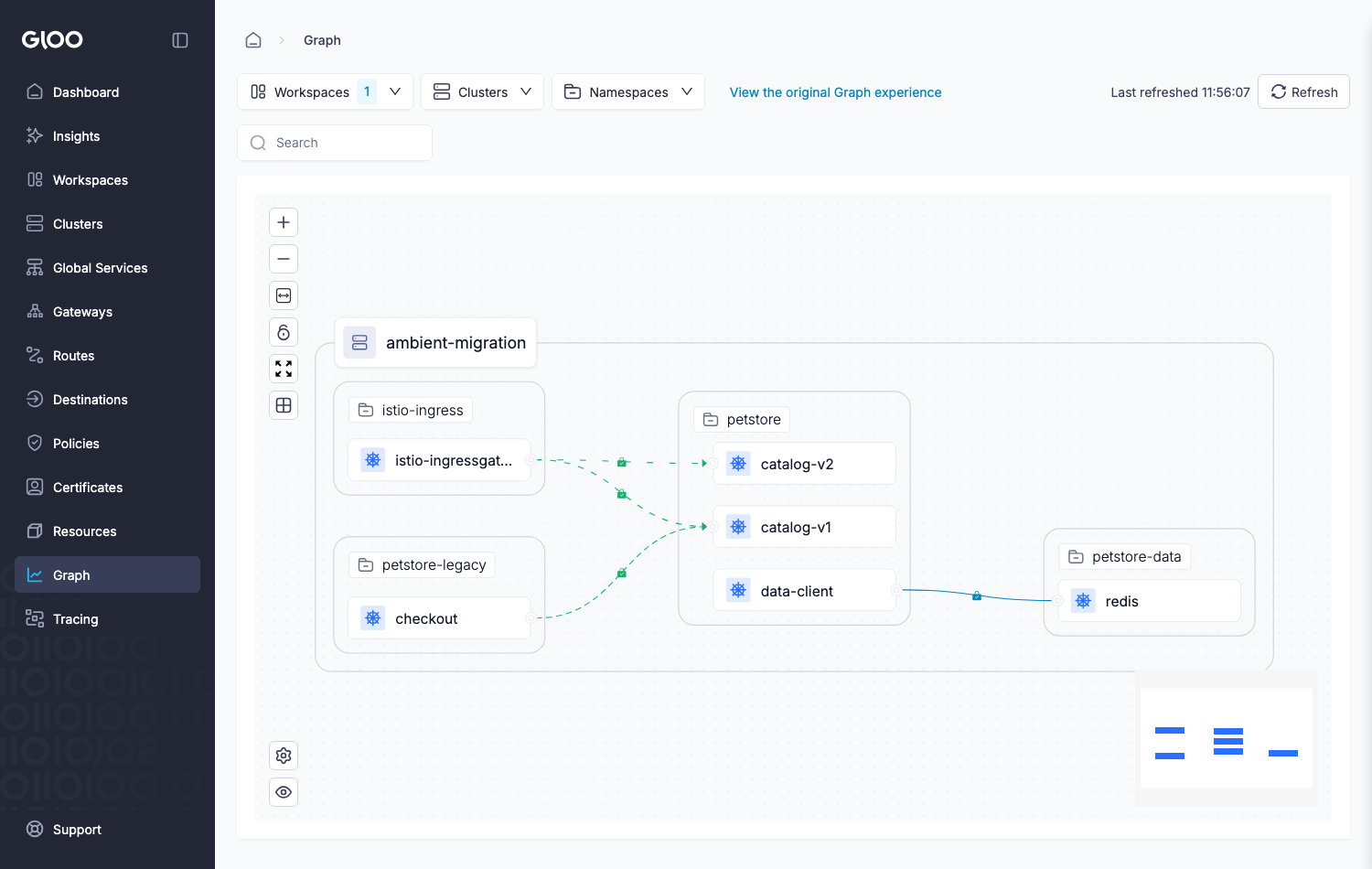
images/step-07-gloo.png here.meshctl dashboard, then Observability → Graph → cluster ambient-migration, namespace petstore.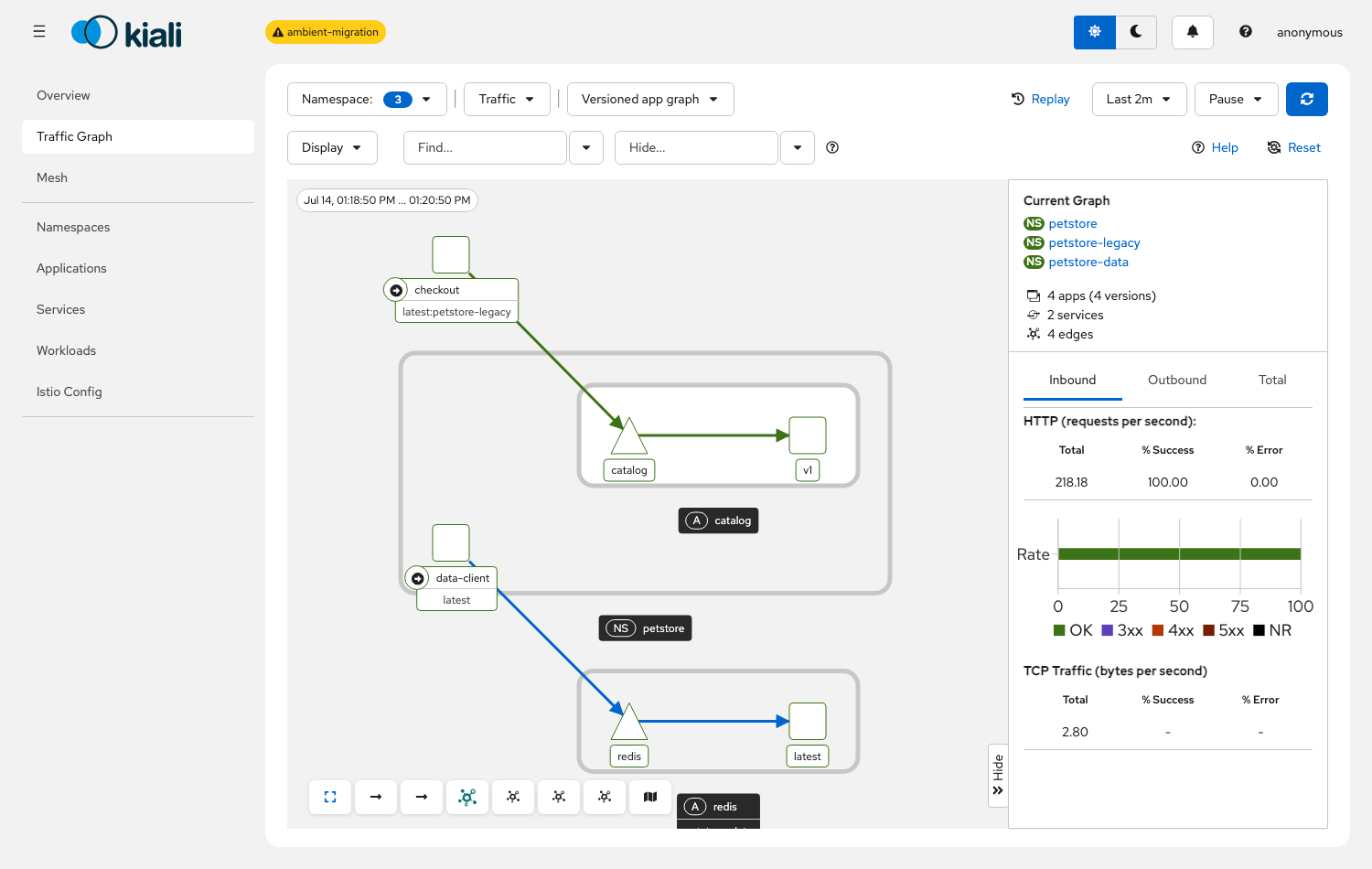
images/step-07-kiali.png here.kubectl -n istio-system port-forward svc/kiali 20001, then Graph → namespace petstore.STRICT mTLS, the catalog canary (DestinationRule + VirtualService), the Redis L4 rule, and the catalog GET-only L7 rule are in place. STEP 8 checks they behave.
Check the sidecar baseline
This step changes nothing. It captures the sidecar-mode baseline that the migration must preserve, so run the checks under Verify.
bashrun
# canary is 100% v1
kubectl -n petstore-legacy exec deploy/checkout -c checkout -- sh -c 'for i in $(seq 1 12); do curl -s http://catalog.petstore/; echo; done' | grep -o 'v[12]' | sort | uniq -c
#   12 v1
# L7 authz: GET allowed (200), DELETE denied (403)
kubectl -n petstore-legacy exec deploy/checkout -c checkout -- sh -c 'echo GET $(curl -s -o /dev/null -w "%{http_code}" http://catalog.petstore/); echo DELETE $(curl -s -o /dev/null -w "%{http_code}" -X DELETE http://catalog.petstore/)'
#   GET 200 / DELETE 403
# L4: the catalog identity may reach Redis; anyone else is denied at L4
kubectl -n petstore exec deploy/data-client -c client -- redis-cli -h redis.petstore-data ping
#   PONG
canary 12 v1; GET 200 / DELETE 403; Redis PONG for the catalog identity. This is the sidecar-mode baseline the migration must preserve.
Enable ambient mode on the mesh
bashrun
kubectl apply -f yaml/00-mesh/smc-ambient.yamlyamlview the YAML · yaml/00-mesh/smc-ambient.yaml
apiVersion: operator.gloo.solo.io/v1
kind: ServiceMeshController
metadata:
  name: managed-istio
  namespace: gloo-system
spec:
  version: "1.29.3"
  dataplaneMode: Ambient
  distribution: Standard
scalingProfile: Demobashverify
kubectl -n istio-system rollout status ds/ztunnel --timeout=150s
kubectl -n istio-system get ds
#   istio-cni-node AND ztunnel, DESIRED=3 each (one per node)
kubectl get pods -n petstore
#   catalog pods still 2/2, no restarts — the flip did not touch them
# zero-downtime: a load run stays at 100% 200 across the flip
kubectl -n petstore-legacy exec deploy/fortio -c fortio -- fortio load -c 8 -n 400 -qps 0 -quiet http://catalog.petstore/ | grep "Code "
#   Code 200 : 400 (100.0 %)
istio-cni and ztunnel are Ready one per node; the sidecar apps are untouched and traffic is unbroken. Nothing is enrolled yet.
Migrate the L4-only namespace (no waypoint)
bashrun
kubectl label ns petstore-data istio.io/dataplane-mode=ambient istio-injection- --overwrite
kubectl -n petstore-data rollout restart deploy/redis
kubectl -n petstore-data rollout status deploy/redis --timeout=120s
sleep 8 # let the ambient endpoint converge after the restartbashverify
kubectl get pods -n petstore-data
#   redis-...   1/1   Running   (no sidecar — ztunnel handles L4)
kubectl -n petstore-data get gateway
#   No resources found  (no waypoint in this namespace)
kubectl -n petstore exec deploy/data-client -c client -- redis-cli -h redis.petstore-data ping
#   PONG  (catalog identity still allowed, now enforced by ztunnel)
redis is 1/1 with no waypoint, and the L4 rule still holds — ztunnel is enforcing mTLS and identity at L4.
Migrate the L7 namespace (waypoint first)
bashrun
# waypoint first, then the targetRefs policy, then bind catalog to the waypoint
kubectl apply -f yaml/30-waypoints/petstore-waypoint.yaml
kubectl -n petstore wait --for=condition=Programmed gateway/waypoint --timeout=120s
kubectl apply -f yaml/40-policies-waypoint/10-catalog-l7-authz-targetref.yaml
kubectl -n petstore label service catalog istio.io/use-waypoint=waypoint --overwrite

# enrol, drop the old selector policy, restart
kubectl label ns petstore istio.io/dataplane-mode=ambient istio-injection- --overwrite
kubectl -n petstore delete authorizationpolicy catalog-get-only
kubectl -n petstore rollout restart deploy/catalog-v1 deploy/catalog-v2 deploy/data-clientyamlview the YAML · yaml/30-waypoints/petstore-waypoint.yaml + yaml/40-policies-waypoint/10-catalog-l7-authz-targetref.yaml
apiVersion: gateway.networking.k8s.io/v1
kind: Gateway
metadata:
  name: waypoint
  namespace: petstore
  labels:
    istio.io/waypoint-for: service
spec:
  gatewayClassName: istio-waypoint
  listeners:
    - name: mesh
      port: 15008
      protocol: HBONE
---
apiVersion: security.istio.io/v1
kind: AuthorizationPolicy
metadata:
  name: catalog-get-only-waypoint
  namespace: petstore
spec:
  targetRefs:
    - kind: Service
      group: ""
      name: catalog
  action: ALLOW
  rules:
    - to:
        - operation:
methods: ["GET", "HEAD"]bashverify
kubectl get pods -n petstore
#   catalog-* now 1/1 (no sidecar); waypoint-* 1/1 Running
# canary still routes at the waypoint — from the still-sidecar checkout client (Solo interop)
kubectl -n petstore-legacy exec deploy/checkout -c checkout -- sh -c 'for i in $(seq 1 12); do curl -s http://catalog.petstore/; echo; done' | grep -o 'v[12]' | sort | uniq -c
#   12 v1
# the GET-only rule is enforced ON THE WAYPOINT, for the sidecar caller too
kubectl -n petstore-legacy exec deploy/checkout -c checkout -- sh -c 'echo GET $(curl -s -o /dev/null -w "%{http_code}" http://catalog.petstore/); echo DELETE $(curl -s -o /dev/null -w "%{http_code}" -X DELETE http://catalog.petstore/)'
#   GET 200 / DELETE 403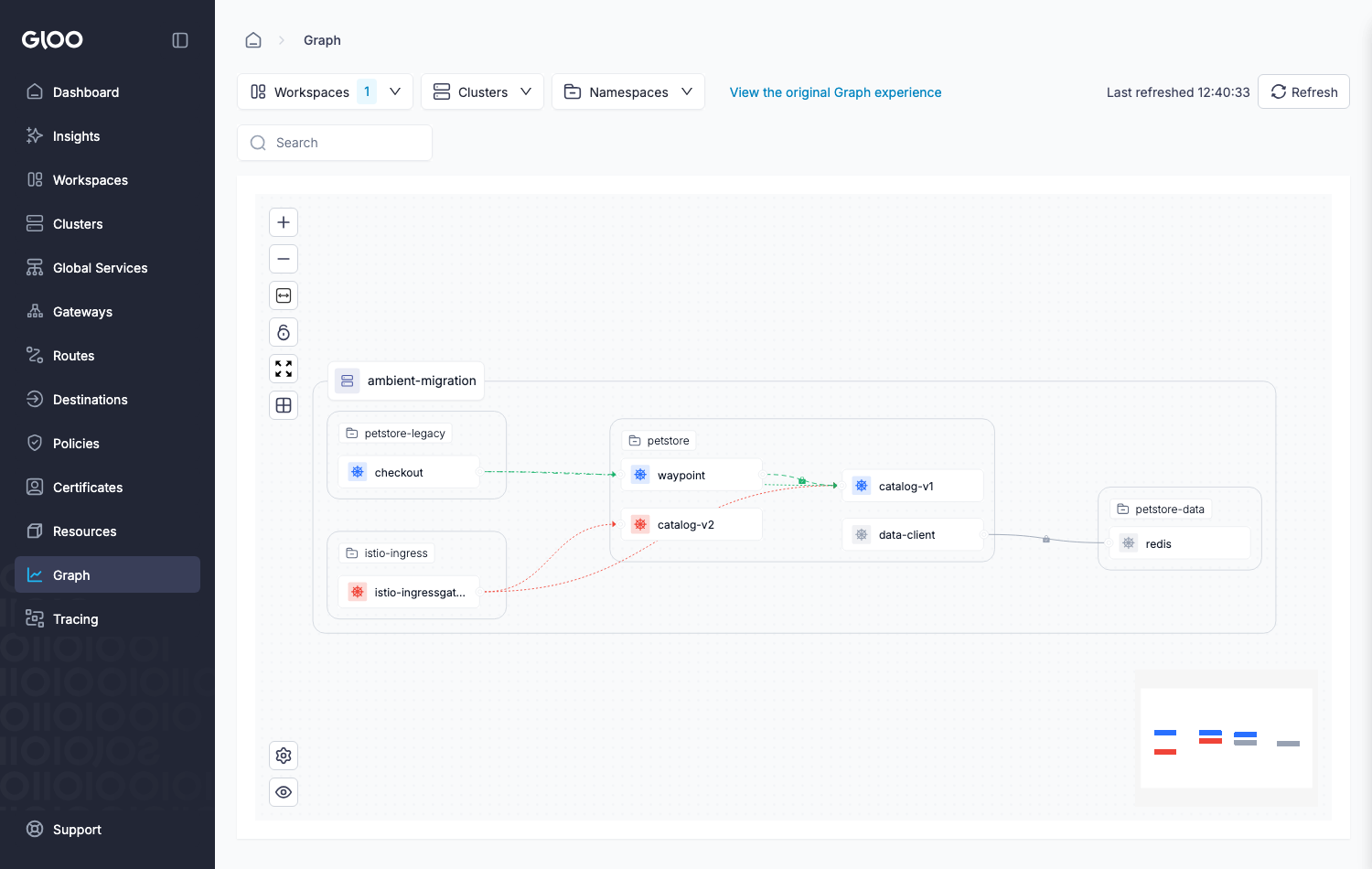
images/step-11-gloo.png here.petstore; catalog traffic routes through it, with the DR/VS canary and GET-only rule enforced at the waypoint.Open with meshctl dashboard, then Observability → Graph → cluster ambient-migration, namespace petstore.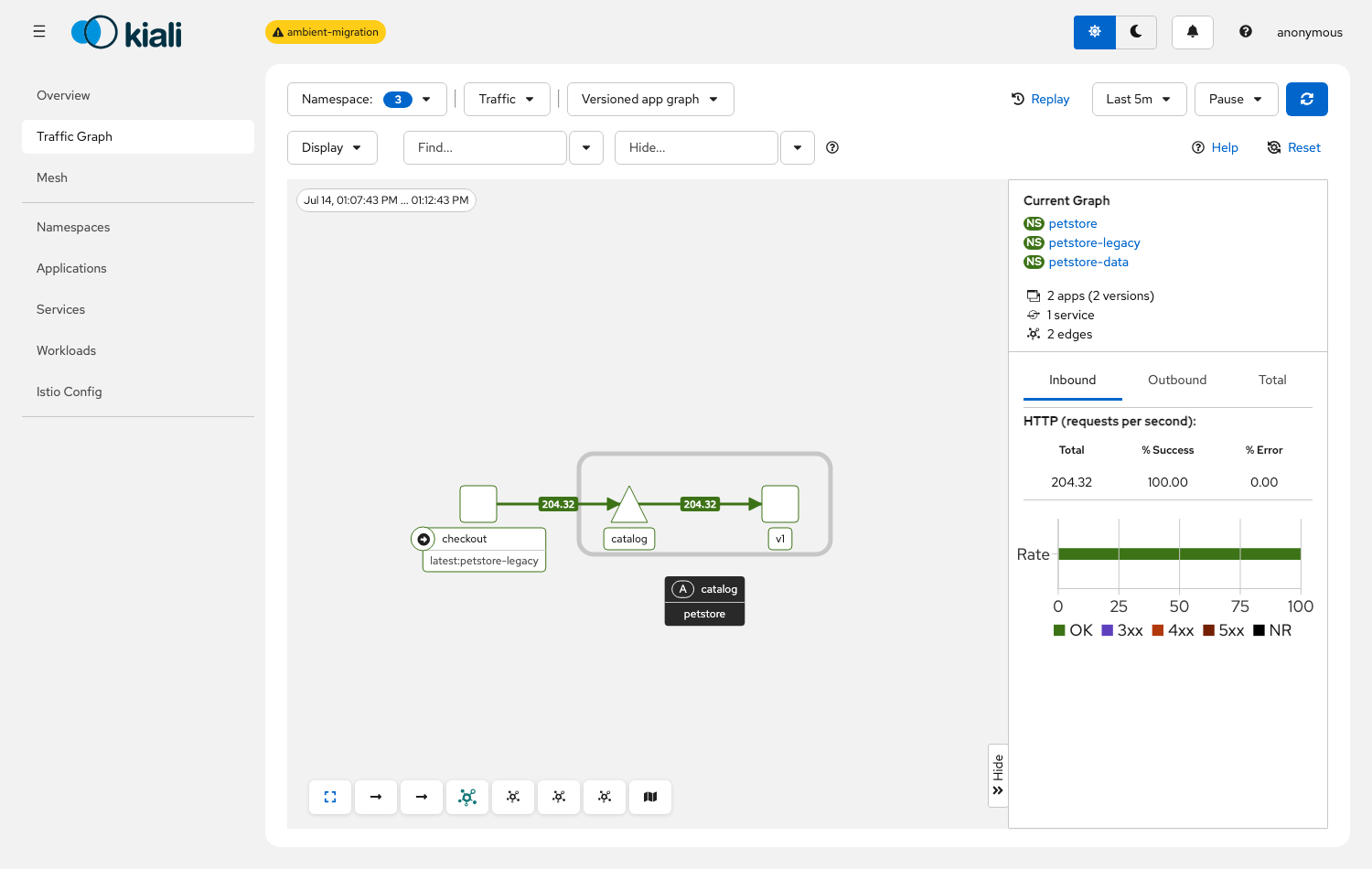
images/step-11-kiali.png here.kubectl -n istio-system port-forward svc/kiali 20001, then Graph → namespace petstore.catalog is 1/1 behind a waypoint; the DestinationRule + VirtualService and the GET-only rule run on the waypoint (canary v1, GET 200 / DELETE 403) — including for the still-sidecar checkout client.
Route the mixed fleet through the waypoint
bashrun
kubectl -n petstore label service catalog istio.io/ingress-use-waypoint=true --overwrite
sleep 5bashverify
# before this label the ingress bypassed the waypoint (DELETE 200, versions mixed); now:
curl -s -o /dev/null -w "ingress DELETE %{http_code}\n" -X DELETE -H 'Host: petstore.local' http://localhost:18080/
#   ingress DELETE 403   (the waypoint's authz now applies to north-south traffic)
for i in $(seq 1 12); do curl -s -H 'Host: petstore.local' http://localhost:18080/; echo; done | grep -o 'v[12]' | sort | uniq -c
#   12 v1   (the canary now applies to ingress traffic too)
the ingress DELETE is now 403 and ingress GET is v1 — north-south traffic flows through the waypoint, so its authz and canary apply.
Optional — move the canary to HTTPRoute
bashrun
kubectl apply -f yaml/50-httproute/
kubectl -n petstore delete virtualservice catalog
# shift traffic by editing the HTTPRoute backendRef weights, e.g. 30/70:
kubectl -n petstore patch httproute catalog --type=json -p='[{"op":"replace","path":"/spec/rules/0/backendRefs/1/weight","value":70},{"op":"replace","path":"/spec/rules/0/backendRefs/0/weight","value":30}]' yamlview the YAML · yaml/50-httproute/*
apiVersion: v1
kind: Service
metadata:
  name: catalog-v1
  namespace: petstore
  labels:
    app: catalog
spec:
  selector:
    app: catalog
    version: v1
  ports:
    - name: http
      port: 80
      targetPort: 5678
---
apiVersion: v1
kind: Service
metadata:
  name: catalog-v2
  namespace: petstore
  labels:
    app: catalog
spec:
  selector:
    app: catalog
    version: v2
  ports:
    - name: http
      port: 80
      targetPort: 5678
---
apiVersion: gateway.networking.k8s.io/v1
kind: HTTPRoute
metadata:
  name: catalog
  namespace: petstore
spec:
  parentRefs:
    - group: ""
      kind: Service
      name: catalog
      port: 80
  rules:
    - backendRefs:
        - name: catalog-v1
          port: 80
          weight: 100
        - name: catalog-v2
          port: 80
          weight: 0
---
apiVersion: networking.istio.io/v1
kind: DestinationRule
metadata:
  name: catalog
  namespace: petstore
spec:
  host: catalog.petstore.svc.cluster.local
  trafficPolicy:
    connectionPool:
      tcp:
        maxConnections: 100
      http:
        http1MaxPendingRequests: 100
        maxRequestsPerConnection: 10
    outlierDetection:
      consecutive5xxErrors: 5
      interval: 10s
baseEjectionTime: 30sbashverify
kubectl -n petstore get httproute catalog
#   catalog   (parented on the catalog Service)
kubectl -n petstore get virtualservice
#   No resources found  (the VirtualService is retired)
kubectl -n petstore exec deploy/data-client -c client -- sh -c 'for i in $(seq 1 20); do wget -qO- http://catalog.petstore/ 2>/dev/null; echo; done' | grep -o 'v[12]' | sort | uniq -c
#   a v1/v2 mix (~30/70) — the split now comes from the HTTPRoute weights
routing carries on unbroken; the version split now comes from the HTTPRoute weights (what Argo Rollouts drives) instead of DestinationRule subsets.
Roll a namespace back (the safety net)
bashrun
# rollback is the mirror of enrolment: injection back on, ambient + waypoint labels off
kubectl label ns petstore-data istio.io/dataplane-mode- istio-injection=enabled --overwrite
kubectl label ns petstore-data istio.io/use-waypoint- 2>/dev/null || true
kubectl -n petstore-data rollout restart deploy/redis
kubectl -n petstore-data rollout status deploy/redis --timeout=120sbashverify
kubectl get pods -n petstore-data
#   redis-...   2/2   Running   (sidecar is back)
kubectl -n petstore exec deploy/data-client -c client -- redis-cli -h redis.petstore-data ping
#   PONG  (the L4 rule stayed enforced across the round trip)
redis is back to 2/2 (sidecar) and the L4 rule is still enforced. For an L7 namespace, also re-apply its selector-based policy and delete the waypoint objects.
Clean up
bashrun
kind delete cluster --name ambient-migrationthe cluster is removed. Re-run STEP 1 to rebuild.
Migration checklist
The order that keeps it zero-downtime and reversible: set the cluster up once, then repeat the per-namespace block for each namespace.
- Per cluster, once
- Solo images across the mesh (the sidecar and ingress interop needs them), driven by the Gloo Operator's
ServiceMeshController, with the Gateway API CRDs present. - Flip
dataplaneMode: Ambient. Confirmistio-cniandztunnelare Ready, one per node, and running sidecar workloads are untouched. - Per namespace, in order
- Audit L4 vs L7. Find any
PeerAuthentication mode: DISABLE(no ambient equivalent, handle it first), any egress scoped by theSidecarobject (moves to an egress-waypoint model), and any L7 field in an AuthorizationPolicy or routing rule (needs a waypoint). - If the namespace has L7 concerns, deploy the waypoint first and wait for it to be Programmed.
- Translate selector policies to
targetRefs, and apply the new policy before removing the old. - Bind the workload to the waypoint with
istio.io/use-waypoint. - Enrol: label the namespace
istio.io/dataplane-mode=ambient, removeistio-injection, delete the old selector L7 policy, and rolling-restart so pods return with no sidecar. - North-south: set
istio.io/ingress-use-waypoint=trueon the Service (before any from-waypoint lockdown, or ingress traffic breaks). - Verify routing, L7 authz, L4 allow/deny and a clean load run, from a sidecar caller too.
- Roll back with a single label if anything is off; clean up the old sidecar-era policies once traffic is confirmed on the waypoint.
- Optional, once ambient
- Move subset canaries to per-version Services +
HTTPRoute(Argo Rollouts drives the weights). - Retire
Sidecaregress scoping andexportTo(no ambient equivalent; ztunnel makes all services visible).
Appendix — the gloo CLI: estimate and migrate
The gloo CLI (curl -sL https://storage.googleapis.com/gloo-cli/install.sh | sh -)
ships two commands that plan the migration for you. They change nothing in the cluster: estimate
writes a report, migrate reads the cluster and generates recommended YAML into an output
directory, phase by phase. (This is distinct from meshctl, the Gloo Mesh management CLI;
meshctl experimental interop-check runs the same sidecar/ambient interoperability checks.)
gloo ambient estimate
Gathers cluster and namespace information for a migration cost estimate, and writes it to a file.
consolegloo ambient estimate
$ gloo ambient estimate
 INFO  Using current Kubernetes context: kind-ambient-migration
 INFO  Gathering namespace information
 INFO  Found 11 namespaces to process
 SUCCESS  Completed Processing namespaces
 INFO  Gathering node information
 INFO  Found 3 nodes to process
 SUCCESS  Completed Processing nodes
 INFO  Saved cluster info to file: kind-ambient-migration.json
 SUCCESS  Cluster information gathered successfully
gloo ambient migrate
Runs in phases. pre-reqs is a Go/no-go compatibility gate; cluster-setup
checks the mesh is ambient-ready before it will generate waypoint and policy recommendations. It is
non-invasive — it only reads and recommends, writing recommended-waypoints.yaml and
recommended-policies.yaml for you to review and apply. Useful flags:
--enterprise— also check the Solo Enterprise features that need a licence.--from-files— run the whole analysis offline against exported YAML instead of a live cluster (a good first dry run from a Git repo).--output-dir— where the generated files land (default/tmp/istio-migrate/).--ignore-failures— continue through all phases despite failed checks.
Run it in sidecar mode and it tells you exactly what to turn on:
consolegloo ambient migrate --enterprise (before ambient is enabled)
$ gloo ambient migrate --enterprise --output-dir ./istio-migrate
• Starting phase pre-reqs...
✅ Phase pre-reqs succeeded!
  ✅ Cluster CNI compatibility: passed
  ✅ Istio version compatibility: passed
  ✅ Multicluster usage compatibility: passed
  ✅ Virtual Machine usage compatibility: passed
  ✅ SPIRE usage compatibility: passed
• Starting phase cluster-setup...
❌ Phase cluster-setup failed!
  ❌ Ambient mode enabled: failed
      * istiod must have 'PILOT_ENABLE_AMBIENT=true'. Upgrade with '--set profile=ambient'.
  ❌ DaemonSets deployed: failed
      * ztunnel not found
  ✅ Required CRDs installed: passed
Turn ambient on (the flip above) and the infrastructure checks pass. One field note from this lab's build:
on Kubernetes 1.29+ the Solo sidecar is injected as a native sidecar (an init container with
restartPolicy: Always), and it carries ISTIO_META_ENABLE_HBONE=true, so it is fully
ambient-ready, but gloo v0.2.0's "sidecars support ambient" check inspects
.spec.containers and does not see it there, so that one check reports the sidecar as missing.
The pre-reqs gate and the ambient-infrastructure checks are the useful part; once cluster-setup passes, the
later phases write recommended-waypoints.yaml and recommended-policies.yaml into the
output directory for you to review and apply.
See also
- Solo docs — sidecar to ambient migration
- Solo docs — Gloo Operator and ServiceMeshController
- Related — Gateway API on ambient
- Related — HBONE east-west
Versions
Built and verified on:
v1.5.10.5.21.351.29.3-solo