Lab overview
This lab puts two Solo Enterprise stories on one cluster. They share the same Solo-shipped Knowledge Base MCP server, but they are independent demos.
Story one: per-user MCP authorisation. agentgateway
sits in front of the Solo KB MCP and runs two
EnterpriseAgentgatewayPolicy resources. One validates a
Keycloak-signed JWT at the listener. The other carries a per-tool
CEL allow-list on the MCP backend keyed on the JWT's
groups claim. alice (group
field-fte) gets all ten Solo KB tools.
bob (group field-trial) gets
search and list_products. Unauthorised
tools never reach the upstream and never show up in
tools/list. The customer doesn't own the MCP, they own
the gate in front of it.
Story two: one Agent, two Runtimes. AgentRegistry
Enterprise hosts a single solofieldassistant Agent
record. Two Deployments point at two Runtimes that ship in the
Enterprise distribution: in-cluster kagent and
AWS Bedrock AgentCore. Same image, same agent code,
only the runtimeRef differs. The chat path goes
directly to the Solo KB MCP, it doesn't traverse the agentgateway
from Story one.
AgentRegistry models an agent as a versioned record. The
Agent record is what the team ships. The
Deployment record says where it runs, by pointing at a
Runtime. The same image and the same agent code back
both runtime deployments; only the runtimeRef differs.
runtimeRef.Architecture
The two identities
alice
- Group
field-fte- JWT
- from Keycloak,
groupsclaim - Tools
- full Solo KB inventory — all ten tools
bob
- Group
field-trial- JWT
- from Keycloak,
groupsclaim - Tools
- just
searchandlist_products— everything else filtered
Steps
1. Prerequisites
Before you start, have the following ready on the box you run the demo from:
- CLIs:
arctl,kubectl,helm,docker,aws,jq,curl. - Cluster: a Kubernetes cluster with Solo Enterprise for kagent (incl. AgentRegistry Enterprise) installed, and the
kagentnamespace present. - AWS: an account with Bedrock model access for anthropic.claude-haiku-4-5 in
us-east-1, an SSO profile signed in, and an ECR repo you can push to. - Solo KB MCP: the hosted endpoint
https://knowledge-base.soloio-field.com/mcp. No auth required — it's the same MCP server used elsewhere in this site.
Export the env vars used throughout the rest of the lab:
# MCP backend the agent calls on both runtimes
export SOLO_KB_MCP_URL="https://knowledge-base.soloio-field.com/mcp"

# Bedrock region (Bedrock for Claude Haiku 4.5 lives in us-east-1)
export AWS_REGION="us-east-1"

# Your ECR registry — replace <account-id> with your AWS account id
export AGENT_IMAGE="<account-id>.dkr.ecr.us-east-1.amazonaws.com/solofieldassistant:0.2.2"

# Keycloak realm + client this lab uses (deployed in the next step)
export KC_BASE="http://keycloak.kagent.svc.cluster.local:8080"
export KC_REALM="solo"
export KC_CLIENT="kagent"
Point arctl at AgentRegistry
arctl defaults to http://localhost:12121. For an
in-cluster AR install, port-forward the AR server in
agentregistry-system so the CLI can reach it:
kubectl -n agentregistry-system port-forward \
  svc/agentregistry-enterprise-server \
  12121:12121 21212:21212 31313:31313 &
AR Enterprise enforces auth. An unauthenticated call returns
401 Unauthorized. How you mint the token depends on how
your AR was installed.
Demo-auth installs. If your Helm values set
oidc.demoAuthEnabled: true (the default for a bench install),
AR runs an embedded IDP at /api/autoauth with built-in
profiles you authenticate as: admin,
engineering, docs, security,
viewer, norole. Mint a token via
client_credentials and export it as
ARCTL_API_TOKEN:
export ARCTL_API_TOKEN=$(curl -s -X POST \
  http://localhost:12121/api/autoauth/oauth/token \
  -H "Content-Type: application/x-www-form-urlencoded" \
  -d "grant_type=client_credentials&client_id=admin&scope=openid profile email Groups" \
  | jq -r .access_token)

arctl user whoami      # sanity check — should show Subject=admin
arctl get runtimes     # should now succeed
Real-OIDC installs. If your AR is wired to a real OIDC
issuer (Keycloak, Okta, Cognito, …), use arctl user login
with that issuer's URL and a registered client ID:
arctl user login \
  --oidc-issuer-url https://<your-issuer> \
  --oidc-client-id arctl \
  --oidc-flow device-authorization
Note: arctl user login enforces a strict match between the
issuer URL you pass and the issuer field returned by the
issuer's discovery document. The port-forward URL above
(localhost:12121) does not match the embedded IDP's
advertised issuer (localhost:8080), which is why demo-auth
installs need the raw token route.
If your AR is exposed via a LoadBalancer or Ingress instead, set
ARCTL_API_BASE_URL to that endpoint rather than
port-forwarding.
2. Stand up Keycloak with realm solo
The EnterpriseAgentgatewayPolicy in step 8 validates JWTs
against Keycloak's live JWKS endpoint, so we need a real OIDC issuer
reachable from the cluster. Keycloak is shared infrastructure across
the identity labs, so the install lives on a helper page rather than
being inlined here.
Follow Keycloak setup end to
end. That helper page deploys the bitnami chart into the kagent
namespace, imports realm solo with client kagent,
and creates users alice (group field-fte) and
bob (group field-trial). Come back here when
Keycloak is rolled out.
Once Keycloak is up, the in-cluster discovery URL
http://keycloak.kagent.svc.cluster.local/realms/solo/.well-known/openid-configuration
resolves to the realm. agentgateway pulls JWKS from there live, so no
key material needs to be pasted into YAML and key rotations propagate
without re-applying anything.
3. Register the Runtimes
AgentRegistry uses Runtime resources to describe execution
targets. We register two: kagent-tor1 for the in-cluster
kagent controller, and aws-agentcore for Bedrock AgentCore.
Once both are Ready, the same Agent record can deploy to
either, which is the whole point of the lab.
Each call to arctl apply below uses the AR API
ar.dev/v1alpha1. If your AR admin has already registered
these runtimes, skip ahead to the verification block at the end of this
step.
3a. Kagent runtime
Points AgentRegistry at the in-cluster kagent control plane. The
kagentUrl is the kagent controller service inside the
kagent namespace.
yaml yaml/runtime-kagent.yaml
apiVersion: ar.dev/v1alpha1
kind: Runtime
metadata:
  name: kagent-tor1
spec:
  type: Kagent
  config:
    kagentUrl: http://kagent-controller.kagent:8083
    namespace: kagent
arctl apply -f yaml/runtime-kagent.yaml3b. BedrockAgentCore runtime
The AWS-side bootstrap creates a cross-account IAM role that AgentRegistry
assumes when it drives Bedrock AgentCore on your behalf. Generate the
CloudFormation template once, apply it in your AWS account, then capture
the outputs (RoleArn, ExternalId) and feed them
into the Runtime manifest.
# Generate the CloudFormation that creates the trust role.
arctl runtime setup bedrock-agent-core \
  --aws-account-id <aws-account-id> \
  > /tmp/ar-cfn.yaml

# Apply it in your AWS account.
aws cloudformation deploy \
  --stack-name agentregistry-access \
  --template-file /tmp/ar-cfn.yaml \
  --capabilities CAPABILITY_NAMED_IAM

# Read back the RoleArn + ExternalId outputs.
aws cloudformation describe-stacks \
  --stack-name agentregistry-access \
  --query 'Stacks[0].Outputs'
yaml yaml/runtime-agentcore.yaml
apiVersion: ar.dev/v1alpha1
kind: Runtime
metadata:
  name: aws-agentcore
spec:
  type: BedrockAgentCore
  config:
    roleArn: arn:aws:iam::<aws-account-id>:role/<role-name>
    externalId: <external-id>
    region: us-east-1
arctl apply -f yaml/runtime-agentcore.yaml3c. Verify both are wired
arctl get runtimesYou should see:
PLATFORM     NAME            REGION       INSTANCES
Kubernetes   kagent-tor1     —            1
AWS          aws-agentcore   us-east-1    1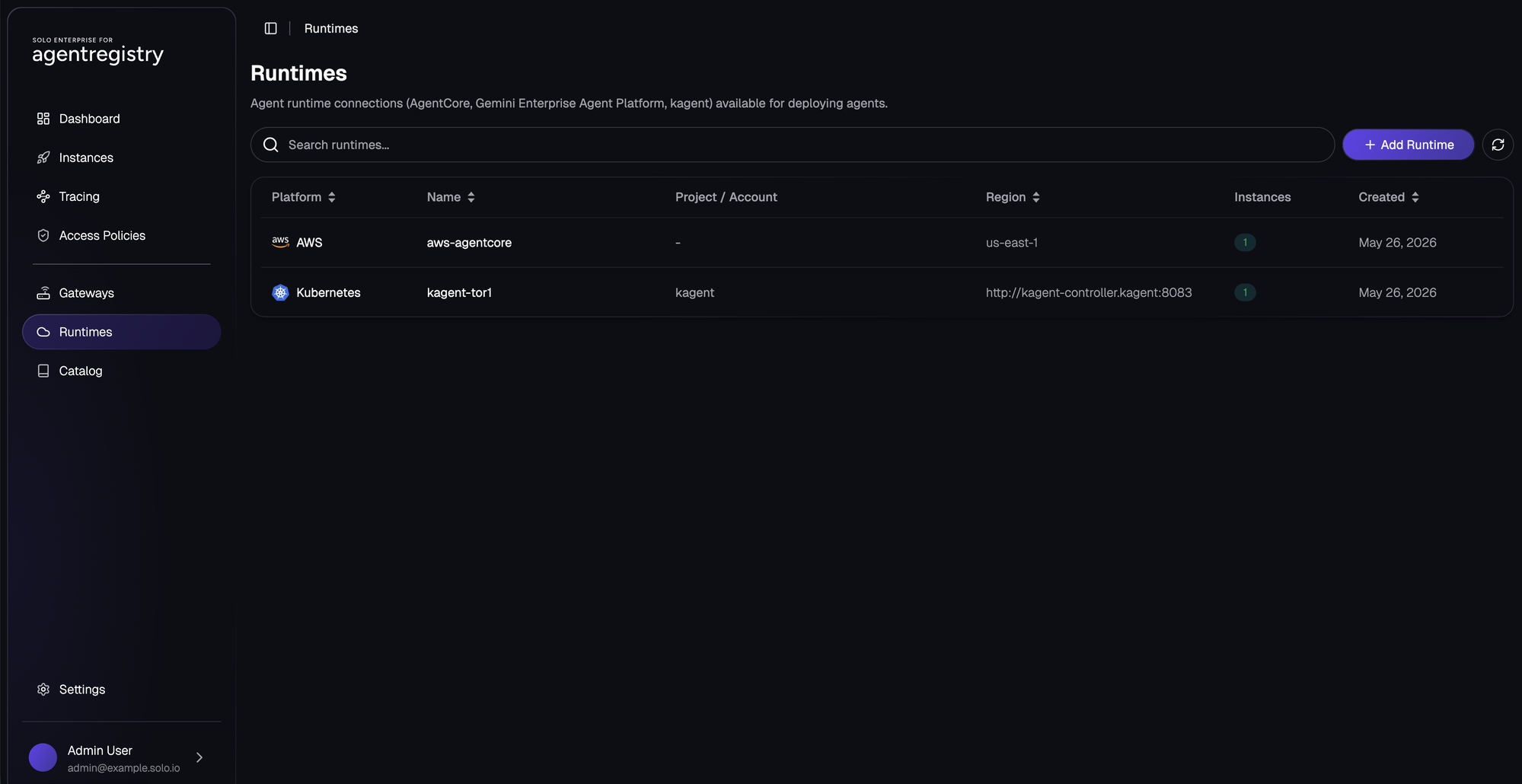
aws-agentcore in us-east-1 and kagent-tor1 bound to the in-cluster kagent controller, both showing one active instance.4. Write the agent
Standard ADK-Python Agent with one MCPToolset
bound to the Solo KB MCP endpoint. The model is Anthropic Claude
Haiku 4.5 served from AWS Bedrock — picked up via the boto3 credential
chain (IRSA on kagent, AR-provisioned workload identity on AgentCore),
so there is no API key in either env block. SOLO_KB_MCP_URL
is read at startup so the same image works unchanged in both runtimes.
python agent/solofieldassistant/agent.py
import os

from google.adk.agents import Agent
from google.adk.tools.mcp_tool import MCPToolset
from google.adk.tools.mcp_tool.mcp_session_manager import StreamableHTTPServerParams

from .bedrock_model import BedrockClaude


SOLO_KB_MCP_URL = os.environ.get(
    "SOLO_KB_MCP_URL",
    "https://knowledge-base.soloio-field.com/mcp",
)
BEDROCK_MODEL_ID = os.environ.get(
    "BEDROCK_MODEL_ID",
    "us.anthropic.claude-haiku-4-5-20251001-v1:0",
)


solo_kb_tools = MCPToolset(
    connection_params=StreamableHTTPServerParams(
        url=SOLO_KB_MCP_URL,
    ),
)


root_agent = Agent(
    name="solofieldassistant_agent",
    model=BedrockClaude(model=BEDROCK_MODEL_ID),
    description=(
        "Answers questions about Solo.io products by calling the Solo "
        "Knowledge Base via MCP."
    ),
    instruction=(
        "You are a Solo.io field engineer assistant. "
        "For any question about kgateway, agentgateway, istio, kagent, "
        "or agentregistry, call the Solo Knowledge Base tools first and "
        "answer from what you get back. "
        "When you cite a fact, name the use-case filename or CRD kind "
        "you read it from, and the product version if the tool returned one. "
        "If a tool returns no result, say so plainly. Do not invent fields, "
        "CRDs, or behaviours that the KB didn't return."
    ),
    tools=[solo_kb_tools],
)
ADK doesn't ship a Bedrock back-end, so the
BedrockClaude adapter wraps
anthropic.AnthropicBedrock behind ADK's
BaseLlm interface — translating ADK parts (text,
function_call, function_response) into
Anthropic content blocks and back. The full file is in the repo at
agent/solofieldassistant/bedrock_model.py.
5. Build and push the image
arctl build takes a directory containing a Python ADK agent,
wraps it in the kagent-adk base image and pushes it to your
OCI registry. The directory it reads is agent/ in this lab,
and the code that gets baked in lives at agent/solofieldassistant/.
Directory layout the build expects:
kagent-agentcore-solo-kb/
└── agent/                          ← arctl build reads this directory
    ├── Dockerfile                  (optional override; arctl falls back to the kagent-adk default)
    ├── pyproject.toml              (Python deps — ADK, anthropic, etc.)
    └── solofieldassistant/         ← Python package the runtime imports
        ├── __init__.py
        ├── agent.py                ← root_agent lives here
        └── bedrock_model.py        (the BedrockClaude adapter)
The runtime imports solofieldassistant.agent:root_agent, so the
package name and the root_agent symbol both matter — rename either
and the agent won't start.
Create the ECR repo and authenticate Docker against it (one-time):
# From the lab root
cd kagent-agentcore-solo-kb

# Create the ECR repo (idempotent — ignore the already-exists error)
aws ecr create-repository \
  --repository-name solofieldassistant \
  --region "${AWS_REGION}" || true

# Docker login against ECR
aws ecr get-login-password --region "${AWS_REGION}" \
  | docker login --username AWS --password-stdin \
      "$(echo "${AGENT_IMAGE}" | cut -d/ -f1)"
Build + push. Same image, same tag, will be referenced by both Deployments:
arctl build ./agent --push --image "${AGENT_IMAGE}"6. Register the Agent record
One record. Both Deployments point at it by metadata.name.
AR assigns the catalog tag (shown as vlatest in the UI).
Edit spec.source.image to the tag you just pushed.
yaml yaml/agent.yaml
apiVersion: ar.dev/v1alpha1
kind: Agent
metadata:
  name: solofieldassistant
spec:
  description: Answers questions about Solo.io products by calling the Solo Knowledge Base via MCP.
  modelProvider: bedrock
  modelName: us.anthropic.claude-haiku-4-5-20251001-v1:0
  source:
    image: ${AGENT_IMAGE}                    # <account-id>.dkr.ecr.us-east-1.amazonaws.com/solofieldassistant:0.2.2
    repository:
      url: https://github.com/<you>/<repo>.git
      branch: main
      subfolder: kagent-agentcore-solo-kb/agent
envsubst < yaml/agent.yaml | arctl apply -f -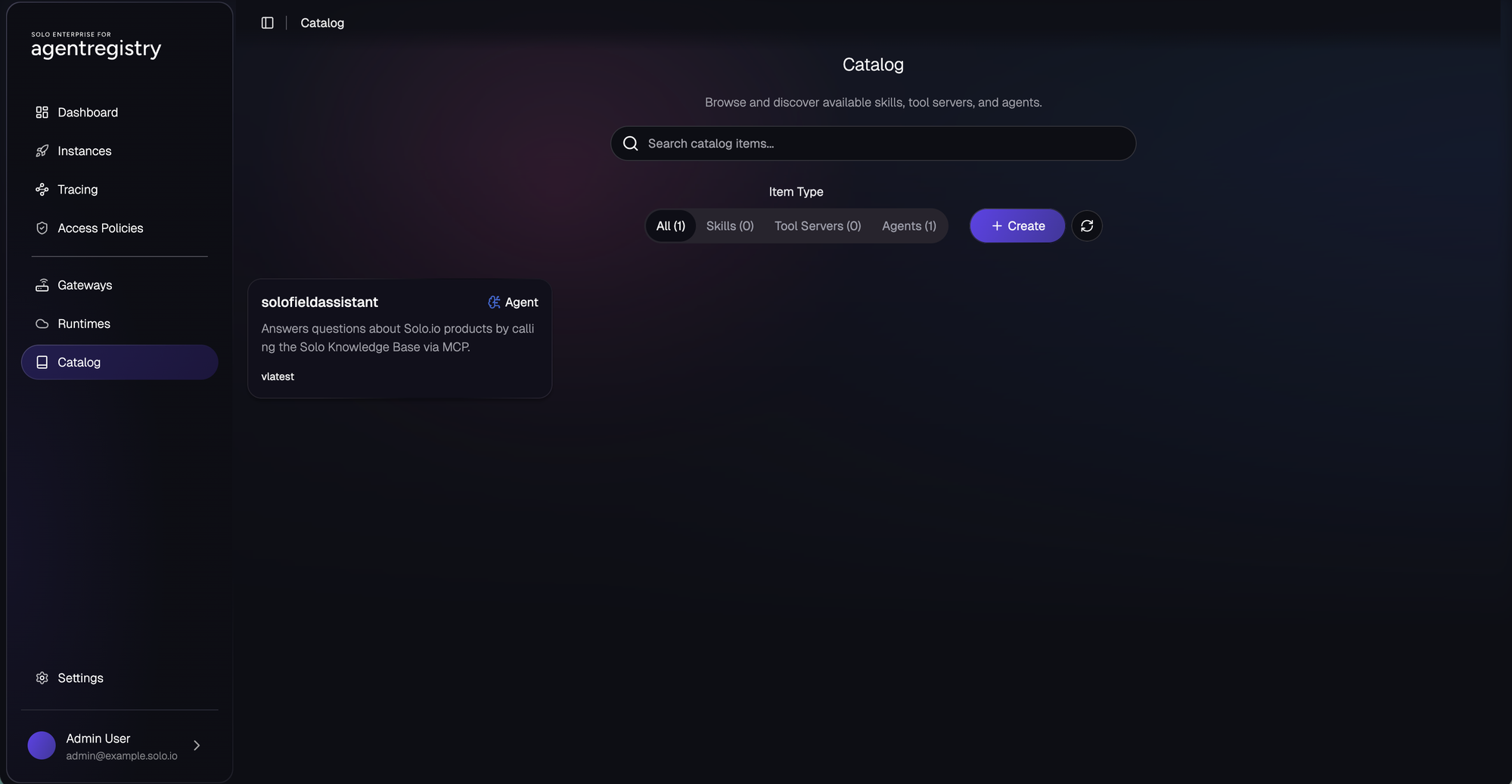
solofieldassistant Agent record is now visible with tag vlatest.7. Deploy it twice
Two Deployments. Same targetRef, different
runtimeRef. No API keys — Bedrock auth comes from the
workload identity AR wires up on each side.
yaml yaml/deployments.yaml
apiVersion: ar.dev/v1alpha1
kind: Deployment
metadata:
  name: solofieldassistant-kagent
spec:
  targetRef:
    kind: Agent
    name: solofieldassistant
  runtimeRef:
    kind: Runtime
    name: kagent-tor1
  env:
    SOLO_KB_MCP_URL: "${SOLO_KB_MCP_URL}"
    AWS_REGION: us-east-1
---
apiVersion: ar.dev/v1alpha1
kind: Deployment
metadata:
  name: solofieldassistant-agentcore
spec:
  targetRef:
    kind: Agent
    name: solofieldassistant
  runtimeRef:
    kind: Runtime
    name: aws-agentcore
  env:
    SOLO_KB_MCP_URL: "${SOLO_KB_MCP_URL}"
    AWS_REGION: us-east-1
envsubst < yaml/deployments.yaml | arctl apply -f -
Confirm both are live in the Catalog and Instances views — the kagent
pod lands as deploy/solofieldassistant in the
kagent namespace; the AgentCore deployment lands in your
AWS account, region us-east-1.
8. Sit agentgateway in front of the Solo KB MCP, gate it on Keycloak group
The agent's own MCP traffic goes straight to
${SOLO_KB_MCP_URL} with no token and no gating. Per-tool
RBAC for the identity demo (Scenes 2 and 3) is a separate path: a
small agentgateway Gateway in the cluster that proxies to the same
Solo KB upstream. Two EnterpriseAgentgatewayPolicy resources sit
on it. The first validates Keycloak JWTs at the listener. The second
evaluates CEL against the JWT's groups claim and the MCP
tool name on every tools/list and tools/call.
First, the data plane: an AgentgatewayBackend of
kind: mcp pointing at the public Solo KB host, a
Gateway on the enterprise-agentgateway class
to handle the demo traffic, and an HTTPRoute that ties
the path /mcp on the listener to that backend.
yaml yaml/agw-mcp-backend.yaml
apiVersion: gateway.networking.k8s.io/v1
kind: Gateway
metadata:
  name: solo-kb-demo
  namespace: kagent
spec:
  gatewayClassName: enterprise-agentgateway
  listeners:
    - name: http
      port: 8080
      protocol: HTTP
      allowedRoutes:
        namespaces:
          from: Same
---
apiVersion: agentgateway.dev/v1alpha1
kind: AgentgatewayBackend
metadata:
  name: solo-kb-mcp
  namespace: kagent
spec:
  mcp:
    sessionRouting: Stateless
    targets:
      - name: solo-kb
        static:
          host: knowledge-base.soloio-field.com
          port: 443
          path: /mcp
          policies:
            tls:
              sni: knowledge-base.soloio-field.com
---
apiVersion: gateway.networking.k8s.io/v1
kind: HTTPRoute
metadata:
  name: solo-kb-mcp
  namespace: kagent
spec:
  parentRefs:
    - name: solo-kb-demo
  rules:
    - matches:
        - path:
            type: PathPrefix
            value: /mcp
      backendRefs:
        - group: agentgateway.dev
          kind: AgentgatewayBackend
          name: solo-kb-mcp
Now the JWT validator at the listener. mode: Strict means
the gateway rejects any request without a valid Keycloak-signed token
before it ever reaches the MCP backend. JWKS is fetched live from the
in-cluster Keycloak Service via backendRef, so key
rotations propagate without a YAML reapply.
yaml yaml/agw-jwt-policy.yaml
apiVersion: enterpriseagentgateway.solo.io/v1alpha1
kind: EnterpriseAgentgatewayPolicy
metadata:
  name: jwt-keycloak
  namespace: kagent
spec:
  targetRefs:
    - group: gateway.networking.k8s.io
      kind: Gateway
      name: solo-kb-demo
  traffic:
    jwtAuthentication:
      mode: Strict
      providers:
        - issuer: "http://keycloak.kagent.svc.cluster.local/realms/solo"
          audiences:
            - kagent
          jwks:
            remote:
              jwksPath: /realms/solo/protocol/openid-connect/certs
              backendRef:
                kind: Service
                name: keycloak
                namespace: kagent
                port: 80
Finally the per-tool RBAC. backend.mcp.authorization
carries a CEL allow-list. matchExpressions is OR — any
expression that returns true grants access to that tool for that
call. Unmatched tools are filtered out of tools/list
silently and tools/call on them returns JSON-RPC
-32602.
yaml yaml/agw-mcp-rbac.yaml
apiVersion: enterpriseagentgateway.solo.io/v1alpha1
kind: EnterpriseAgentgatewayPolicy
metadata:
  name: mcp-tool-rbac
  namespace: kagent
spec:
  targetRefs:
    - group: agentgateway.dev
      kind: AgentgatewayBackend
      name: solo-kb-mcp
  backend:
    mcp:
      authorization:
        action: Allow
        policy:
          matchExpressions:
            - 'jwt.groups.exists(g, g == "field-fte")'
            - 'jwt.groups.exists(g, g == "field-trial") && mcp.tool.name in ["search", "list_products"]'
kubectl apply -f yaml/agw-mcp-backend.yaml -f yaml/agw-jwt-policy.yaml -f yaml/agw-mcp-rbac.yaml
Three pieces wired up: the Gateway accepts JWTs at its listener, the MCP backend evaluates per-tool CEL against the claims the JWT carried, and the HTTPRoute glues the path to the backend. The demo scenes below walk through what alice and bob each see.
9. Mint a token for alice, mint a token for bob
The Keycloak setup · Mint a token
section walks through the OIDC password-grant calls and
port-forward. Mint two tokens against realm solo, client
kagent:
ALICE_JWTfor alice (groups["field-fte"]) · full Solo KB toolset.BOB_JWTfor bob (groups["field-trial"]) ·searchandlist_products.
Both tokens should carry
"iss": "http://keycloak.kagent.svc.cluster.local/realms/solo"
and "aud": "kagent". That's what the
jwt-keycloak policy validates.
Walk through the demo
Scene 1 — chat through agentregistry
Same Agent record, two Deployments, one chat UI. The AgentRegistry
Instances page lists both solofieldassistant
deployments side by side: one on the kagent-tor1 runtime
(in-cluster), one on aws-agentcore (AWS Bedrock AgentCore).
Clicking Chat on either row opens the same conversation
surface against that runtime's pod.
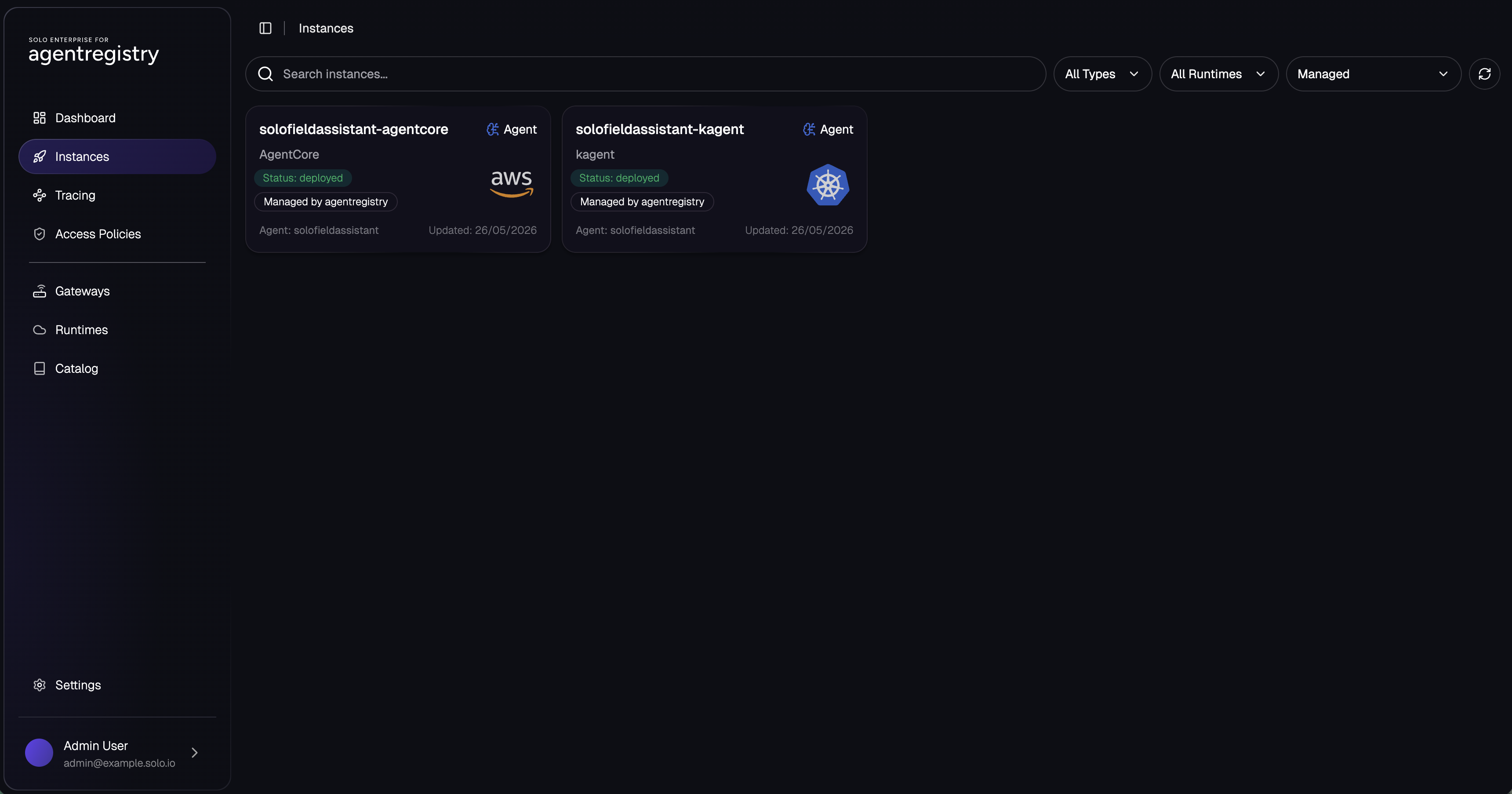
solofieldassistant Agent running on both Runtimes from a single image.Ask each instance the same question. The model, the prompt, and the MCP backend are identical; only the runtime underneath changes.
What is a kgateway TrafficPolicy?AgentCore runtime answering a TrafficPolicy question by calling the Solo KB tools and citing the CRD kind it pulled the field names from.
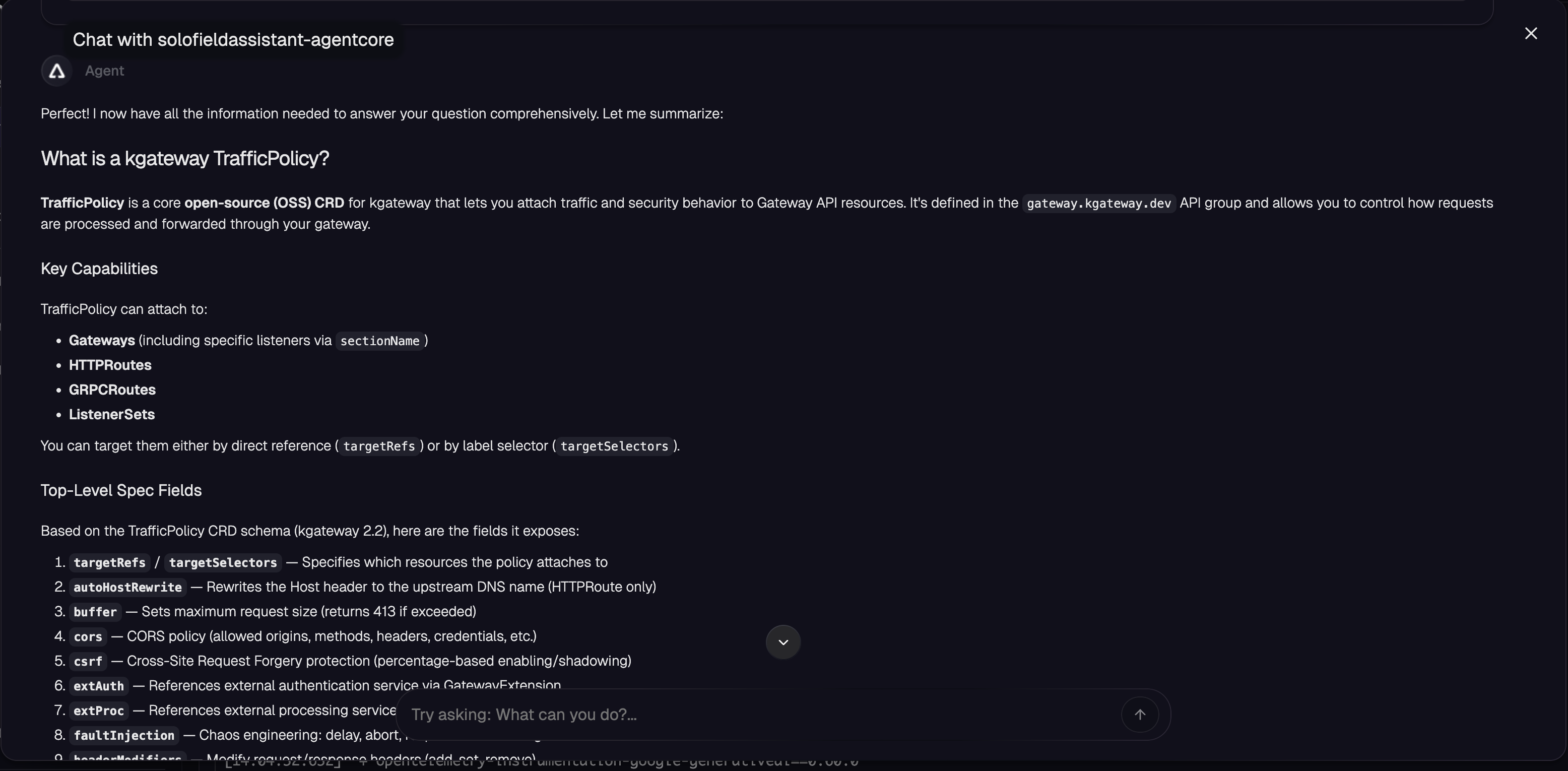
solofieldassistant-agentcore on AWS Bedrock AgentCore.kagent runtime answering the same question from inside the cluster. Same Agent record, same image, different runtime.
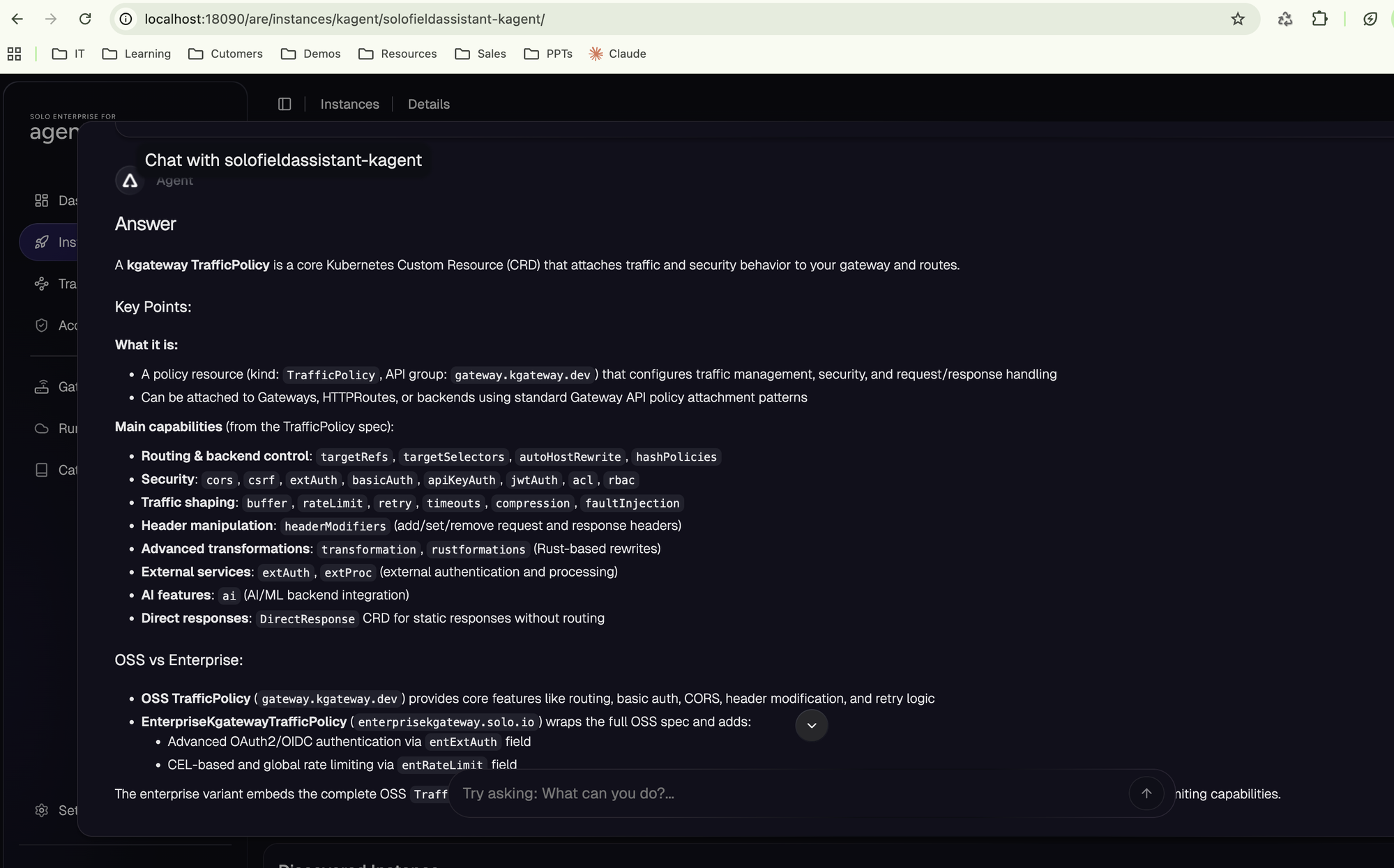
solofieldassistant-kagent on the in-cluster kagent runtime.Scene 2 — list tools by each persona
groups=field-fte passes all ten tool names through.groups=field-trial drops eight, and bob's catalogue is two.
Port-forward the demo Gateway and POST tools/list as each
user. The MCP backend is stateless, so a single POST per call is
enough — no initialize handshake. The gateway
evaluates the CEL allow-list against the JWT's groups
claim and shapes the response. alice gets all ten tools, bob gets two.
Gateway listener is on :8080 inside the cluster; mapped to 18081 locally so we don't collide with OrbStack, Docker Desktop, or anything else that defaults to 8080.
kubectl -n kagent port-forward svc/solo-kb-demo 18081:8080 &curl -sS http://127.0.0.1:18081/mcp \
-H "Authorization: Bearer ${ALICE_JWT}" \
-H "Content-Type: application/json" \
-H "Accept: application/json, text/event-stream" \
-H "MCP-Protocol-Version: 2025-06-18" \
-d '{"jsonrpc":"2.0","id":1,"method":"tools/list","params":{}}' \
| sed -n 's/^data: //p' | jq '.result.tools | map(.name)'Expected response: ten tool names.
[
  "list_products",
  "get_product_info",
  "get_versions",
  "get_changelog",
  "search_use_cases",
  "get_api_specs",
  "get_crd_map",
  "get_use_case",
  "get_crd_schema",
  "search"
]curl -sS http://127.0.0.1:18081/mcp \
-H "Authorization: Bearer ${BOB_JWT}" \
-H "Content-Type: application/json" \
-H "Accept: application/json, text/event-stream" \
-H "MCP-Protocol-Version: 2025-06-18" \
-d '{"jsonrpc":"2.0","id":1,"method":"tools/list","params":{}}' \
| sed -n 's/^data: //p' | jq '.result.tools | map(.name)'Expected response: only the two tools whose names satisfy bob's CEL predicate.
[
  "list_products",
  "search"
]
The MCP spec requires the client to accept both
application/json and text/event-stream, so the
gateway responds with an SSE frame: a single line starting with
data: followed by the JSON-RPC payload. The
sed strips that prefix so jq can parse the
body.
A graphical MCP client would be the more customer-facing view of the
same proof, but at the time of writing the official
MCP Inspector
does not reliably pass a static bearer token through to the upstream
(inspector#826);
it falls through to OAuth Dynamic Client Registration and 404s on
/register. Until that settles, curl is the deterministic
demo. The filtering happens in the gateway, the client is incidental.
Scene 3 — same call, two identities, two answers
Scene 2 proved the read-side filter: bob's tools/list
comes back with two entries, alice's with ten. But that's just
response shaping. The upstream MCP still has all ten tools available;
the gateway is hiding eight of them from bob's catalogue.
Scene 3 proves the action-side filter. Even if bob knows the tool name and calls it directly, the gateway still denies it. alice and bob fire the same JSON-RPC body at the same endpoint: only the bearer differs.
curl -sS http://127.0.0.1:18081/mcp \
  -H "Authorization: Bearer ${ALICE_JWT}" \
  -H "Content-Type: application/json" \
  -H "Accept: application/json, text/event-stream" \
  -H "MCP-Protocol-Version: 2025-06-18" \
  -d '{"jsonrpc":"2.0","id":3,"method":"tools/call",
       "params":{"name":"get_product_info",
                 "arguments":{"product":"kgateway"}}}' \
  | sed -n 's/^data: //p' | jq -r '.result.content[0].text' | head -12
Expected response: the Solo KB get_product_info tool returns markdown. First twelve lines, untrimmed:
# kgateway

## Product Identity

| | |
|---|---|
| **Current Enterprise Name** | Solo Enterprise for kgateway |
| **Current OSS Name** | kgateway |
| **Enterprise Vendor** | Solo.io |
| **OSS License** | Apache 2.0 |
| **OSS Repository** | [kgateway-dev/kgateway](https://github.com/kgateway-dev/kgateway) |
| **Enterprise Docs** | [docs.solo.io/kgateway](https://docs.solo.io/kgateway/) |curl -sS http://127.0.0.1:18081/mcp \
-H "Authorization: Bearer ${BOB_JWT}" \
-H "Content-Type: application/json" \
-H "Accept: application/json, text/event-stream" \
-H "MCP-Protocol-Version: 2025-06-18" \
-d '{"jsonrpc":"2.0","id":3,"method":"tools/call",
"params":{"name":"get_product_info",
"arguments":{"product":"kgateway"}}}' \
| jqExpected response: JSON-RPC denial. The body never reaches the upstream MCP:
{
  "jsonrpc": "2.0",
  "id": 3,
  "error": {
    "code": -32602,
    "message": "Unknown tool: get_product_info"
  }
}get_product_info in tools/list (Step 9 showed that), and even if he calls it by name the gateway rejects with JSON-RPC -32602 before the upstream Solo KB ever hears the request. From bob's view the tool simply doesn't exist. Nothing in the agent code knows or cares about this.Stateful MCP backends
The Solo KB upstream in this lab is stateless, which is why every
scene above is a single POST and the AgentgatewayBackend
sets sessionRouting: Stateless. Most other MCP servers
(FastMCP, and anything that holds per-session context server-side)
are not. They expect an initialize handshake, hand
back an mcp-session-id, and reject every follow-up POST
that doesn't carry it with a 400 or 422.
Agentgateway covers this. The sessionRouting field on
AgentgatewayBackend takes two values and
defaults to Stateful when not set.
The lab opts out; for a stateful upstream you leave the field off,
or set it explicitly:
yaml stateful variant of yaml/agw-route.yaml
apiVersion: agentgateway.dev/v1alpha1
kind: AgentgatewayBackend
metadata:
  name: fastmcp
  namespace: kagent
spec:
  mcp:
    sessionRouting: Stateful      # default; can be omitted
    targets:
      - name: fastmcp
        selector:
          services:
            matchLabels:
              app: fastmcp
In Stateful mode the gateway mints its own session id on the
initialize call, returns it on the response, and pins
every later POST that carries it to a consistent upstream replica.
The id the client sees is a base64-encoded JSON envelope; the
upstream session ids stay inside the gateway and never reach the
client.
An example envelope captured from a real gateway run against an
upstream named everything:
# What the gateway returns in the mcp-session-id response header
eyJ0IjoibWNwIiwicyI6W3sidCI6ImV2ZXJ5dGhpbmciLCJzIjoiMDQyZTU2NWUtMTI4OS00OTk5LTkzOGQtYTFmMzRhMzA5MzJmIn1dfQ

# echo "$SID" | base64 -d
{"t":"mcp","s":[{"t":"everything","s":"042e565e-1289-4999-938d-a1f34a30932f"}]}
The s array inside the envelope is per upstream target;
the inner s is the upstream's own session id. The
outer envelope is what the gateway tracks; the inner ids are what
it replays to each upstream.
Against a stateful upstream the curl flow grows one step. Initialize, capture the session id off the response headers, replay it on every follow-up call:
# 1) initialize and grab the gateway-issued session id
SID=$(curl -sS -D - -o /dev/null http://127.0.0.1:18081/mcp \
  -H "Authorization: Bearer ${ALICE_JWT}" \
  -H "Content-Type: application/json" \
  -H "Accept: application/json, text/event-stream" \
  -H "MCP-Protocol-Version: 2025-06-18" \
  -d '{"jsonrpc":"2.0","id":1,"method":"initialize",
       "params":{"protocolVersion":"2025-06-18",
                 "capabilities":{},
                 "clientInfo":{"name":"curl","version":"1"}}}' \
  | awk -F': ' 'tolower($1)=="mcp-session-id"{print $2}' | tr -d '\r')

echo "$SID"

# 2) every follow-up POST must echo it back
curl -sS http://127.0.0.1:18081/mcp \
  -H "Authorization: Bearer ${ALICE_JWT}" \
  -H "mcp-session-id: ${SID}" \
  -H "Content-Type: application/json" \
  -H "Accept: application/json, text/event-stream" \
  -H "MCP-Protocol-Version: 2025-06-18" \
-d '{"jsonrpc":"2.0","id":2,"method":"tools/list"}'mcp-session-id (or a fabricated
one) and rejects it. The fix is to keep going through the gateway
Service the lab port-forwards above (svc/solo-kb-demo)
and let it handshake on your behalf. If you really need to hit the
upstream directly, initialize against it first and
reuse the session id it returns on every later call.