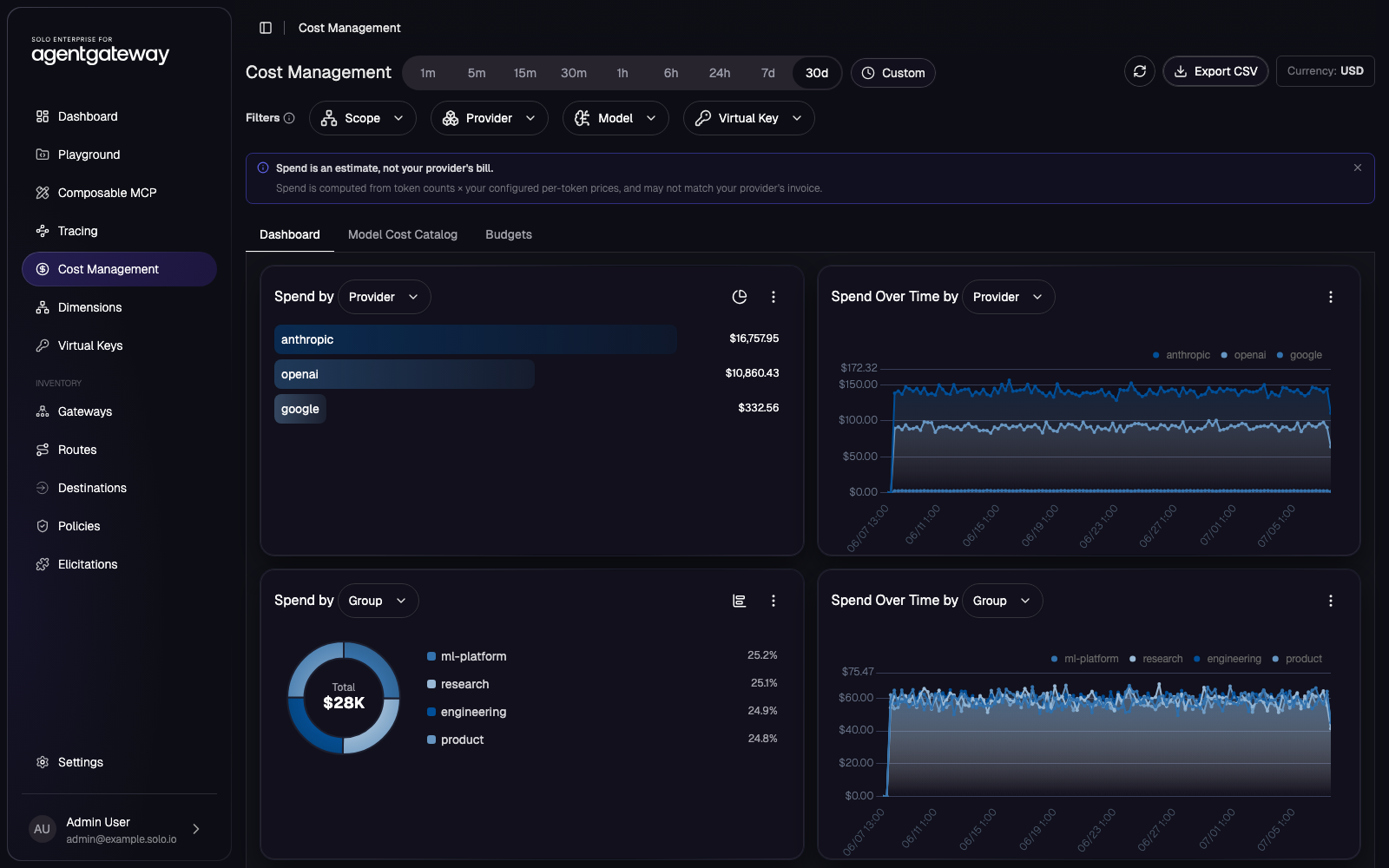
The idea: the gateway already sees every token in and out of every LLM call, so it is the one place that can attribute cost without touching the app or reconciling five provider invoices. agentgateway multiplies the token counts by a per-model price and emits the priced span. A collector writes it to ClickHouse, the dashboard reads it back, and a budget filter on the request path enforces the limits you set.
Everything runs on a single kind cluster: the enterprise gateway, the Solo Enterprise management UI that serves the Cost Management page, and a bundled ClickHouse for the spend history. Source at github.com/tjorourke/solo-labs/tree/main/agentgateway-cost-management-kind.
What you'll build
   client ── POST /openai ─────────────▶ agentgateway (Gateway: agentgateway)
   Authorization: Bearer <virtual key>      │
                                            │ EnterpriseAgentgatewayPolicy
                                            │   apiKeyAuthentication (Strict): verify the virtual key,
                                            │     expose its metadata to CEL as apiKey.*
                                            │   entBudgetEnforcement: resolve budget dimensions,
                                            │     enforce any matching budget, tag the span
                                            ▼
                                   AgentgatewayBackend (openai / anthropic)  ──▶ LLM provider
                                            │  priced span: tokens × model price = spend
                                            ▼
              solo-enterprise-telemetry-collector ──▶ ClickHouse (agw_spans_typed)
                                            │  materialized views roll up 5-min buckets
                                            ▼
                              Cost Management dashboard  (Spend · Dimensions · Budgets · Virtual Keys)
A request has to carry a valid virtual key or it never reaches a provider. That key's metadata (team, cost centre, user) rides through as budget dimensions, so the same call both accrues attributed spend and counts against any budget scoped to it.
Budgets: Audit versus Block
A budget is an EnterpriseAgentgatewayBudget. Each entry names a limit (a
dollar amount or a token count), a rolling window, a subject that scopes it to a
budget dimension, and what to do when it is exceeded. Audit records the overage and
lets the request through, so you can watch spend before you gate it. Block denies
further spend for that subject once the limit is hit, which is your denial-of-wallet stop.
yamlyaml/budgets.yaml
apiVersion: enterpriseagentgateway.solo.io/v1alpha1
kind: EnterpriseAgentgatewayBudget
metadata:
  name: cost-profiling-budgets
  namespace: gloo-system
spec:
  budgets:
    - name: individual-alice
      subject: {user: alice}
      limit:  {amount: 4,  unit: USD}
      window: {unit: Month}
      onBudgetExceeded: Audit          # log the overage, keep serving
    - name: team-engineering
      subject: {group: engineering}
      limit:  {amount: 50, unit: USD}
      window: {unit: Month}
      onBudgetExceeded: Block          # deny once the team hits $50/month
    - name: org-wide-tokens
      subject: {}                      # empty subject = whole org
      limit:  {amount: 20000000, unit: Tokens}
      window: {unit: Month}
      onBudgetExceeded: Block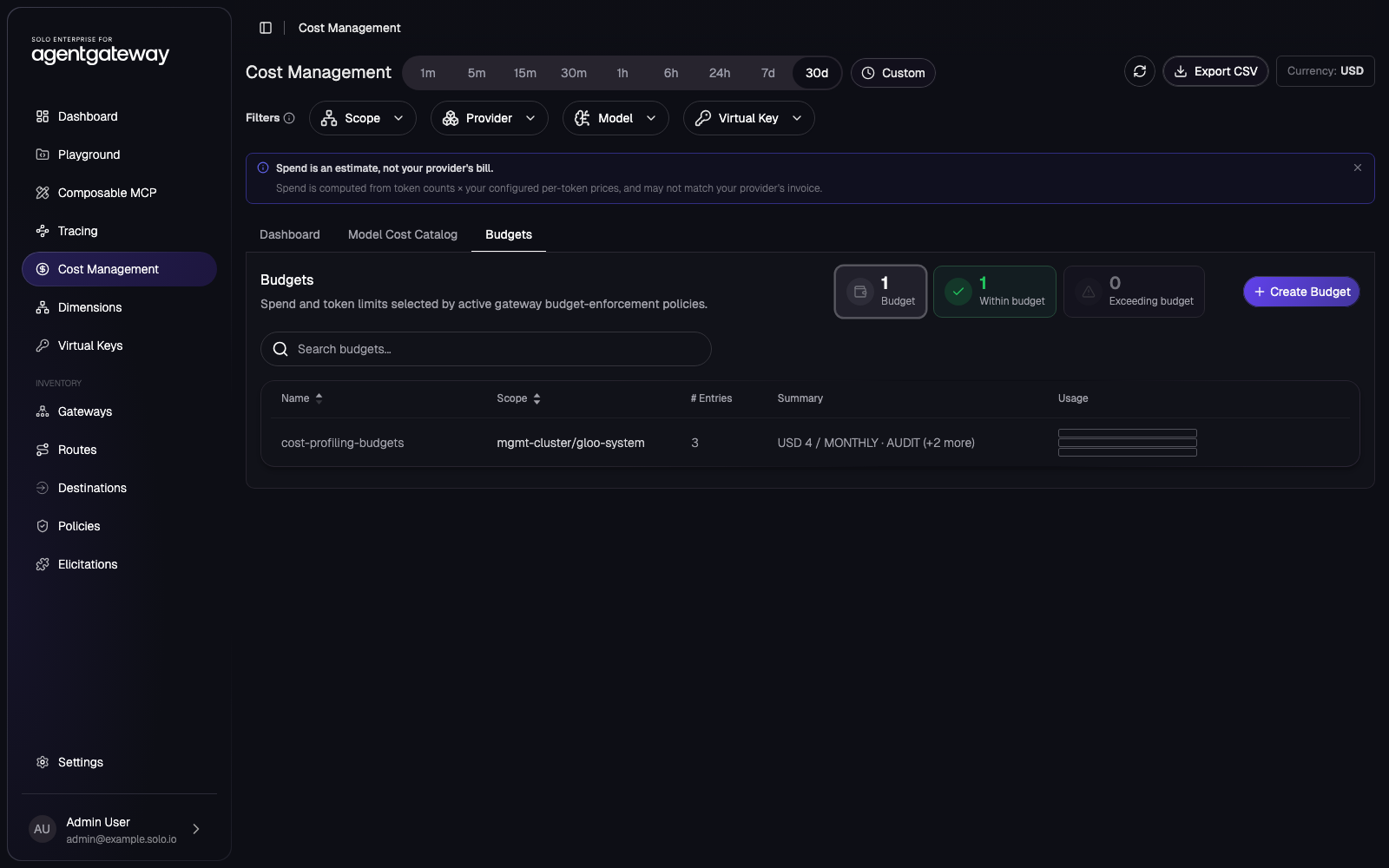
Virtual API keys carry the identity
A virtual key is an opaque key you hand to a team or app that maps to metadata the gateway can read,
rather than a raw provider key. It lives in a Kubernetes Secret labelled
agentgateway.solo.io/virtual-key-set; each entry is a small JSON blob with the key and
its metadata (organisation, cost centre, group, user, environment, project, application). The
gateway's apiKeyAuthentication selects that Secret and hoists each metadata field onto
the CEL apiKey object, so a field costCenter reads as
apiKey.costCenter, which is what the budget dimensions read.
yamlyaml/gateway-resources.yaml (policy excerpt)
apiVersion: enterpriseagentgateway.solo.io/v1alpha1
kind: EnterpriseAgentgatewayPolicy
metadata:
  name: cost-management-api-key
  namespace: gloo-system              # same namespace as the HTTPRoute it targets
spec:
  targetRefs:
  - group: gateway.networking.k8s.io
    kind: HTTPRoute
    name: openai
  traffic:
    apiKeyAuthentication:
      mode: Strict                    # no valid virtual key, no LLM
      secretSelector:
        matchLabels:
          agentgateway.solo.io/virtual-key-set: cost-demo-virtual-keys
    entBudgetEnforcement:
      discovery:
        namespaces:
          from: All
With the policy attached, the enforcement is exactly what you'd want: a request with no key is rejected, a request with a seeded key reaches the provider and its spend is attributed to that key's team.
  $ curl -s -o /dev/null -w '%{http_code}\n' -X POST localhost:8080/openai \
      -H 'content-type: application/json' -d '{"messages":[{"role":"user","content":"hi"}]}'
  401                                                        # Strict: no virtual key

  $ curl -s -X POST localhost:8080/openai \
      -H 'Authorization: Bearer sk-acme-prod-001' \
      -H 'content-type: application/json' -d '{"messages":[{"role":"user","content":"hi"}]}'
  {"model":"gpt-3.5-turbo-0125","usage":{"total_tokens":18}, ... }   # priced, attributed to acme-corp / engineering
Attribution by dimension
A dimension is a label the gateway resolves per request from the virtual key metadata or a JWT
claim, using CEL. The built-in dimensions are model and provider; on top of
those the default configuration adds group and user as a hierarchy and
virtualKey as an attribute. You add your own declaratively in the gateway's
budgetDimensions.config (a Helm value the chart renders into a ConfigMap the proxy
mounts). This lab adds four: costCenter, environment, project
and application, each a CEL expression like
coalesce(apiKey.costCenter, jwt.cost_center) so the value comes from the virtual key,
falling back to a JWT claim. The Dimensions tab also lets you author them from the UI, but keeping
them in yaml/budget-dimensions.values.yaml means a fresh cluster comes up with them
already defined.
Every priced span carries those resolved dimensions, so the dashboard can slice total spend by any of them: which team is spending, which model dominates the bill, which virtual key is hot. The Spend-by control on each panel just changes the dimension it groups on.
The Model Cost Catalogue
Spend is an estimate, not your provider's invoice: the gateway computes it as token count times a per-model price. Those prices are the Model Cost Catalogue, one input and output price per million tokens per model, with optional cache-read and cache-write prices for providers that support prompt caching. Edit a model's price on the catalogue tab and the spend charts recompute against it, so the catalogue and the dashboard always agree.
Run it
scripts/setup.sh brings the whole thing up on one kind cluster: the enterprise
agentgateway (with the custom dimensions), the Solo Enterprise management UI and its ClickHouse
with products.agentgateway.features.cost-management: true, then the cost pipeline
below. It needs AGENTGATEWAY_LICENSE_KEY and OPENAI_API_KEY in your
shell. The steps below are what it applies, if you want to run them by hand on an existing cluster.
bashone-shot
./scripts/setup.sh                              # cluster + gateway + UI + pipeline
TRUNCATE=true ROWS=300000 DAYS=30 ./scripts/seed-clickhouse.sh   # a month of spend
kubectl -n kagent port-forward svc/solo-enterprise-ui 8090:80 # then open /age/cost-managementbashapply the cost pipeline
# 1. virtual keys (labelled Secret the api-key policy selects)
#    built from yaml/virtual-keys.csv — one {key, metadata} entry per row

# 2. gateway + backend + /openai route + api-key/budget-enforcement policy
OPENAI_API_KEY=sk-... envsubst < yaml/gateway-resources.yaml | kubectl apply -f -

# 3. budgets (so dimensions attribute and limits enforce)
kubectl apply -f yaml/budgets.yaml

# 4. send traffic with a seeded virtual key
kubectl port-forward -n gloo-system svc/agentgateway 8080:8080 &
curl -X POST localhost:8080/openai -H 'Authorization: Bearer sk-acme-prod-001' \
  -H 'content-type: application/json' -d '{"messages":[{"role":"user","content":"hello"}]}'
Live traffic accrues real spend, but a fresh cluster starts empty and the charts need history to be
worth looking at. scripts/seed-clickhouse.sh backfills a month of synthetic spend
straight into the agw_spans_typed table, the same table real traffic writes to, so the
materialized views roll it up into the by-model and by-dimension views the dashboard reads. It seeds
five models across three providers and four teams, so every panel and every filter has data.
bashscripts/seed-clickhouse.sh
# ~300k priced requests spread across the last 30 days, into the buckets the page reads
TRUNCATE=true ROWS=300000 DAYS=30 ./scripts/seed-clickhouse.sh
# → requests  296.81 thousand
#   tokens    8.83 billion
# spend_usd $27,951See also
- Per-team static key injection (the identity-to-backend half, the same virtual-key idea for upstream credentials)
- Per-team Bedrock cost with application inference profiles (cost attribution on the AWS side)
- Solo — agentgateway LLM cost, budgets and observability
Versions
Built and verified on:
v1.4.0v2026.7.00.5.0