The premise. When an agent calls tools that mutate real systems, "the agent knows what it's allowed to do" is the wrong place for trust. The agent's tool list comes from the LLM's system prompt or a code constant — both editable by anyone with code access. If the boundary lives in the agent, every new agent has to re-implement it, and every prompt jailbreak threatens it.
So put the boundary at the gateway. The agent asks tools/list; the
gateway answers with the subset that caller is allowed to see, based on the JWT
they present. The agent never finds out about the tools it isn't allowed to use —
they're invisible, not just "blocked when called".
Alice · platform
Admin — all 6 tools
- JWT claims
sub=alice,team=platform,groups=["admin"]- Sees
- read_orders, read_customers, truncate_table, run_migration, get_secrets, audit_log
- Matched by
jwt.groups.exists(g, g == "admin")— catch-all
Bob · dev
Developer — 4 tools
- JWT claims
sub=bob,team=dev,groups=["dev"]- Sees
- read_orders, read_customers, truncate_table, run_migration
- Hidden
- get_secrets, audit_log
Carol · intern
Read-only — 2 tools
- JWT claims
sub=carol,team=intern,groups=["intern"]- Sees
- read_orders, read_customers
- Hidden
- everything else (truncate, migrate, secrets, audit)
What you'll build
One small inspector UI mounts all three JWT Secrets and switches identity in the
browser. The selected JWT goes on every outbound MCP call. The gateway validates
the token, then evaluates one CEL rule per line against jwt.* and
mcp.tool.name to decide what the caller sees and can invoke.
Why per-user RBAC at the gateway
| Concern | In-agent allowlist | vs | Gateway MCP authz |
|---|---|---|---|
| Where the policy lives | Each agent's code or prompt — many copies, easy to drift | vs | One declarative policy on the path every agent goes through |
| Visibility to the LLM | LLM can be tricked into asking for a tool the agent then refuses | vs | Forbidden tools never appear in tools/list — the LLM can't ask |
| Identity model | Often baked into the agent's config — no per-user separation | vs | One JWT per identity; CEL on jwt.* drives the decision |
| Audit story | Each agent's stdout | vs | Single gateway log line per call, with caller + tool + decision |
Steps
1. Clone and bring it up
About — what this does & why
quick.sh up runs 01..06 in order, all idempotent. Needs
both an Anthropic API key (used by the LLM in the BYO agent and by kagent's
default model config) AND a Solo Enterprise licence key (the data plane refuses
to start without one).
Bashclone, set keys, bring up the kind cluster
git clone https://github.com/tjorourke/solo-labs.git
cd solo/agentic-mcp-rbac-kind

export ANTHROPIC_API_KEY=sk-ant-...
export AGENTGATEWAY_LICENSE_KEY=...

./scripts/quick.sh up
./scripts/port-forward.sh   # leave running
Then open http://localhost:8090 — the RBAC
Inspector UI. The "Acting as" dropdown in the header switches between
alice, bob, and carol; flipping it re-fetches
tools/list from the gateway with the new identity's JWT and re-renders
the visible-tool panel.
2. The MCP server (six tools, one endpoint)
About — why one endpoint, not six
Per-path gating works fine for HITL ("gate this one privileged surface") but not for RBAC. RBAC needs N×M decisions (N users × M tools), and that would explode into N×M paths. The gateway's MCP-aware policy lets a single policy evaluate the tool name from the JSON-RPC body and decide per-(caller, tool).
Pythonsrc/ops-tools/server.py — single FastMCP server, 6 tools, no auth code
mcp = FastMCP("ops-tools", stateless_http=True, transport_security=_TS)

@mcp.tool()
def read_orders(limit: int = 10) -> dict: ...
@mcp.tool()
def read_customers(limit: int = 10) -> dict: ...
@mcp.tool()
def truncate_table(table: str) -> dict: ...
@mcp.tool()
def run_migration(version: str) -> dict: ...
@mcp.tool()
def get_secrets(key: str) -> dict: ...
@mcp.tool()
def audit_log(since: str = "") -> dict: ...

# The MCP server is identity-agnostic. It exposes ALL tools to whoever
# can reach the streamable_http endpoint. The gateway is the entire RBAC
# story — this server doesn't even read the Authorization header.
# Mount at "/" (not "/mcp"); FastMCP's app exposes /mcp internally, and a
# nested mount triggers a 307 to /mcp/ with the upstream's DNS in Location.
app = Starlette(routes=[
    Route("/healthz", health),
    Route("/state",   state_endpoint),
    Mount("/", app=mcp.streamable_http_app()),
])
3. The JWT issuer — identity for every request
About — why JWTs carry the identity
Every gateway authorization decision in this lab keys off who sent
the request. The wire shape for "who" is a signed JWT — a token carrying
claims (sub, team, groups) that the
gateway verifies against the issuer's public key. The RBAC policy's CEL
expressions then match on those claims (jwt.team,
jwt.groups) at evaluation time.
In production this is your existing IdP — Entra ID, Okta, Auth0, Keycloak.
The lab ships a small in-cluster issuer that mints the same standard-shape
JWTs (RS256, JWKS at /.well-known/jwks.json) so the whole
identity round-trip is visible end-to-end without standing up an external
IdP first. The inspector UI mounts all three Secrets and picks the right
token per request based on the "Acting as" dropdown.
Gosrc/jwt-issuer/main.go — claim shape for one identity (excerpt)
claims := jwt.MapClaims{
    "iss":    "agentic-mcp-rbac-kind",
    "sub":    "bob",
    "team":   "dev",
    "groups": []string{"dev"},
    "iat":    now.Unix(),
    "exp":    now.AddDate(10, 0, 0).Unix(),
    "aud":    "ops-tools",
}
tok := jwt.NewWithClaims(jwt.SigningMethodRS256, claims)
tok.Header["kid"] = "agentic-rbac-key-1"
signed, _ := tok.SignedString(priv)
4. The gateway side — JWT auth + MCP-aware RBAC
About — two policies, one CRD shape
The Enterprise agentgateway speaks MCP, so the authorization policy can pick
rules by tool name without us inspecting the JSON-RPC body ourselves.
matchExpressions is OR-ed; a tool is visible iff at least one
expression evaluates true. Tools that match no expression are silently filtered
from tools/list.
YAMLyaml/agentgateway/mcp-rbac-policy.yaml — the entire RBAC rule set
apiVersion: enterpriseagentgateway.solo.io/v1alpha1
kind: EnterpriseAgentgatewayPolicy
metadata: { name: mcp-tool-rbac, namespace: ops-tools }
spec:
  targetRefs:
    - { group: agentgateway.dev, kind: AgentgatewayBackend, name: ops-tools-mcp }
  backend:
    mcp:
      authorization:
        action: Allow
        policy:
          matchExpressions:
            # admins (alice) see and call everything
            - 'jwt.groups.exists(g, g == "admin")'
            # developers (bob) — read + write, but NOT secrets or audit log
            - 'jwt.team == "dev" && mcp.tool.name in ["read_orders","read_customers","truncate_table","run_migration"]'
            # interns (carol) — read-only
            - 'jwt.team == "intern" && mcp.tool.name in ["read_orders","read_customers"]'
5. The caller side — one UI, three JWTs, dropdown switch
About — why a small custom UI instead of a kagent BYO agent
The earlier version of this lab ran three kagent BYO LangGraph agents (dba-assistant-alice / bob / carol) each mounting a different JWT. That setup worked but it obscured the story — visitors thought the access control lived in the per-user agents, not in the gateway. Replacing it with a single UI that switches identity in the browser makes the boundary obvious: the same caller becomes a different identity by presenting a different JWT, and the gateway is the only thing that changes its mind about which tools to advertise.
The UI reads its three JWT files from a mounted Secret per identity
(/etc/jwts/{alice,bob,carol}) and passes whichever the dropdown
is currently set to as Authorization: Bearer … on every MCP
request. There is no LangGraph, no kagent agent, no A2A wire — just an
HTTP form that POSTs to the gateway with the chosen token.
Pythonsrc/rbac-inspector-ui/app.py — JWT-from-disk per request (excerpt)
JWT_PATH = "/etc/jwts"   # Secret-mounted: alice / bob / carol files

def _read_jwt(user: str) -> str:
    return (Path(JWT_PATH) / user).read_text().strip()

# Each /tools, /chat, /attack request reads the JWT for the chosen
# identity and ships it as Authorization: Bearer ... on every MCP call:
tools = await mcp_client.list_tools(http, MCP_GATEWAY_URL, _read_jwt(user))
# tools is ONLY what the gateway is willing to show this identity.
Walk through the demo
Open http://localhost:8090. The UI loads with the "Acting as" dropdown
set to alice; flip it through bob and carol
and watch the visible-tool panel change. Then use the chat to send the same prompt
under each identity, and finally fire the "Quick attack" buttons to see what the
gateway does when a forbidden tool is called directly.
Scene 1 — Alice sees everything
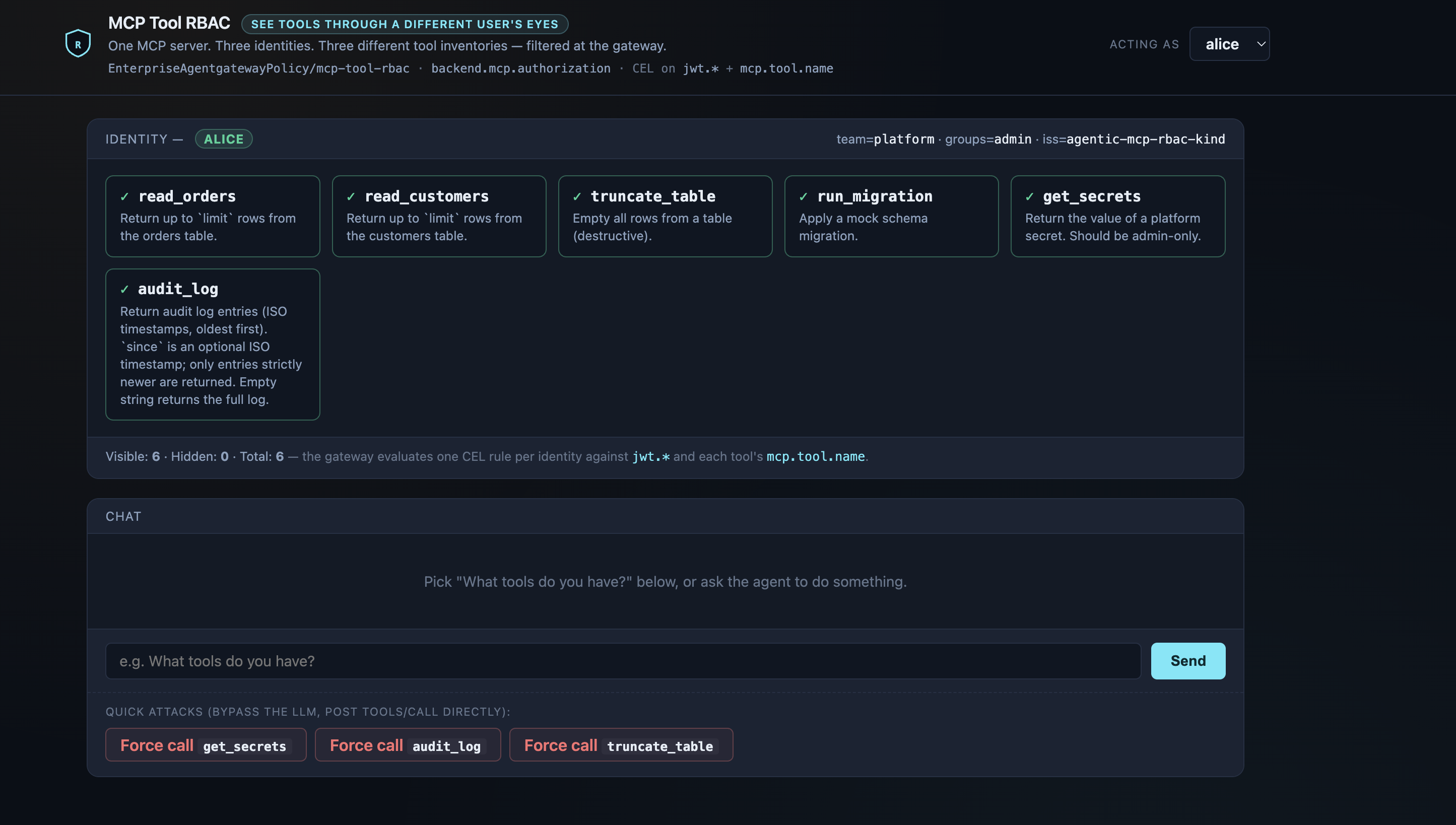
alice — JWT claim groups=["admin"] matches the catch-all CEL rule, so the gateway returns all six tools.groups=["admin"],
which matches the catch-all CEL rule. The gateway returns the unfiltered tool list,
so the UI binds all six to Claude. The UI does no policy work — it discovers tools
via tools/list and renders whatever the gateway hands back.
Scene 2 — Bob sees a subset
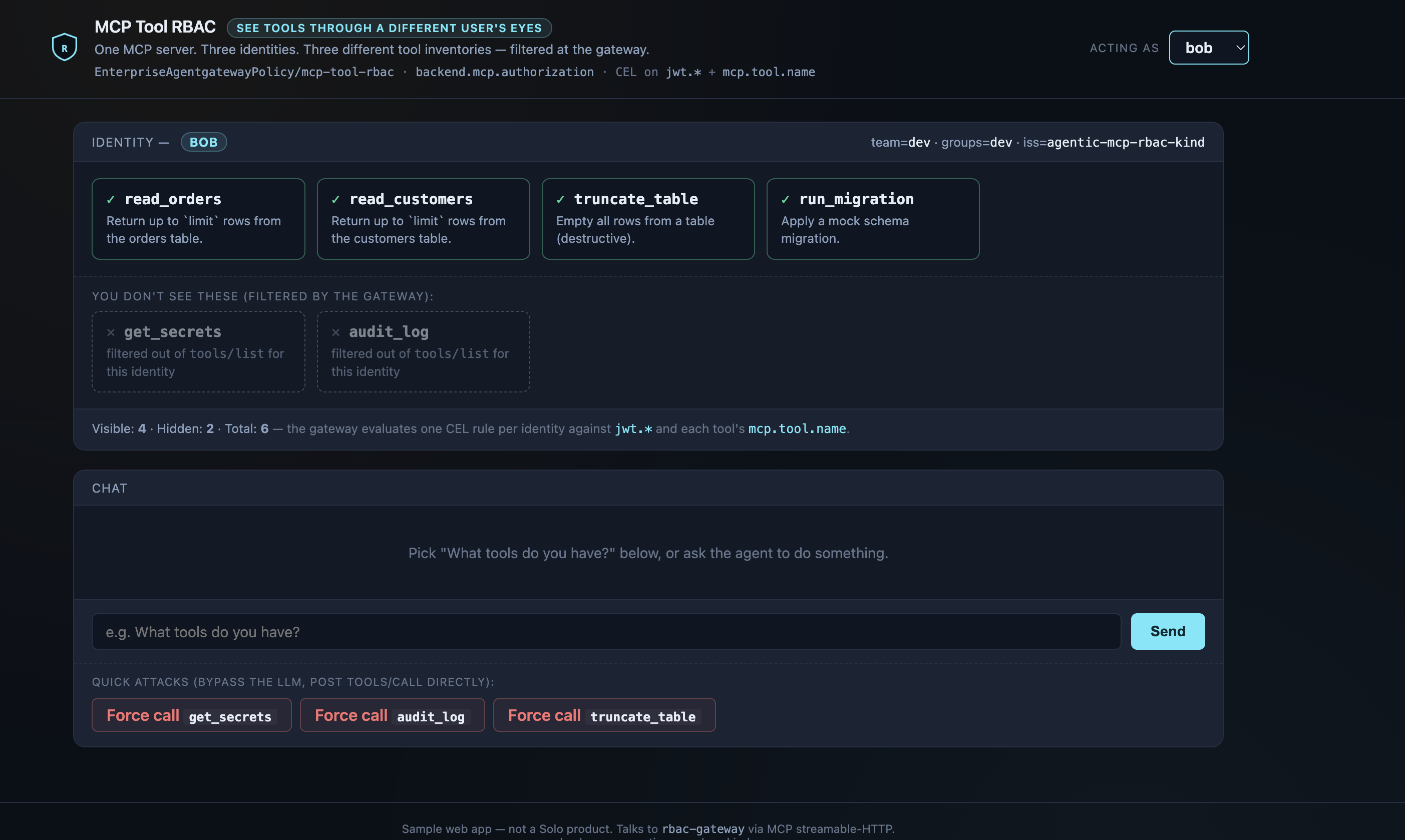
bob — JWT claim team=dev matches the second CEL rule, which lists exactly four tool names. get_secrets and audit_log never appear in Claude's tool schema.team=dev, which matches
the second CEL rule. The gateway filtered the tool list down to those four. Claude
literally cannot decide to call get_secrets — that name is never in its
bound-tool schema.
Scene 3 — Carol sees only reads
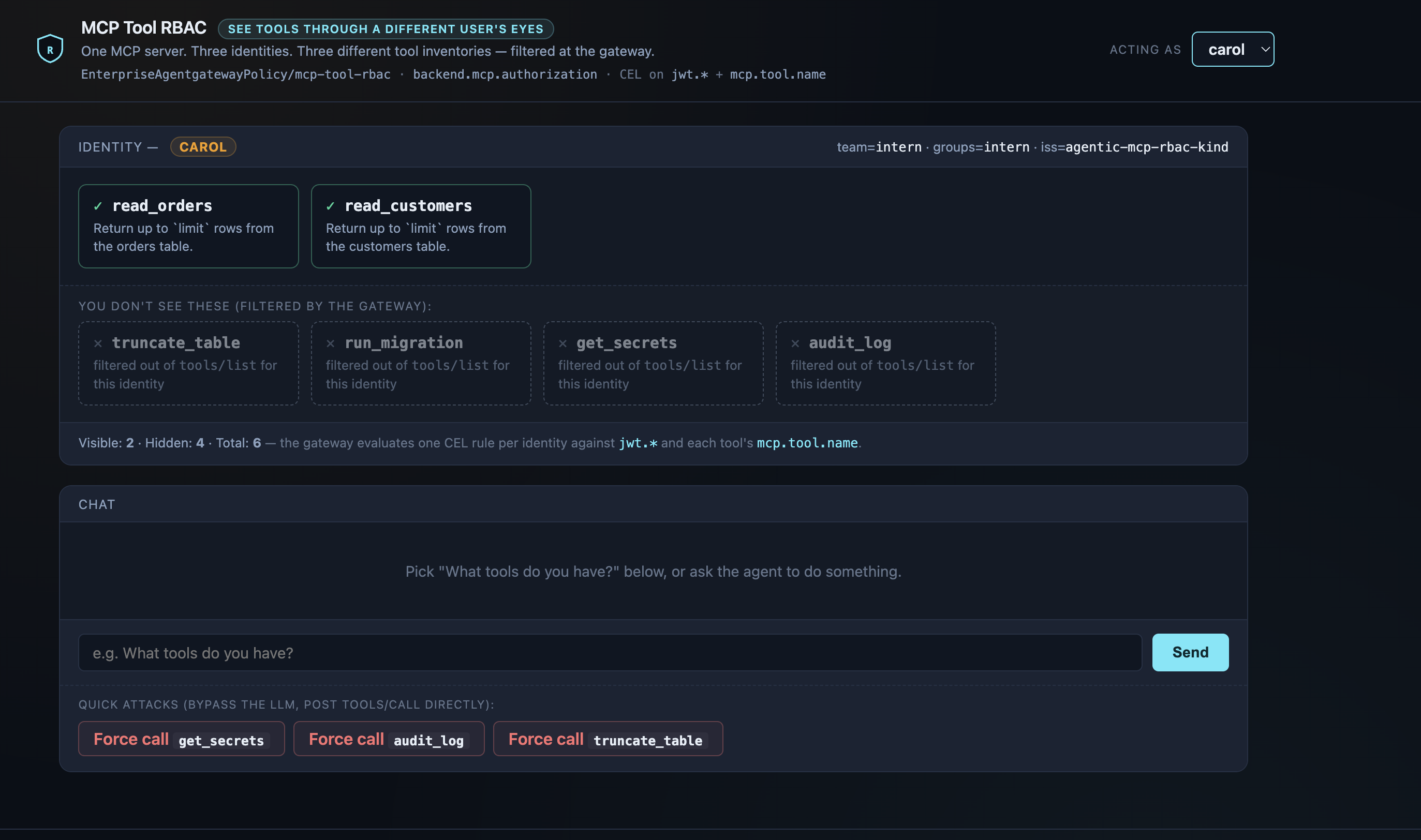
carol — JWT claim team=intern matches a two-element CEL allow list. Even truncate_table is hidden.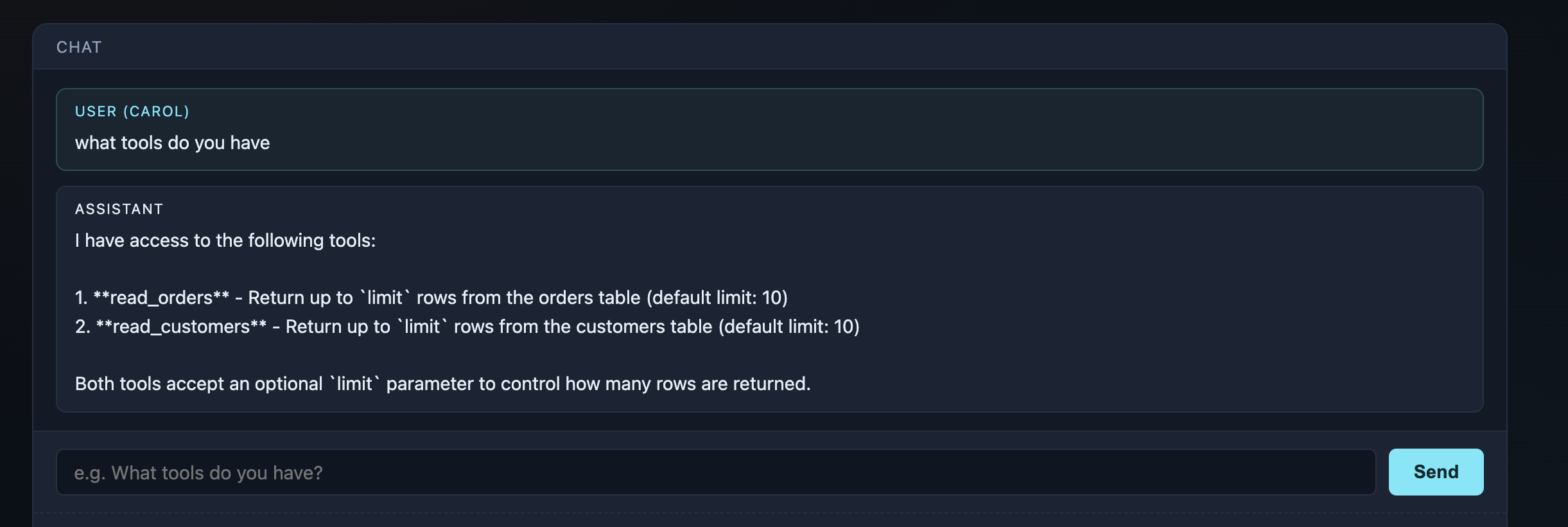
team=intern, matching
the third CEL rule's two-element in list. Read access only — even
the destructive-but-popular truncate_table is hidden. The agent's
chat answer confirms the LLM is constrained by what the gateway advertised, not
by any client-side filtering.
Scene 4 — Bob tries an unauthorised tool
get_secrets
function available. The tools I have access to are read_orders, read_customers,
truncate_table, run_migration." The LLM was never given get_secrets
in its tool schema (the gateway filtered it out of tools/list), so it
literally cannot ask for it.
gateway said: JSON-RPC -32602 Unknown tool: get_secrets.
The MCP server never sees the call.
-32602 Unknown tool, not as 403 Forbidden. The denial
isn't even “you can't do that” — it's “that tool doesn't exist”.
There's nothing for a prompt-injection attack to chip away at. The MCP server
never receives the call, and the audit line lives in one place — the
gateway — for every caller in the org, not in N agents' stdout.
Talking points
- Invisible > denied. Tools the caller isn't allowed to use are
filtered out of
tools/listentirely. The LLM cannot ask for what it doesn't know about — that's a stronger boundary than "we'll 403 you on call". - One policy, every agent. The same MCP server can sit behind many agents in many teams; the per-tool decision is made once, at the gateway, with a CEL expression you can read. No code in any agent.
- Identity is just a JWT claim. CEL on
jwt.team,jwt.groups,jwt.sub, or any custom claim. Swap the lab's in-cluster issuer for Keycloak, Entra, Okta, etc. — same policy shape. - Native MCP authz beats BYO ext-auth for this case. Ext-auth can deny a whole request, but it can't filter a list response. If you want tools-invisible-to-the-LLM semantics, you want gateway-native MCP authz.
- The caller is identity-agnostic. A single UI mounts all three
JWT Secrets and chooses one per request based on the dropdown. The "who am I"
lives entirely in the mounted JWT — there's no per-identity code path. Adding
a fourth identity means a fourth Secret, a fourth file in
/etc/jwts, and a fourth one-line CEL rule — no code change.
Teardown
./scripts/quick.sh teardownSee also
- Solo docs — MCP tool-level access control
- Solo docs — JWT authentication
- Sibling lab — Two-layer HITL on the same kagent + agentgateway stack
Versions
Built and verified on both editions:
v1.5.1v1.3.0v1.4.0v2.3.4