Two teams want different things from MCP infrastructure. Application teams want to register a tool server and get it running without raising a ticket. The platform team wants to know what is exposed, where, by whom, and to put identity in front of all of it. Solo Enterprise for agentregistry covers both: the registry UI carries a server from catalogue entry to running pod to gateway endpoint, and the policy the platform team sets once on the gateway applies to every server any team deploys after it.
This page walks that path end to end, in the UI, with the exact form values. The server lands on Solo Enterprise for kagent, gets its own agentgateway route through the registry's Virtual runtime, and is then probed with curl as two different Keycloak users to show the tool list changing with the caller's group membership. Everything here ran live; the failure modes at the bottom are the ones the run actually hit.
The two planes of this article. Solid arrows are the data path: a client presents a Keycloak JWT to agentgateway, which enforces identity and per-tool policy on every route before reaching the MCP servers on kagent. Dashed violet arrows are the control plane: the registry creates the pods when you deploy to a kagent runtime, and writes the gateway routes when you deploy to the Virtual runtime.
What is running before the first click
The environment is a single Kubernetes cluster carrying four things:
- Solo Enterprise for agentregistry v2026.7.1, installed in-cluster by Helm with a bundled Postgres. The UI and API are served through the gateway.
- Solo Enterprise for kagent: the runtime the server will be deployed to.
- Enterprise agentgateway v2026.8.0: one proxy acting as the ingress for every console and every MCP endpoint on this page. The Virtual runtime needs v2026.8.0 or later.
- Keycloak, one realm, the single OIDC issuer for everything: the registry UI, the kagent UI, the registry's own calls to the kagent control plane, and the bearer tokens on MCP traffic.
Two test users exist in the realm, and the difference between them is the point of the exercise:
| User | Keycloak group | What that means downstream |
|---|---|---|
alice | admins | Registry superuser; sees every MCP tool through the gateway |
bob | developers | Registry user; the gateway hides write-class tools from him |
The group lands in each user's JWT as a Groups claim via a Keycloak group-membership mapper. Everything below hangs off that one claim.
The MCP server being deployed
The worked example is a small FastMCP server called incident-tools, scaffolded with arctl init mcp, exposing three tools:
list_open_alerts: open alerts, optionally filtered by servicecorrelate_alerts: groups open alerts into per-service incidentsacknowledge_alert: the write tool, and the one the policy will hide from developers
Its image is built and pushed to an OCI registry the cluster can pull from, here a local registry at localhost:5001; in production this is your ECR, GAR or Artifactory. One build-time decision matters later: the image forces HTTP transport rather than the FastMCP default of stdio.
ENV MCP_TRANSPORT_MODE=http
ENV HOST=0.0.0.0
ENV PORT=3000
Without those, the deploy in step 3 completes and the pod runs, but kagent cannot open a session against it. The failure is quiet and the error, when it surfaces, is "Failed to create MCP session".
Step 1: connect kagent as a runtime
A runtime is a destination the registry can deploy to. Registering one is a UI action: Runtimes → Add Runtime Connection → Kubernetes. The form wants the kagent controller's address, the namespace it lives in, and, for kagent runtimes, an Outbound OIDC block.
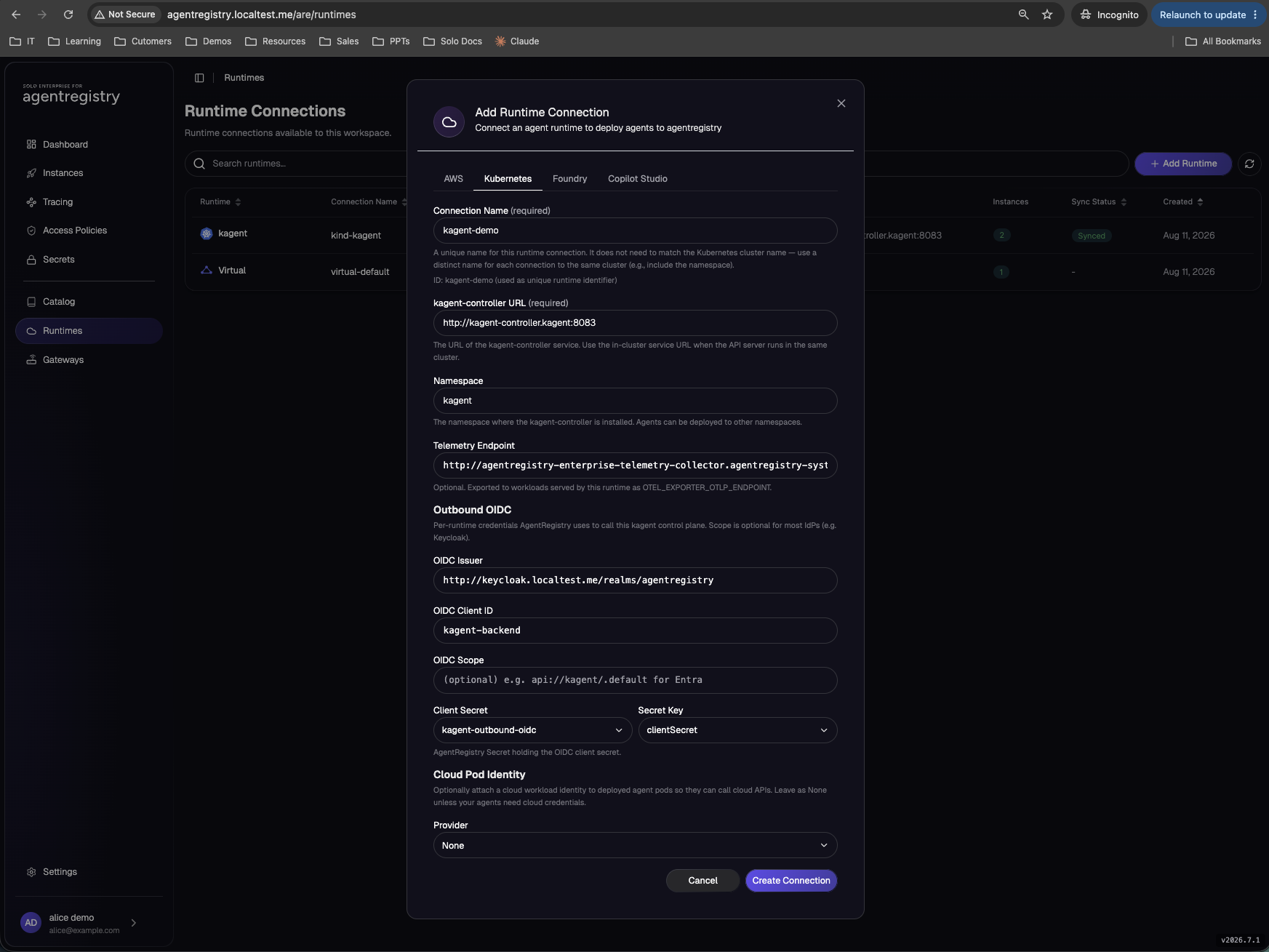
| Field | Value |
|---|---|
| Connection Name | kagent-demo |
| kagent-controller URL | http://kagent-controller.kagent:8083 |
| Namespace | kagent |
| Telemetry Endpoint | http://agentregistry-enterprise-telemetry-collector.agentregistry-system.svc.cluster.local:4318 |
| OIDC Issuer | http://keycloak.localtest.me/realms/agentregistry |
| OIDC Client ID | kagent-backend |
| OIDC Scope | empty; Keycloak needs none |
| Client Secret | kagent-outbound-oidc, key clientSecret |
| Cloud Pod Identity | None |
The Outbound OIDC block is not optional here. Submitting without it returns "invalid input: auth.oidc is required for kagent runtimes". These are the credentials the registry itself uses to call the kagent control plane: a client-credentials token from the same Keycloak realm, carrying aud=kagent-backend and the Groups claim that kagent's role mapper reads. The client secret is picked from the registry's own secret store, not pasted into the form; on this install the Helm chart had already materialised it as the kagent-outbound-oidc secret.
Machine-to-machine auth uses the same identity model as user login. The user logged into the UI with Keycloak; the registry now authenticates to the runtime with Keycloak too. There is no shared admin token between the two systems, and revoking the registry's access is a Keycloak operation, not a redeploy.
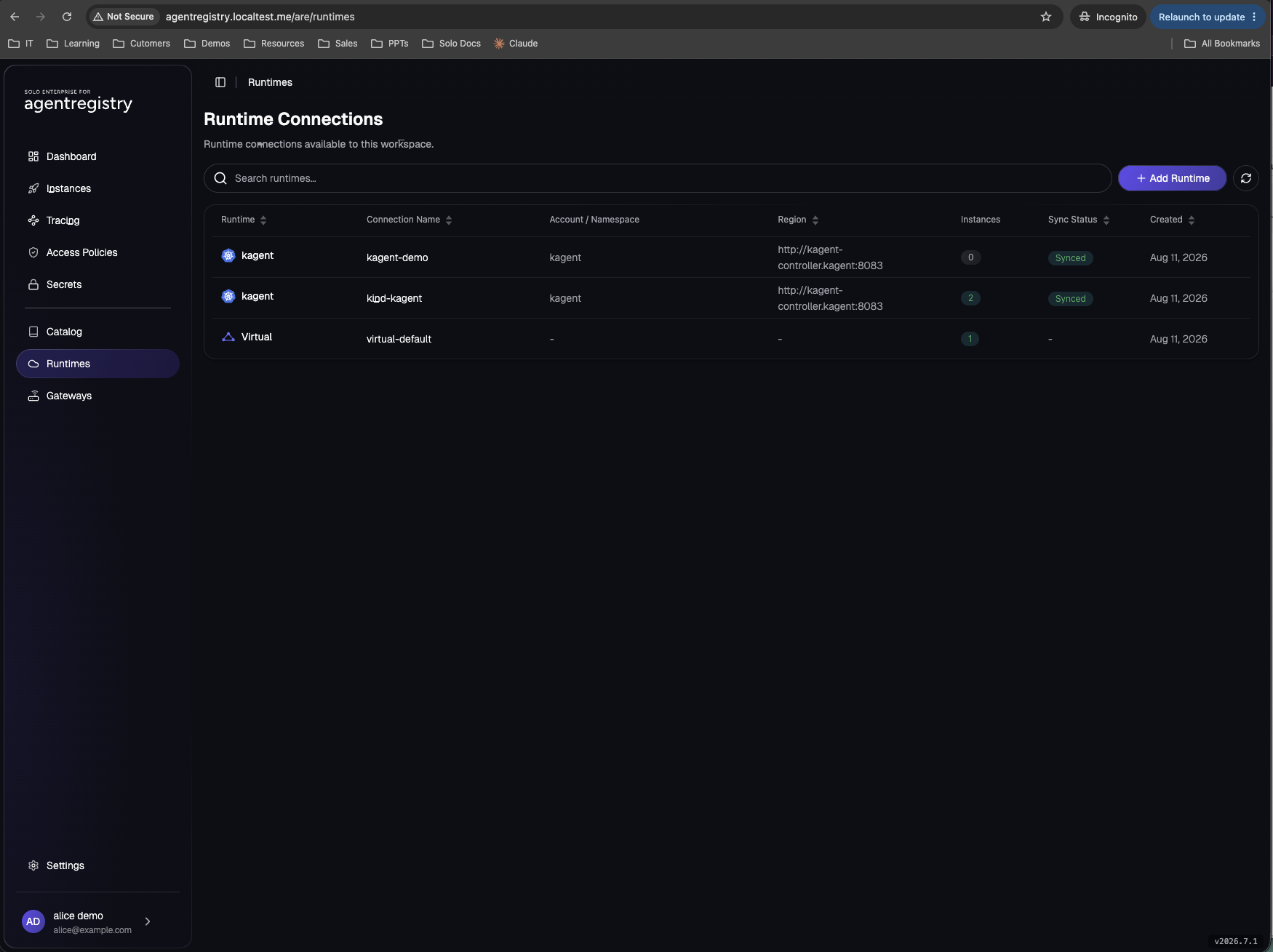
Step 2: publish the server to the catalogue
A catalogue entry is a pointer plus metadata, not a copy of the artifact. For an OCI-packaged server, publishing records where a runtime can pull the image from and how to talk to the process once it runs. The image itself stays in the OCI registry and is pulled at deploy time, not at publish time.
Catalog → Create MCP Server. The form has two panels. Basic Information first:
| Field | Value |
|---|---|
| Server Name | incident-tools |
| Tag | empty; defaults to latest |
| Description | Incident tool server: list_open_alerts, correlate_alerts, acknowledge_alert. |
Then MCP Server Origin. Pick Source, then Prebuilt package, and fill the Package panel:
| Field | Value |
|---|---|
| Registry Type | OCI; the form defaults to NPM |
| Registry Base URL | empty |
| Package Identifier | localhost:5001/incident-tools:latest |
| Version | empty; the tag rides in the identifier |
| Upstream Server Name | incident-tools |
| Environment Variables | none; transport, host and port are baked into the image |
| Transport Protocol | HTTP, port 3000, path /mcp |
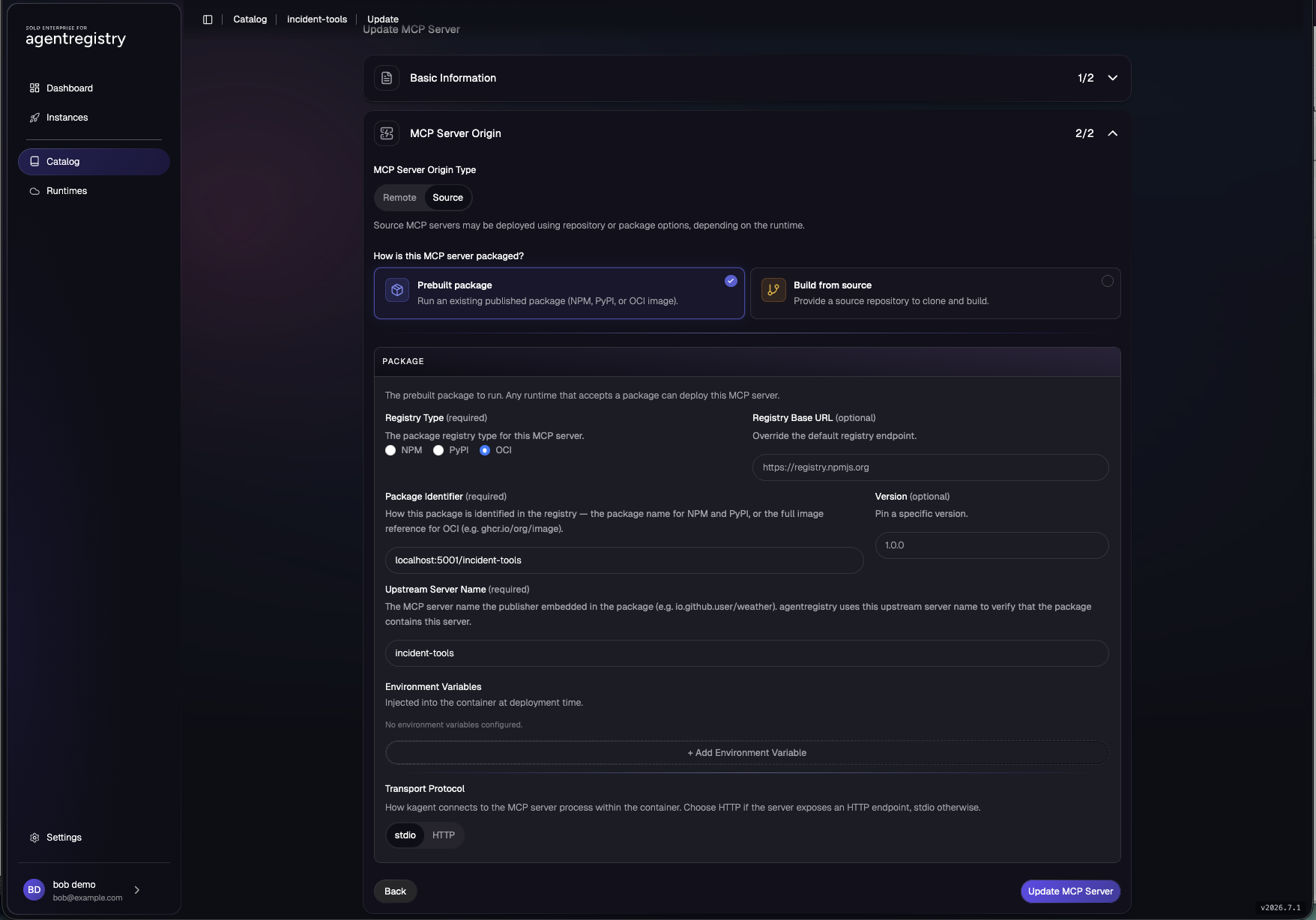
The identifier is the same string you would give docker pull: registry host, repository, tag. The Upstream Server Name is an integrity check: for published packages the registry verifies the package really contains the server it claims to. Local-registry images are exempt from that verification, so this entry publishes immediately.
The Transport toggle defaults to stdio, and stdio is wrong for kagent. This is the same trap as the image build, one layer up. Left on stdio the publish succeeds and nothing complains until deploy time: in this run the kagent deployment sat at pending with no pod and no error text. The recovery is self-service, and it is shown in the Instances figure below: edit the entry, switch Transport to HTTP with the port and path the image serves, deploy again.
Step 3: deploy it to kagent
Open the new catalogue entry and press Deploy MCP Server.
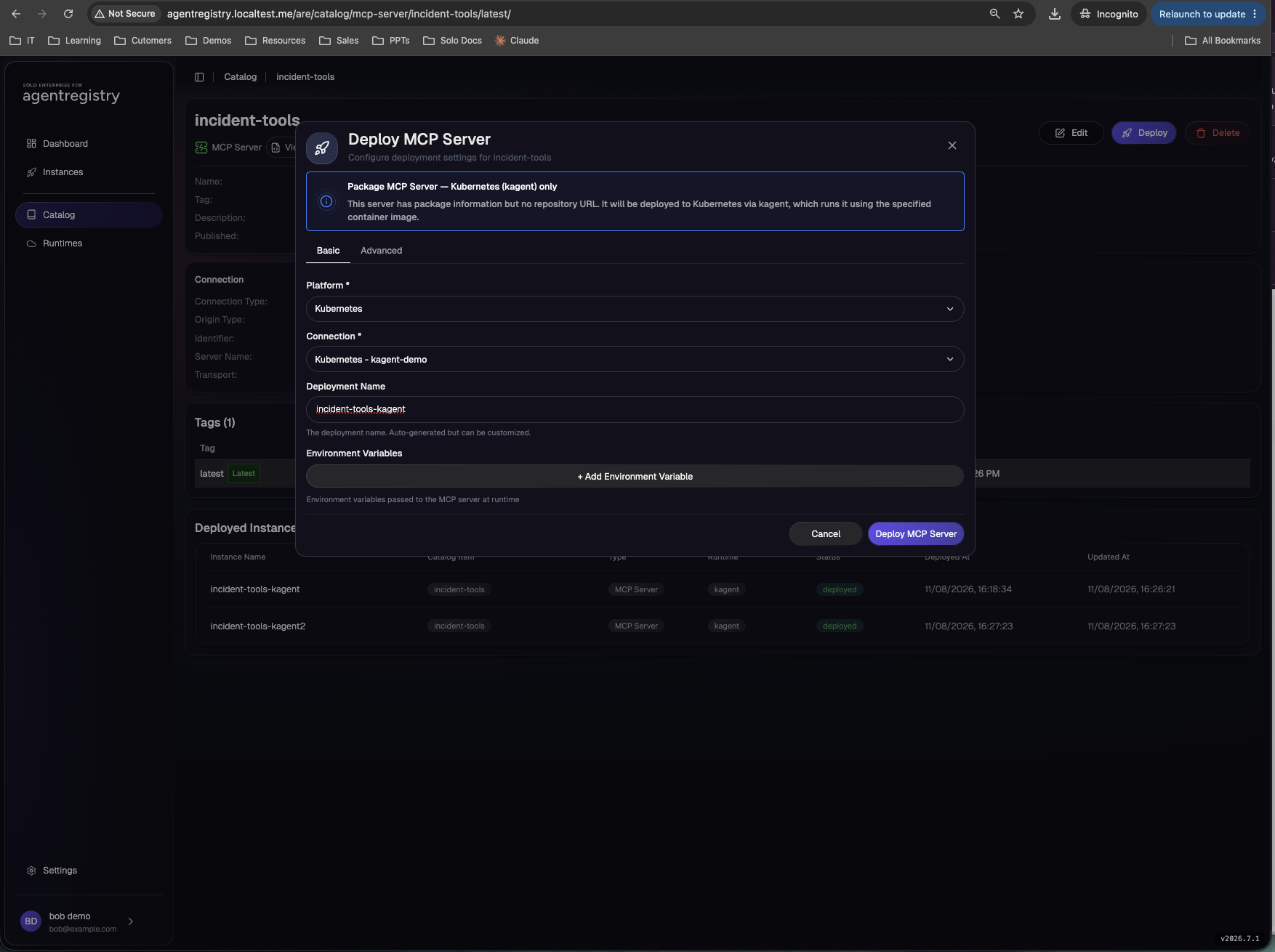
| Field | Value |
|---|---|
| Platform | Kubernetes |
| Connection | Kubernetes - kagent-demo |
| Deployment Name | incident-tools-kagent; the auto-generated name works but reads badly in the Deployments list |
| Environment Variables | none |
The deployment name labels the registry's record of this rollout. The pod and service take their names from the catalogue entry, so they come out as incident-tools. Three objects appear in the kagent namespace:
- The server pod, pulling
localhost:5001/incident-tools:latest. - A Service with the port marked
appProtocol: kgateway.dev/mcp. kagent stamps that protocol marker on every MCP server it runs, and it matters in the last section. - A dedicated agentgateway waypoint pod,
mcpserver-incident-tools-waypoint. Solo Enterprise for kagent puts one in front of every MCP server it manages.
At this point the server is running and healthy, and reachable only from inside the cluster.
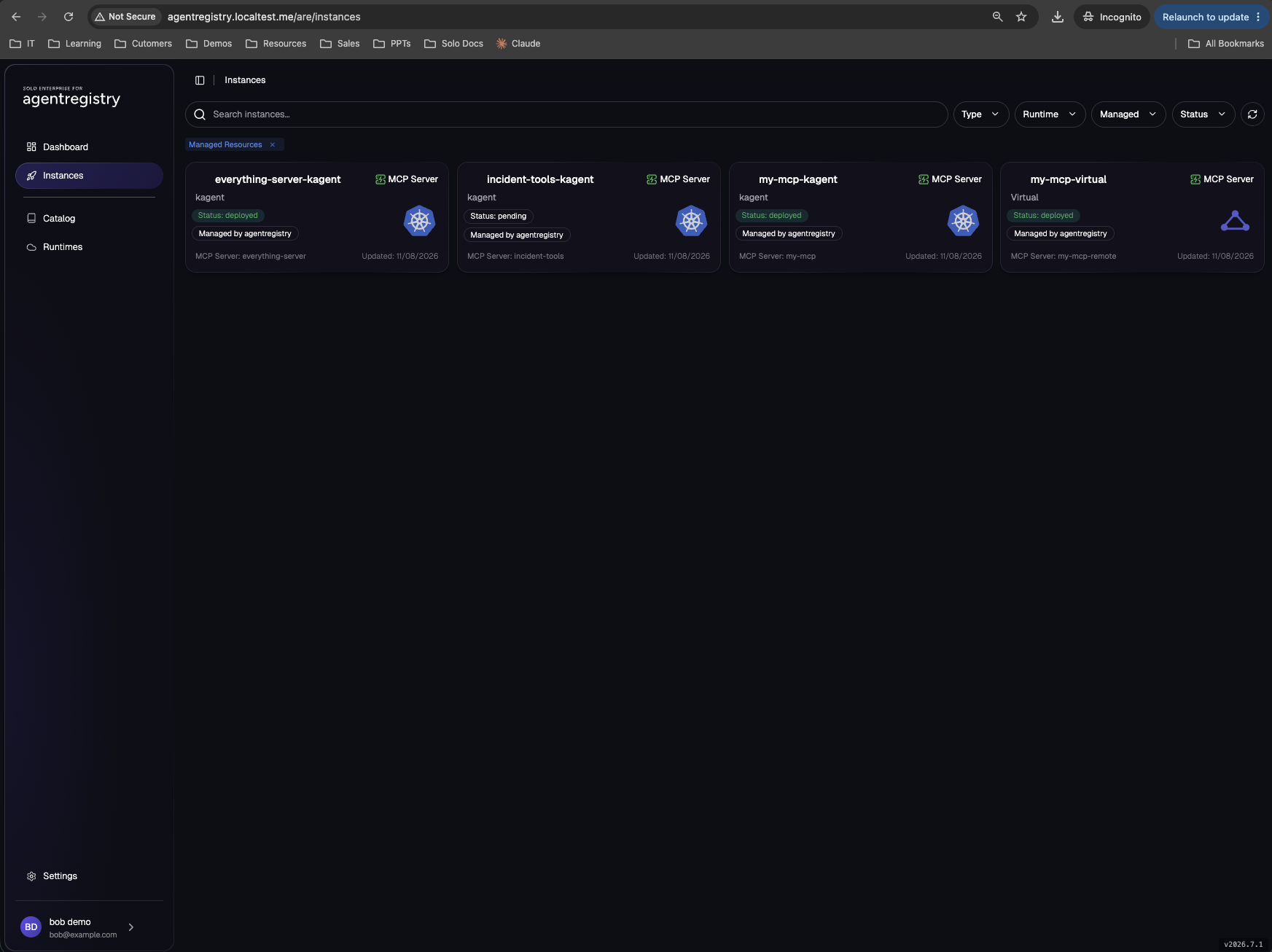
Step 4: give it a gateway route with the Virtual runtime
Alongside real runtimes like kagent, the registry seeds a runtime called virtual-default whose type is Virtual. It runs nothing: it is agentgateway registered as a deploy destination.
What deploying to it does
The registry writes a route into the gateway, tracks the rollout, and records the resulting URL in the deployment's status. Create the deployment and the route exists; delete the deployment and the route is gone.
What that buys the platform
Which servers are exposed, at which URLs, deployed by whom: all answerable from the Deployments view, because the exposure is a deployment. No gateway YAML, no ticket, and revocation is one delete.
Because a Virtual runtime runs nothing, it can only route to something already running, so it targets remote-type catalogue entries: entries that are just a URL. The pod from step 3 sits behind incident-tools.kagent.svc.cluster.local:3000, and that is the URL to register.
First the remote entry. Catalog → Create MCP Server, origin type Remote this time:
| Field | Value |
|---|---|
| Server Name | incident-tools-remote |
| Description | incident-tools exposed through the virtual MCP gateway. |
| MCP Server Origin Type | Remote |
| Remote URL | http://incident-tools.kagent.svc.cluster.local:3000/mcp |
| Transport Protocol | Streamable HTTP |
| HTTP Headers | empty |
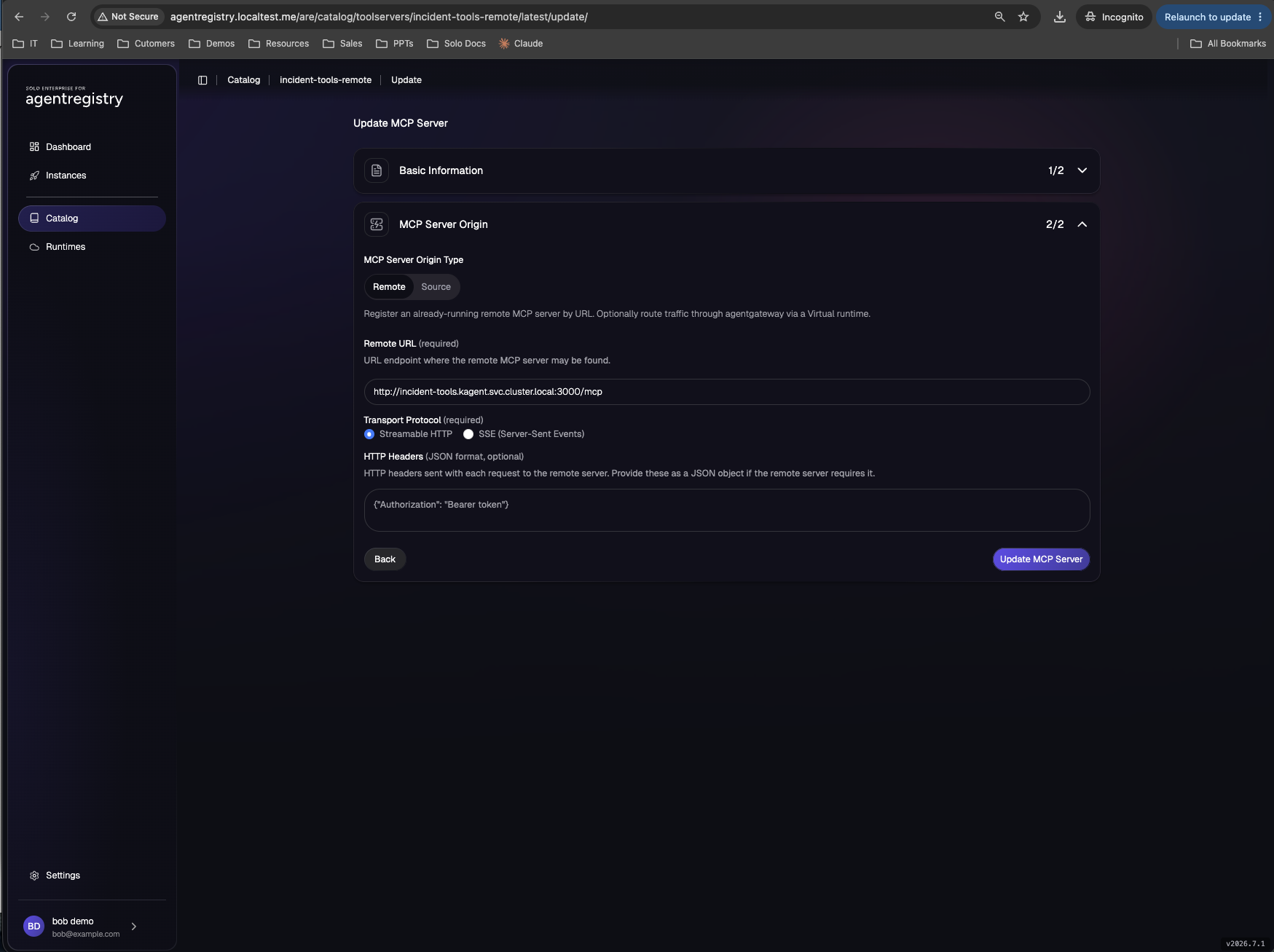
Then deploy that entry to the Virtual runtime: Deploy MCP Server on incident-tools-remote, runtime virtual-default, deployment name incident-tools-virtual, route path suffix /incident-tools.
Behind the click, the registry generates a delegated HTTPRoute and an EnterpriseAgentgatewayBackend, the gateway controller accepts them, and the deployment reports deployed with the exposed URL in status.details.agentgateway.exposedAt. On this cluster the route serves at http://mcp.localtest.me/registry/incident-tools.
Step 5: prove the policy from a terminal
Two helper functions keep the probes short. mint gets a Keycloak token for a user with the password grant; tools runs the MCP handshake against a gateway URL with that token and prints the tool names the caller is allowed to see:
mint() { curl -s -X POST http://keycloak.localtest.me/realms/agentregistry/protocol/openid-connect/token \
  -d "grant_type=password&client_id=ar-cli-password&username=$1&password=$2" | jq -r .access_token; }
tools() { local T="$1" URL="$2"
  SID=$(curl -s -X POST "$URL" -H "Authorization: Bearer $T" \
    -H 'Content-Type: application/json' -H 'Accept: application/json, text/event-stream' \
    -d '{"jsonrpc":"2.0","id":1,"method":"initialize","params":{"protocolVersion":"2025-06-18","capabilities":{},"clientInfo":{"name":"probe","version":"0"}}}' \
    -D - -o /dev/null | awk 'tolower($1)=="mcp-session-id:"{print $2}' | tr -d '\r')
  curl -s -X POST "$URL" -H "Authorization: Bearer $T" -H "Mcp-Session-Id: $SID" \
    -H 'Content-Type: application/json' -H 'Accept: application/json, text/event-stream' \
    -d '{"jsonrpc":"2.0","method":"notifications/initialized"}' >/dev/null
  curl -s -X POST "$URL" -H "Authorization: Bearer $T" -H "Mcp-Session-Id: $SID" \
    -H 'Content-Type: application/json' -H 'Accept: application/json, text/event-stream' \
    -d '{"jsonrpc":"2.0","id":2,"method":"tools/list"}' | grep -o '"name":"[a-zA-Z_-]*"' | sort; }
No token first. The gateway rejects the request before any MCP traffic flows:
curl -s -o /dev/null -w '%{http_code}\n' -X POST http://mcp.localtest.me/registry/incident-tools \
  -H 'Content-Type: application/json' -H 'Accept: application/json, text/event-stream' \
  -d '{"jsonrpc":"2.0","id":1,"method":"initialize","params":{"protocolVersion":"2025-06-18","capabilities":{},"clientInfo":{"name":"x","version":"0"}}}'
401
Now the same endpoint as each user:
tools "$(mint alice alice)" http://mcp.localtest.me/registry/incident-tools
"name":"acknowledge_alert"
"name":"correlate_alerts"
"name":"list_open_alerts"

tools "$(mint bob bob)" http://mcp.localtest.me/registry/incident-tools
"name":"correlate_alerts"
"name":"list_open_alerts"
Same endpoint, same request, different tool lists. bob's JWT carries Groups: ["developers"], and the write tool is gone. The filtering happens inside tools/list, so a model driven by bob's credentials never learns acknowledge_alert exists, and the same check runs again on tools/call if the name is guessed anyway.
Where that decision lives
Nobody wrote a policy for incident-tools. The platform team set two AgentgatewayPolicy objects on the Virtual runtime's parent route, once, before this server existed. Every route the registry creates through virtual-default inherits both, so a server deployed minutes ago arrives already governed:
apiVersion: agentgateway.dev/v1alpha1
kind: AgentgatewayPolicy
metadata:
  name: registry-virtual-jwt
  namespace: agentgateway-system
spec:
  targetRefs:
    - group: gateway.networking.k8s.io
      kind: HTTPRoute
      name: registry-virtual-parent
  traffic:
    jwtAuthentication:
      mode: Strict
      providers:
        - issuer: http://keycloak.localtest.me/realms/agentregistry
          jwks:
            remote:
              url: http://keycloak.keycloak.svc.cluster.local:8080/realms/agentregistry/protocol/openid-connect/certs
---
apiVersion: agentgateway.dev/v1alpha1
kind: AgentgatewayPolicy
metadata:
  name: registry-virtual-tools
  namespace: agentgateway-system
spec:
  targetRefs:
    - group: gateway.networking.k8s.io
      kind: HTTPRoute
      name: registry-virtual-parent
  backend:
    mcp:
      authorization:
        action: Allow
        policy:
          matchExpressions:
            - 'jwt.Groups.exists(g, g == "admins")'
            - 'jwt.Groups.exists(g, g == "developers") && !(mcp.tool.name.contains("acknowledge") || mcp.tool.name.contains("printenv"))'
The first policy validates the bearer token against Keycloak and turns away anything without one. The second is the fine-grained layer: CEL expressions evaluated per tool, per request, with the validated JWT's claims (jwt.Groups) and the tool's name (mcp.tool.name) in scope. Admins match the first expression and see everything; developers match the second only for tools whose names avoid the deny patterns. Because the rule matches on claims and names rather than on servers, it needed no update when incident-tools appeared.
Optional: one endpoint for every server
Everything above is per-server and self-service. There is a complementary platform-side pattern: a single endpoint that merges every MCP server behind one URL and one tools/list. It is one backend object with a selector instead of a server list:
apiVersion: agentgateway.dev/v1alpha1
kind: AgentgatewayBackend
metadata:
  name: mcp-all
  namespace: agentgateway-system
spec:
  mcp:
    targets:
      - name: kagent-servers
        selector:
          namespaces:
            matchLabels:
              kubernetes.io/metadata.name: kagent
          services:
            matchExpressions:
              - key: app.kubernetes.io/name
                operator: Exists
The selector matches any Service in the kagent namespace whose port carries appProtocol: kgateway.dev/mcp, which is exactly the marker kagent stamps on every MCP server it runs. The gateway watches Services continuously, holds an upstream session to each match, merges their tools on tools/list, and prefixes each name with the server it came from so that two servers can both ship a search tool. On tools/call it strips the prefix and routes to the owner. The server deployed in step 3 joined this endpoint the moment its Service appeared; no YAML changed:
tools "$(mint alice alice)" http://mcp.localtest.me/mcp
"name":"everything-server-http_echo"
"name":"everything-server-http_printenv"
"name":"everything-server-http_reverse_text"
"name":"everything-server-http_sum"
"name":"everything-server-http_to_uppercase"
"name":"incident-tools-http_acknowledge_alert"
"name":"incident-tools-http_correlate_alerts"
"name":"incident-tools-http_list_open_alerts"
"name":"my-mcp-http_word_count"
The same JWT and claims policies apply on this route, so bob's version of that list is missing acknowledge_alert and printenv. The two patterns answer different questions and coexist happily: the Virtual runtime gives a team a governed endpoint for their server with the exposure recorded in the registry; the federated backend gives the platform one address for everything.
Scaling this past a handful of servers
The policy in this article matches tool names by substring, and that is deliberate shorthand: it shows the mechanism, claims and tool name in scope, evaluated per tool, in one readable line. A platform team should not be guessing tool names across hundreds of servers. Four tips keep the same mechanism while changing what the expression anchors on:
- Grant by server, not by tool. On a federated endpoint every tool name arrives prefixed with the server it came from, so the realistic per-team rule is one line scoping a group to its servers:
jwt.Groups.exists(g, g == "payments") && mcp.tool.name.startsWith("payments-"). The unit of grant is the server, and the rule does not change when a server adds tools. - Enforce naming and annotation conventions at catalogue intake, then key policy off the convention. The platform publishes a contract, for example that write tools carry
destructiveHintor awrite_prefix, and enforces it where servers enter the catalogue. Once intake only admits servers that follow the convention, a rule like "developers do not get destructive tools" is safe because the metadata it reads has been checked. The intake side of that is covered in the MCP intake review article: annotations are a claim, and intake is where the claim gets checked against the evidence. - Distribute ownership with per-deployment policy. The Deploy dialog's agentgateway Policies section attaches policy to that one exposure. The team who owns the server writes its allow-list, since they are the ones who know their tools; the platform keeps only the baseline.
- Generate list-like policy from the registry. The registry already knows every approved server and tool, so a pipeline can render the gateway allow-list from registry state: the policy becomes a reviewed, regenerated artifact rather than a hand-maintained list. The same shape, CI writing the policy that says which servers and tools need what, is worked through in the approval-gating lab.
What the platform team hand-maintains stays small: authenticate everyone, set the default posture, scope teams to their servers. Conventions are enforced at intake, per-server detail belongs to the owning team at deploy time, and anything list-like is generated from the catalogue.
Who is allowed to do any of this
Every click on this page was made by one of two Keycloak users: alice in the admins group, and bob in developers. What each of them may do in the registry, publish but not delete, deploy but not author policy, is decided by registry access policies bound to those IdP groups, with default deny underneath. Setting that up is its own walkthrough: part 2, fine-grained RBAC for the registry UI, which builds the exact self-service policy this page ran under and shows the failure modes it hit live.
Where it can go wrong
Each of these was hit live on the way to the working state above.
| Symptom | Cause | Fix |
|---|---|---|
| "invalid input: auth.oidc is required for kagent runtimes" on Create Connection | The Outbound OIDC block was left empty; the UI requires per-runtime credentials for kagent runtimes | Fill issuer, client id and pick the client secret from the registry secret store (step 1) |
| Deploy succeeds, clients get "Failed to create MCP session" | Transport left on stdio, in the image or in the catalogue entry; FastMCP scaffolds default to stdio | Force HTTP in the image env and set Transport Protocol to HTTP, port 3000, path /mcp, in the entry |
Virtual deployment stuck at pending with NoAcceptedListener, "no accepted listener with a reported address" |
The Gateway reports no address, so the registry cannot build the exposed URL; common on local clusters where nothing assigns LoadBalancer IPs | Give the gateway Service a LoadBalancer address (MetalLB on kind), then recreate the deployment. Traffic works either way; the status needs the address |
| Remote entry rejected or route never binds | Remote transport set to plain http, or a path suffix without a leading slash |
Remote type must be streamable-http; pathSuffix must start with / |
| alice and bob see identical tool lists | The JWT does not carry the Groups claim, usually a missing group-membership mapper or wrong claim casing |
Decode the token and check: mint bob bob | cut -d. -f2 | base64 -d | jq .Groups |
The same objects from the CLI
Every UI action above writes a registry resource, so the whole flow also scripts with arctl. The four objects, in order:
apiVersion: ar.dev/v1alpha1
kind: Runtime
metadata:
  name: kagent-demo
spec:
  type: Kagent
  telemetryEndpoint: http://agentregistry-enterprise-telemetry-collector.agentregistry-system.svc.cluster.local:4318
  config:
    kagentUrl: "http://kagent-controller.kagent:8083"
    namespace: kagent
---
apiVersion: ar.dev/v1alpha1
kind: MCPServer
metadata:
  name: incident-tools
spec:
  description: 'Incident tool server: list_open_alerts, correlate_alerts, acknowledge_alert.'
  title: incident-tools
  source:
    package:
      origin:
        identifier: localhost:5001/incident-tools:latest
        type: oci
        oci:
          serverName: incident-tools
      transport:
        path: /mcp
        port: 3000
        type: http
---
apiVersion: ar.dev/v1alpha1
kind: Deployment
metadata:
  name: incident-tools-kagent
spec:
  targetRef:
    kind: MCPServer
    name: incident-tools
    tag: latest
  runtimeRef:
    kind: Runtime
    name: kagent-demo
---
apiVersion: ar.dev/v1alpha1
kind: MCPServer
metadata:
  name: incident-tools-remote
spec:
  title: incident-tools-remote
  description: 'incident-tools exposed through the virtual MCP gateway.'
  remote:
    url: http://incident-tools.kagent.svc.cluster.local:3000/mcp
    type: streamable-http
---
apiVersion: ar.dev/v1alpha1
kind: Deployment
metadata:
  name: incident-tools-virtual
spec:
  targetRef:
    kind: MCPServer
    name: incident-tools-remote
    tag: latest
  runtimeRef:
    kind: Runtime
    name: virtual-default
  runtimeConfig:
    route:
      pathSuffix: /incident-tools
Apply with arctl apply -f against the registry URL and the UI shows the same servers, deployments and exposed URLs as if they had been clicked in. That symmetry is the useful property: the UI for people, the same resources for pipelines, one catalogue underneath both.
Next: part 2, fine-grained RBAC for the registry UI: the access policy that decided what alice and bob could each do on this page, built step by step.