Part 1 walked an MCP server through the registry UI end to end. Every click in it was made by one of two Keycloak users: alice in the admins group, and bob in developers. alice could do everything from the start; bob could do nothing at all until a policy said otherwise. This page is that policy: where registry RBAC lives, how a policy binds an IdP group to verbs on resources, and how to build the self-service policy that let a developer publish and deploy without being able to delete, touch secrets, or widen their own access.
Everything here ran live, including one trap that costs real time: a policy whose principal name does not exactly match the IdP group grants nothing, silently.
Two policy layers, one identity
Gateway policy and registry policy answer different questions, and both key off the same IdP groups:
| Layer | Question it answers | Where it lives |
|---|---|---|
| Gateway policy | Which tools does this caller see and call | agentgateway, CEL over JWT claims (part 1) |
| Registry access policy | Who may publish, edit, deploy and delete catalogue entries | The registry, UI and arctl alike (this page) |
Users live in the IdP
No user database here: users and group membership stay in Keycloak (or Entra, or Okta), and the registry consumes the token's Groups claim. The superuserRole install setting names the admin group; everyone else gets exactly what access policies grant.
Default deny
A user in a group with no policy can authenticate, and sees an empty registry. No error, no partial access: nothing until a policy says otherwise.
The worked example: a self-service policy for the developers group, giving an app team the publish-and-deploy loop from part 1 without runtime administration, secrets, deletion, or policy authorship. Step by step:
1. Create the group and user in the IdP
In Keycloak: the realm's Groups hold admins and developers, the user bob is a member of developers, and a group-membership mapper stamps the membership into each token as the Groups claim. Nothing user-related happens in the registry; if your IdP is Entra or Okta, this step is wherever your groups already live.
2. Start the policy
As a superuser: Access Policies → New Access Policy. Name self-service, description free-text. The Access Policies page is absent from a non-admin's navigation entirely, so a team can never widen its own grants.
3. Principals: bind the IdP group
Add one principal: Kind Role, Name developers, Role developers.
The Name field is the one that matters. The engine matches it byte-for-byte against the values in the caller's Groups claim. A descriptive label here ("developers-binding") produces a policy that grants nothing, silently: authentication succeeds and every list comes back empty. Put the group name in both fields.
4. Rules: grant the verbs
Each rule combines actions (scope:verb strings) with resources (a kind plus a name, exact or *, with optional tool/skill/prompt subresources for finer grain). Three rules make the self-service shape:
| Rule | Actions | Resources | What it enables |
|---|---|---|---|
| 1 | registry:read, registry:publish, registry:edit, registry:deploy | MCP Server / * | Browse the catalogue, publish new servers, update their own. deploy is the documented verb for rollouts and is granted for forward compatibility; rule 3 is what the current build checks |
| 2 | registry:read | Runtime / * | See the runtimes available to deploy onto |
| 3 | registry:read, registry:publish | Agent / * | Create deployments: in the current build a deployment is authorised under the agent resource kind, so this rule is what makes the Deploy button work |
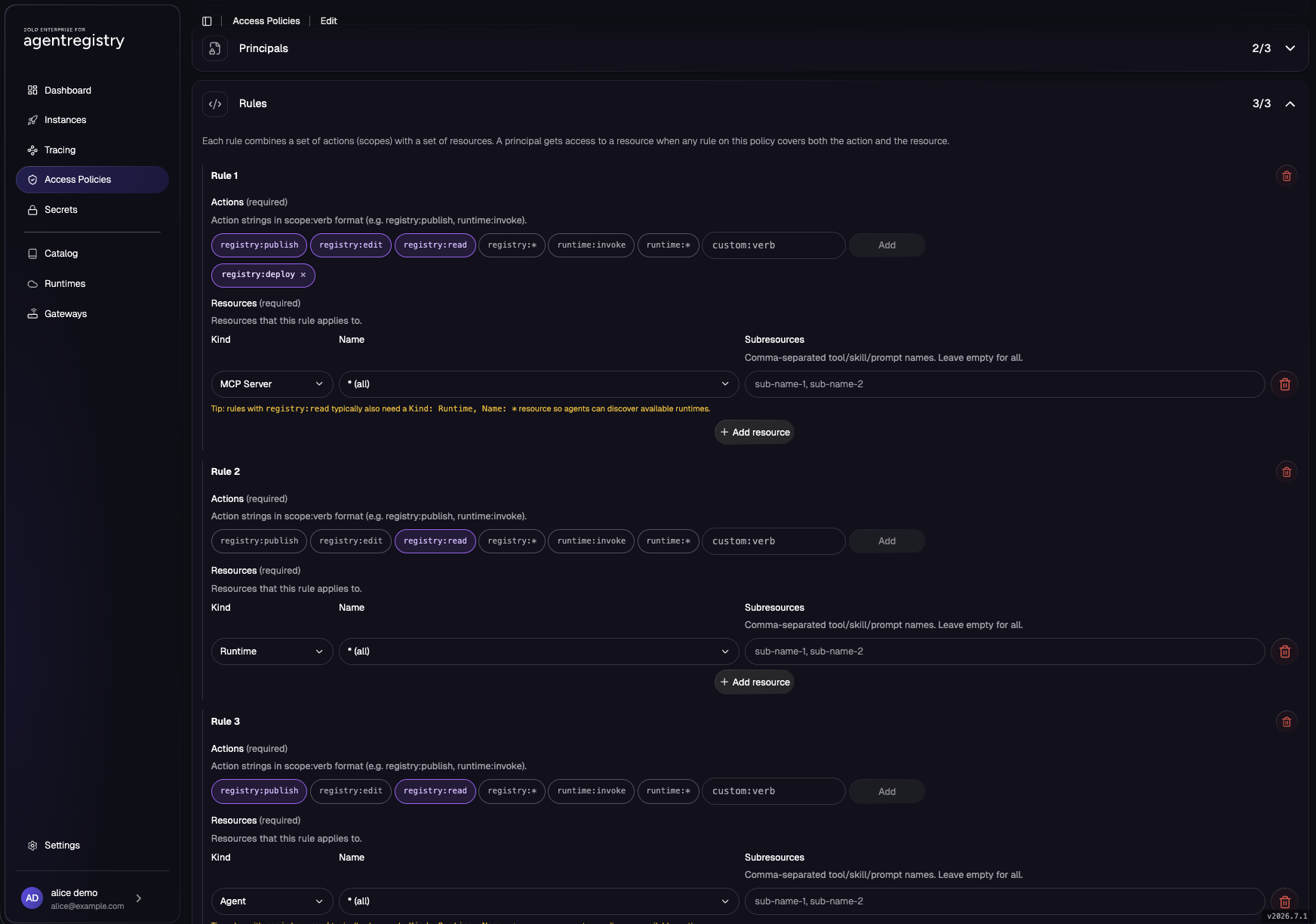
registry:deploy) is added through the custom field.5. Create it and check the list
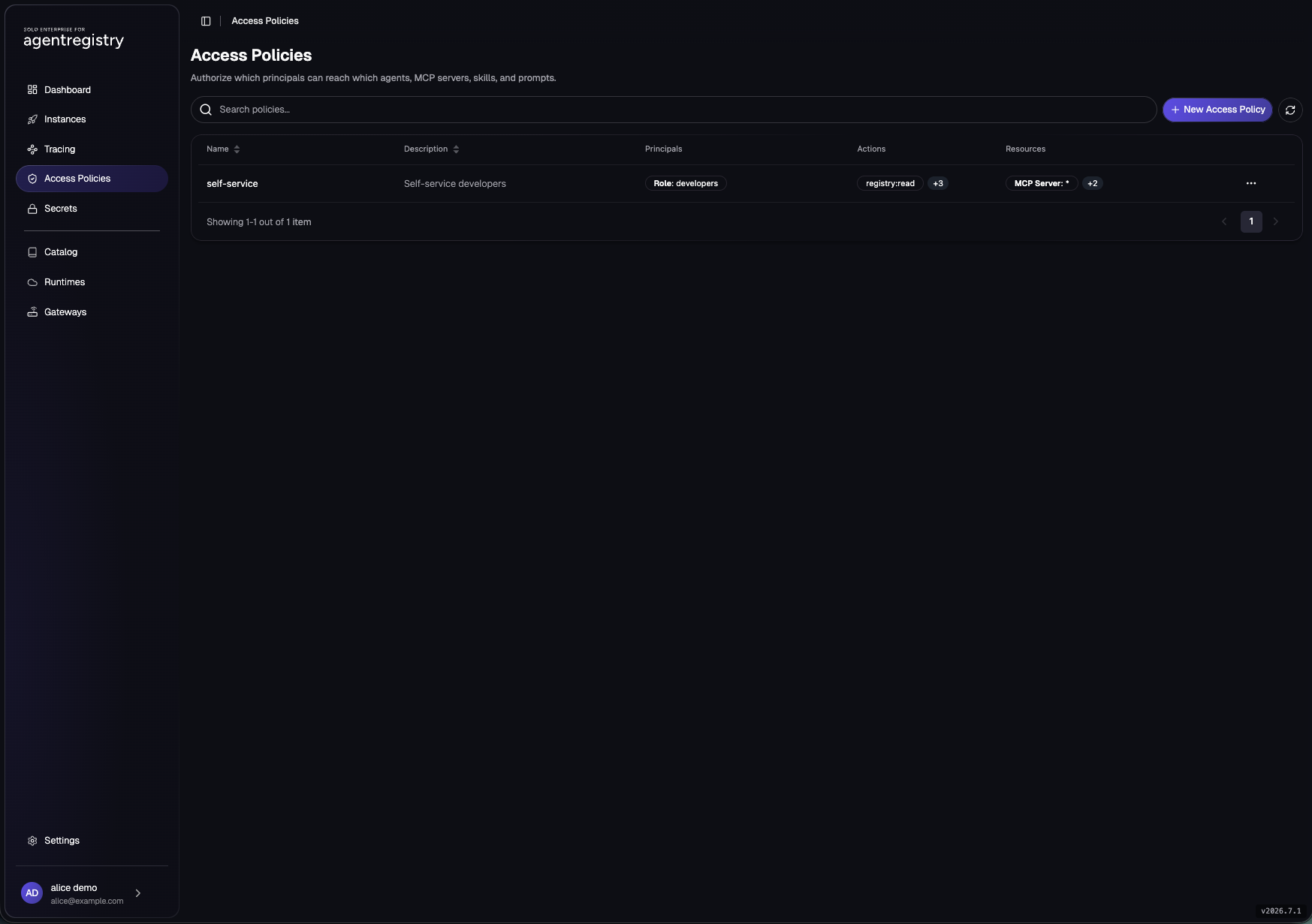
Role: developers, summarising its actions and resources.The saved policy also downloads as JSON, and that export is exactly what arctl apply takes, so policies can be authored in the UI and versioned in git:
{
  "description": "Self-service developers",
  "name": "self-service",
  "principals": [
    { "kind": "Role", "name": "developers", "role": "developers" }
  ],
  "rules": [
    { "actions": ["registry:read", "registry:publish", "registry:edit", "registry:deploy"],
      "resources": [{ "kind": "MCPServer", "name": "*" }] },
    { "actions": ["registry:read"],
      "resources": [{ "kind": "Runtime", "name": "*" }] },
    { "actions": ["registry:read", "registry:publish"],
      "resources": [{ "kind": "Agent", "name": "*" }] }
  ]
}
6. Verify as the developer
Log in as the developer user in a private window (the browser otherwise reuses the admin's Keycloak session). Before the policy exists, or while its principal name is wrong, an authenticated developer sees this:
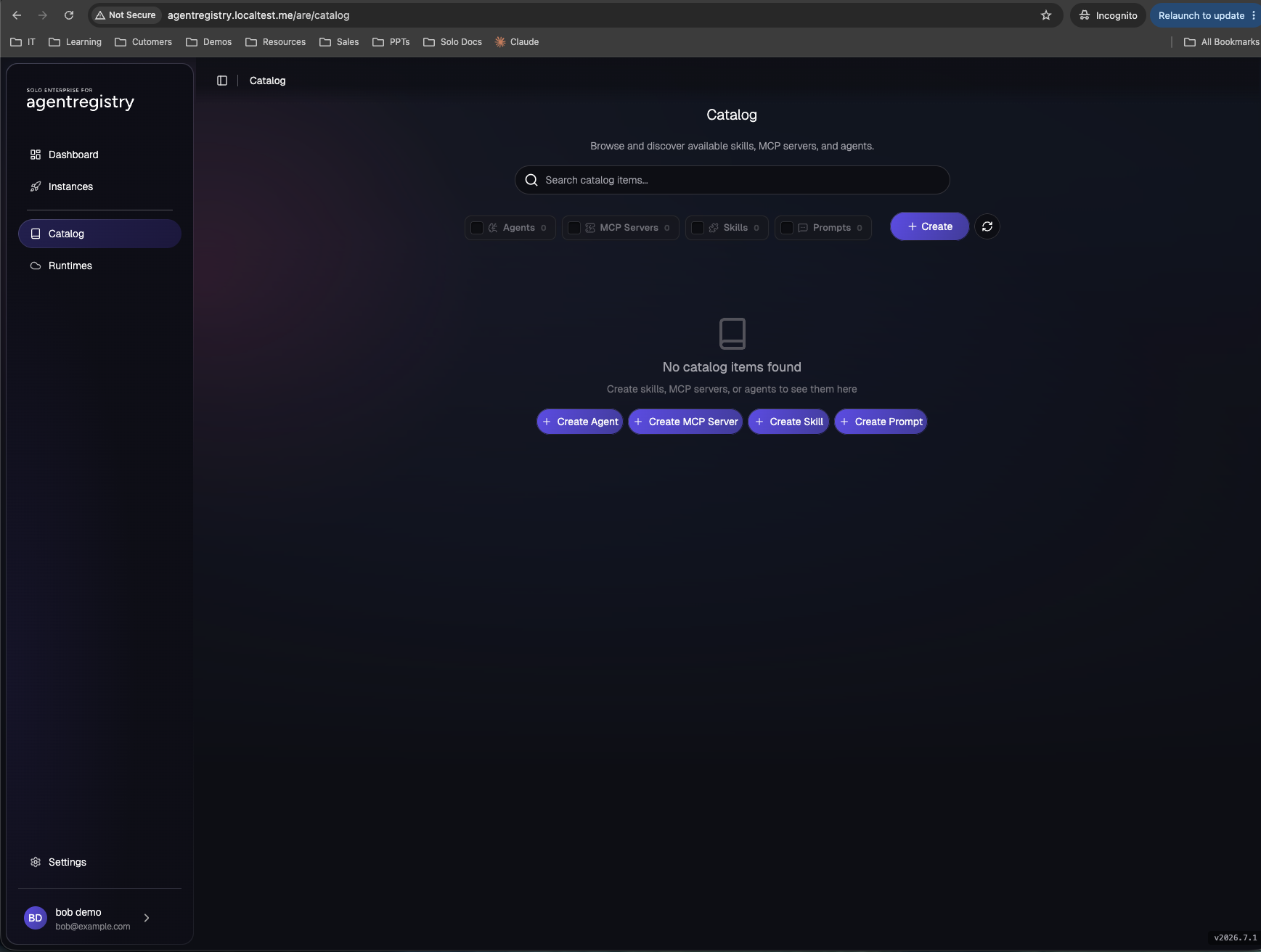
With the policy in place the same login shows the catalogue and runtimes, and Create MCP Server and Deploy both work. Publish and edit are distinct verbs: creating a new entry checks publish, changing an existing one checks edit, so publish-only and edit-only roles are both expressible.
What the developer can do
Browse the catalogue, publish servers, edit their own entries, deploy to the runtimes they can see. The whole loop in part 1 ran under this policy.
What stays forbidden
Delete anything, touch secrets, add runtimes, author policy. A delete attempt gets a 403 that names the exact scope:verb it wanted, which makes policy debugging pleasantly literal.
The claim doing all the work
To show the identity underneath, decode the two users' tokens side by side. Same issuer, same audience, one differing claim, and both policy layers hang off it:
mint() { curl -s -X POST http://keycloak.localtest.me/realms/agentregistry/protocol/openid-connect/token \
  -d "grant_type=password&client_id=ar-cli-password&username=$1&password=$2" | jq -r .access_token; }
claims() { local p; p=$(mint "$1" "$2" | cut -d. -f2 | tr '_-' '/+'); while [ $((${#p} % 4)) -ne 0 ]; do p="${p}="; done
  printf '%s' "$p" | base64 -d 2>/dev/null | jq '{preferred_username, Groups, aud, iss, exp}'; }

claims alice alice
claims bob bob
alice returns "Groups": ["admins"] and bob returns "Groups": ["developers"]. That one value decides bob's registry rights on this page and his gateway tool list in part 1.
Scoping teams tighter than this
Resource names in rules are exact or * in the current release, so a strict per-team catalogue means enumerating that team's resource names in its policy; pair it with the registry's approval workflow (teams submit, platform approves) for the guardrails half. For the gateway side of scaling, per-server grants by name prefix and policy generated from registry state, see the scaling section in part 1.
Where it can go wrong
| Symptom | Cause | Fix |
|---|---|---|
A user's registry is empty despite an access policy granting read on * (lists return 200 with no items) |
The policy's principal Name is a descriptive label rather than the IdP group name; the engine matches principals by Name against the Groups claim |
Set the principal Name to the group value itself, e.g. developers |
The developer can publish but Deploy fails with a 403 naming registry:publish on an agent resource |
The policy lacks the rule for the agent kind; the current build authorises deployments under it |
Add rule 3 from the table above |
| The developer's browser opens the registry already signed in as the admin | The Keycloak SSO cookie from the admin session is still live in that browser | Use a private window or a separate browser profile for the second user |
| Group changes in the IdP do not show up in the registry | The change lands in tokens minted after it; an existing session carries the old claim | Sign out and back in, or wait for token refresh |
That closes the pair: part 1 is what a team can do self-service; this page is how the platform decides which team can do it, from one policy object and one IdP claim.